AutoLISP: Text Box Width

Sorry for not posting in a while. I now have a full time job. I get work with AutoCAD and help people with their AutoCAD problems – Which is something that I love.

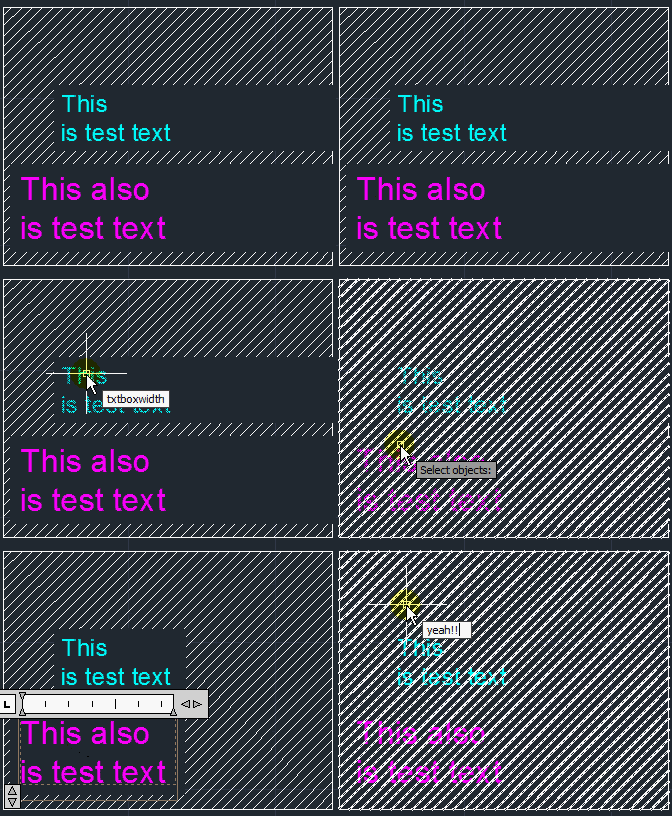
Anyways – This routine is a great routine that apparently has been pieced together from other routines to make it work. But hey, it works… If you have ever had MTEXT that has its bounding box too wide, you now that you can double click the MTEXT object and then manually double click the “diamond” (arrows) to make the bounding box fit your text (as seen below).

But what if you have many MTEXT objects and you want to minimize these boxes? That is where this routine comes in very handy. You can easily select multiple MTEXT objects and this will do it all for you.
This is especially helpful for when you have the Text Background fill turned on and your MTEXT is over other objects (like a hatch). If your bounding box is too large, the text background fill will be as large as the bounding box. And as seen below, with this scenario, you can really see the benefit.

Here’s how:

  • TXTBOXWIDTH <enter> to start
  • Select MTEXT objects
  • <enter> when finished selecting

~enjoy

(defun mip-mtext-wrap-BB (en / el SetHandles CheckHandles sclst)

(vl-load-com)

;;; Argument: the ename of an mtext

;;; Shrinkwrap the bounding box of selected MText objects

;;; http://discussion.autodesk.com/forums/message.jspa?messageID=5734567

;;; ShrinkwrapMText v2a.lsp - Joe Burke - 10/13/2007 - Version 2a

;;;;;http://discussion.autodesk.com/forums/thread.jspa?threadID=448625

;;;; USE:

;;; (mip-mtext-wrap-BB (car(entsel)))

;;; !!!! AutoCAD 2010 2011 2012

;;; http://forums.autodesk.com/t5/Visual-LISP-AutoLISP-and-General/MTEXT-Column-property/m-p/2690952

;;;Need to change the column type from dynamic to not add the dxf group of 75 with 0

;;; http://www.theswamp.org/index.php?topic=28243.0

(defun GetAnnoScales (e / dict lst rewind res)

;;; Argument: the ename of an annotative object.

;;; Returns the annotative scales associated with the

;;; ename as a list of strings.

;;; Example: ("1:1" "1:16" "1:20" "1:30")

;;; Returns nil if the ename is not annotative.

;;; Can be used to test whether ename is annotative or not.

;;; Works with annotative objects: text, mtext, leader, mleader,

;;; dimension, block reference, tolerance and attribute.

;;; Based on code by Ian Bryant.

(if

(and

e

(setq dict (cdr (assoc 360 (entget e))))

(setq lst (dictsearch dict "AcDbContextDataManager"))

(setq lst

(dictsearch (cdr (assoc -1 lst)) "ACDB_ANNOTATIONSCALES")

) ;_ end of setq

(setq dict (cdr (assoc -1 lst)))

) ;_ end of and

(progn

(setq rewind t)

(while (setq lst (dictnext dict rewind))

(setq e (cdr (assoc 340 lst))

res (cons (cdr (assoc 300 (entget e))) res)

rewind nil

) ;_ end of setq

) ;_ end of while

) ;_ end of progn

) ;_ end of if

(reverse res)

) ;end

(defun CheckHandles (e / dict lst rewind nlst d42 d43 n p ptlst)

;;; Argument: the ename of annotative mtext object.

;;; Returns T if the object has only one scale or

;;; the handles for all scales are proportionally the

;;; same and all scales use the same insertion point.

(if

(and

e

(setq dict (cdr (assoc 360 (entget e))))

(setq lst (dictsearch dict "AcDbContextDataManager"))

(setq lst

(dictsearch (cdr (assoc -1 lst)) "ACDB_ANNOTATIONSCALES")

) ;_ end of setq

(setq dict (cdr (assoc -1 lst)))

) ;_ end of and

(progn

(setq rewind t)

(while (setq lst (dictnext dict rewind))

(setq nlst (cons lst nlst)

rewind nil

) ;_ end of setq

) ;_ end of while

(cond

((= 1 (length nlst)))

(t

;; lst is nil so reuse it.

(foreach x nlst

;Horizontal width. Can be zero, a null text string.

(setq d42 (cdr (assoc 42 x))

;Vertical height cannot be zero so a divide

;by zero error can't happen.

d43 (cdr (assoc 43 x))

n (/ d42 d43)

lst (cons n lst)

;Insertion point

p (cdr (assoc 11 x))

ptlst (cons p ptlst)

) ;_ end of setq

) ;_ end of foreach

(and

(vl-every '(lambda (x) (equal n x 1e-4)) lst)

(vl-every '(lambda (x) (equal p x 1e-4)) ptlst)

) ;_ end of and

)

) ;_ end of cond

) ;_ end of progn

) ;_ end of if

) ;end

(defun SetHandles (lst / oldlst charwidth ht pat)

;;; ;Argument: an entget list.

;;; ;Code 42 is the smallest width of the handles.

;;; ;If 41 is larger than 42 then the handles can be shrunk

;;; ;horizontally given a single line mtext object.

;;;

;;; ;Code 46 is the current height of the handles in 2007/2008.

;;; ;Substitute the actual height from the code 43 value.

;;;

;;; ;Used to determine number of objects modified.

(setq lst (entget (cdr(assoc -1 lst)) '("ACAD")))

;;; (setq oldlst lst)

(setq charwidth (* (cdr (assoc 42 lst)) 1.05) ;_1.035

ht (cdr (assoc 43 lst))

lst (subst (cons 41 charwidth) (assoc 41 lst) lst)

lst (subst (cons 46 ht) (assoc 46 lst) lst)

lst (if (assoc 75 lst) ;;; 75 - òèï êîëîíîê

(subst (cons 75 0) (assoc 75 0) lst)

(append lst (list(cons 75 0)))

)

) ;_ end of setq

;;;Code 46 is the current height of the handles in 2007/2008.

;;;Substitute the actual height from the code 43 value.

(if (and

(setq pat (assoc -3 lst))

(eq "ACAD" (caadr pat))

) ;_ end of and

(progn

(if (assoc 46 lst)

;;;Code 46 is the current height of the handles in 2007/2008.

;;; Remove extended data regarding height if found.

(setq pat '(-3 ("ACAD")))

(progn

(setq pat

(cons -3

(list (subst (cons 1040 ht)

(assoc 1040 (cdadr pat))

(cadr pat)

) ;_ end of subst

) ;_ end of list

) ;_ end of cons

) ;_ end of setq

) ;_ end of progn

) ;_ end of if

(setq lst (subst pat (assoc -3 lst) lst))

)

) ;_ end of if

(setq lst (entmod lst))

) ;end SetHandles

(if (= (cdr (assoc 0 (setq EL (entget en '("*"))))) "MTEXT")

(progn

(cond

((and

(setq sclst (GetAnnoScales en))

(CheckHandles en)

) ;_ end of and

(vl-cmdf "._chprop" en "" "_Annotative" "_No" "")

;(SetHandles (entget ename))

(SetHandles el)

(vl-cmdf "._chprop" en "" "_Annotative" "_Yes" "")

(foreach x sclst

(vl-cmdf "._objectscale" en "" "_Add" x "")

) ;_ end of foreach

)

((not (GetAnnoScales en))

(SetHandles el)

)

(t nil)

) ;_ end of cond

) ;_ end of progn

) ;_ end of if

) ;_ end of defun

(defun C:TxtBoxWidth (/ ss i)

(and (setq ss (ssget "_:L" '((0 . "MTEXT"))))

(repeat (setq i (sslength ss))

(mip-mtext-wrap-BB (ssname ss (setq i (1- i))))

)

(setq ss nil)

)

)
Posted in AutoLISP, Modifying, Text, TIPS | 4 Comments

Spline to Polyline Without LISP

So, after all those posts about LISP routines that change Polylines into Splines and Splines into Polylines, I saw a video on Cadalyst’s Website that shows how this is available in AtuoCAD since 2010. This is very handy because you don’t have to worry about loading any LISP routines.

All you have to do is use one of 2 commands:

1) The PEDIT command PE <enter> and select a spline.

  • It will ask is you want to turn it into a polyline <Y> <enter>
  • Specify a precision <10> (can enter a value of 0-99) the higher the number the higher the resolution. But apparently, the default value of “10” works really well.

2) SPLINEDIT <enter> and select the spline.

  • Select the option to “convert to polyline”
  • then Specify the Precision (same as above)

~enjoy

Posted in BASICS, Modifying, Polylines, TIPS | Leave a comment

How to Fix Blocky Circles & Arcs

If you have worked on large drawings or have had to zoom in and out a lot you may have noticed that curved objects like circles and arcs appear blocky or look more like polygons rather than circles. Don’t worry, you have options to fix this.

1) Set the system variable WHIPARC to a value of <1> This variable determines if curved objects is displayed as a smooth curve or as a series of “vectors” Setting this variable to <o> (zero) turns off the smooth curves.
After setting the WHIPARC Variable, do a REGEN – RE <enter>

2) Change the “View Resolution” in the command line.
VIEWRES <enter> Y <enter> to acccept “fast zooms” then set a value up to 20,000. The lower the value, the more blocky circles and arcs will appear. With newer computers, you should not have any problems settings this to the maximum value of 20,000.

3) Set the “View Resolution” in the Options Dialog box.
Open the “Options Dialog” by either entering OP <enter> or by a right clickin the drawing area and selecting “Options”.
Click on the “Display” tab
In the “Display Resolution” area of this tab, set the value of the “circle and arc smoothness” to a value of up to 20,000 (same as above)
When you are finished, click OK

Posted in BASICS, Customization, Settling In, TIPS | 37 Comments

Circles: 3Point and Tan, Tan, Tan

If you have made the switch to the Ribbon from the beloved toolbars, there is a new tool that is only available via the ribbon. That’s right, even if you switch back over to “AutoCAD Classic” (toolbars) this circle tool is not available. The tool is Circle with the “Tangent, Tangent, Tangent” option.

The difference between this tool and the “3 Point Circle” may not be very obvious so I decided to show the difference below.

By selecting the Circle, Tangent, Tangent, Tangent tool you select three OBJECTS and  a circle is then made to fit Tangentially between these 3 OBJECTS. I am emphasizing “OBJECTS” because that is the main difference between this tool and the 3 Point circle. The 3 Point circle is made to fit within the 3 specific POINTS.

Hopefully the animated picture below make this clear.

Posted in BASICS, Settling In, TIPS | 2 Comments

Deselect Objects from Selection Set

If you selects objects and then realize that you selected an object or two on accident, removing those objects is really simple. Also, it may be quicker to make a selection set and remove objects from the selection set than it would be to select each object individually.

  • After making a selection set,
  • Hold the SHIFT button while you select the objects that are to be removed from the selection set.
  • Note: You can the common selection methods: Pick, Window, or Crossing Window


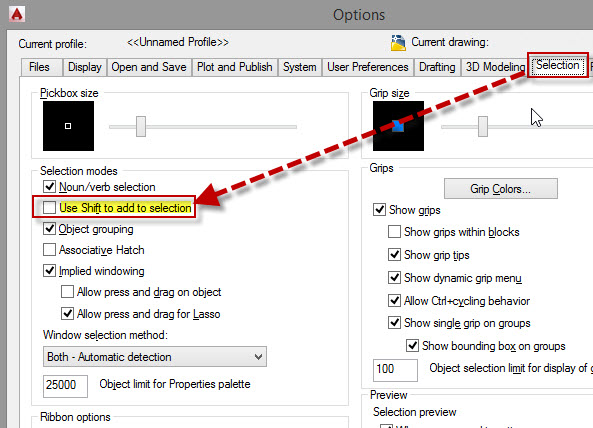
If this isn’t working for you, check the OPTIONS dialog box > Selection tab > and in the “Selection modes” area, make sure that the “Use Shift to add to selection” is unchecked (shown below).

SHIFT to Deselect

Posted in BASICS, Settling In, TIPS | 11 Comments

AutoLISP: Eraser

WARNING!! WARNING!!

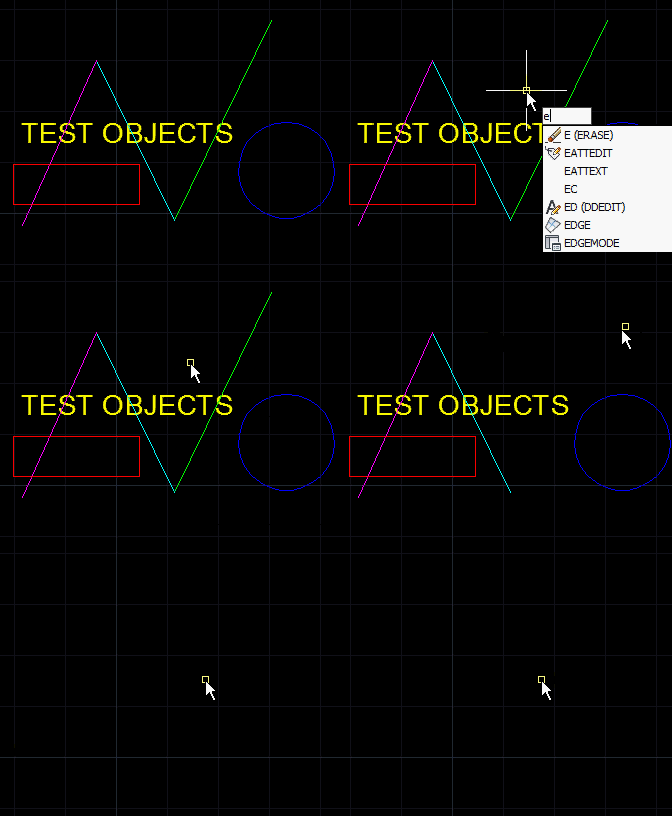
This is yet another erasing routine but there is a warning that goes along with it. You don’t actually select anything. Instead, whatever your cursor hovers over gets erased. So if you don’t have a steady hand, then this routine will be dangerous for you… HAHA!!

Written by the CAB

~enjoy

;; modified by CAB 05.08.07

(defun C:ERASER (/ *error* pt ent usrpb)

(defun *error* (msg)

(if (not

(member msg '("console break" "Function cancelled" "quit / exit abort" "" nil)))

(princ (strcat "\nError: " msg))

) ; if

(and usrpb (setvar "pickbox" usrpb))

(princ)

) ; end error function

(setq usrpb (getvar "pickbox"))

(setvar "pickbox" 3)

(command "_.undo" "_begin")

(while (listp (setq pt (cadr (grread T 4 2))))

(if (setq ent (car (nentselp pt)))

(progn

(if (= (cdr(assoc 0 (entget ent))) "VERTEX")

(setq ent (cdr(assoc 330 (entget ent)))

))

(print)

(princ (entdel ent))

)

)

) ; while

(command "_.undo" "_end")

(*error* nil)

(princ)

)
Posted in AutoLISP, Modifying, TIPS | 1 Comment

AutoLISP: Erase Continuously (new & improved)

So Lee answered once again and combined the two previous routines into one awesome routine. You remain in the erase command and are able to select objects by 1) picking them 2) Window 3) Crossing window and as soon as you are done selecting them, they are erased.

; Erase Continuous by Lee Mac

(defun c:ec ( / fl p1 p3 ls hi ss )

(princ "\nSelect Objects to Erase: ")

(while (and (not fl) (= 3 (car (setq p1 (grread nil 12 2)))))

(if (setq ss (ssget (setq p1 (cadr p1))))

(command "_.erase" ss "")

(progn

(princ "\nSpecify Opposite Corner: ")

(while (= 5 (car (setq p3 (grread t 13 0))))

(redraw)

(setq p3 (cadr p3))

(setq ls

(list

p1

(list (car p3) (cadr p1) (caddr p1))

p3

(list (car p1) (cadr p3) (caddr p1))

)

)

(setq hi (if (< (car p1) (car p3)) 0 1))

(mapcar '(lambda ( a b ) (grdraw a b -1 hi)) ls (append (cdr ls) (list p1)))

)

(if (listp (setq p3 (cadr p3)))

(if (setq ss (ssget (if (< (car p1) (car p3)) "_W" "_C") p1 p3))

(command "_.erase" ss "")

)

(setq fl t)

)

(redraw) (princ "\nSelect Objects to Erase: ")

)

)

)

(redraw) (princ)

)
Posted in AutoLISP, Modifying, TIPS | 1 Comment

AutoLISP: Erase Single

Here is another erase routine that lets you select only one object at a time but like the previous post, it erases the selected object and then continues the erase command.

My ultimate goal would be to combine these 2 routines into one.

;; erase single

;; found at http://cadpanacea.com/node/309#comment-3974

;;

(defun c:es (/ ent ecnt eprompt)

(setvar "ERRNO" 0)

(setq eprompt "\nSelect object: "

ecnt 0

)

(while (or (setq ent (entsel eprompt))

(eq 7 (getvar "errno"))

)

(cond

((= ent "Undo")

(command "u")

(setq ecnt (1- ecnt))

)

((= (type ent) 'list)

(command "erase" ent "")

(setq ecnt (1+ ecnt))

)

(t nil)

)

(setvar "ERRNO" 0)

(if (not (zerop ecnt))

(progn

(setq eprompt "\nUndo/<Select object>: ")

(initget "Undo")

)

(setq eprompt "\nSelect object: ")

)

)

(princ)

)
Posted in AutoLISP, Modifying, TIPS | Leave a comment

AutoLISP: Erase Continuous With a Window

A lot of the drawings that I get I end up erasing a lot of stuff. And after using SkethUP’s erase command, I wish that AutoCAD’s erase command worked in the same way. I asked Lee-Mac for help with this and he delivered a great little routine that I am sure you guys will enjoy.

What it does is let you select objects with either a window or crossing window. And after making the selection set it automatically erases the selection and continues the erase command.

Here’s How:

  • EC <enter> to start Erase Continuous
  • Make selection sets with a Window or Crossing Window
  • The command will stay in a loop, so to end the routine, hit the escape <ESC> button

; Erase Continuous by Lee-Mac

(defun c:ec ( / p1 p2 ss )

(while

(and

(setq p1 (getpoint "\nSpecify First Corner: "))

(setq p2 (getcorner "\nSpecify Opposite Corner: " p1))

)

(if (setq ss (ssget (if (< (car p1) (car p2)) "_W" "_C") p1 p2))

(command "_.erase" ss "")

)

)

(princ)

)

Here is a version that uses the grread function

;Erase Continuous by Lee-Mac. Uses grread

(defun c:ec ( / p1 p3 ls hi ss )

(while

(and (setq p1 (getpoint "\nSpecify First Corner: "))

(progn

(princ "\nSpecify Opposite Corner: ")

(while (= 5 (car (setq p3 (grread t 13 0))))

(redraw)

(setq p3 (cadr p3))

(setq ls

(list

p1

(list (car p3) (cadr p1) (caddr p1))

p3

(list (car p1) (cadr p3) (caddr p1))

)

)

(setq hi (if (< (car p1) (car p3)) 0 1))

(mapcar '(lambda ( a b ) (grdraw a b -1 hi)) ls (append (cdr ls) (list p1)))

)

(listp (setq p3 (cadr p3)))

)

)

(redraw)

(if (setq ss (ssget (if (< (car p1) (car p3)) "_W" "_C") p1 p3))

(command "_.erase" ss "")

)

)

(redraw) (princ)

)
Posted in AutoLISP, Modifying, TIPS | 2 Comments

AutoLISP: Curves To POLYLINE

Well, posted a routine not long ago that lets you convert Splines to Polylines. I just found a better routine than the one I posted made by Lee-Mac that lets you convert many types of objects to polylines. It even lets you select a polyline and add more segments to it (as seen with the rectangle in the animated pic)

Here’s how:

  • SEGS <enter> to start
  • Select objects – Line, Arc, Circle, Ellipse, Rectangle, Polyline, Spline…
  • <enter> when finished selecting objects
  • Specify # of segments (the more segments the smoother curved objects will look)


;;---------------------=={ Segment Curve }==------------------;;

;; ;;

;; Divides selected objects into an LWPolyline with a ;;

;; specified number of segments of equal length. ;;

;;------------------------------------------------------------;;

;; Author: Lee Mac, Copyright © 2011 - www.lee-mac.com ;;

;;------------------------------------------------------------;;

(defun c:Segs ( / *error* _StartUndo _EndUndo acdoc ss j ) (vl-load-com)

(defun *error* ( msg ) (and acdoc (_EndUndo acdoc))

(or (wcmatch (strcase msg) "*BREAK,*CANCEL*,*EXIT*")

(princ (strcat "\n** Error: " msg " **")))

(princ)

)

(defun _StartUndo ( doc ) (_EndUndo doc)

(vla-StartUndoMark doc)

)

(defun _EndUndo ( doc )

(if (= 8 (logand 8 (getvar 'UNDOCTL)))

(vla-EndUndoMark doc)

)

)

(setq acdoc (vla-get-ActiveDocument (vlax-get-acad-object)) *segs (cond ( *segs ) ( 10 )))

(if

(and (setq ss (ssget "_:L" '((0 . "ARC,CIRCLE,LWPOLYLINE,SPLINE,LINE,ELLIPSE"))))

(progn (initget 6)

(setq *segs (cond ( (getint (strcat "\nSpecify Number of Segments <" (itoa *segs) "> : ")) ) ( *segs )))

)

)

(progn (_StartUndo acdoc)

(repeat (setq j (sslength ss))

(

(lambda ( e / k l i p )

(setq k (/ (vlax-curve-getDistatParam e (vlax-curve-getEndParam e)) (float *segs))

l (entget e)

i -1

)

(repeat (1+ *segs)

(setq p (cons (cons 10 (trans (vlax-curve-getPointatDist e (* (setq i (1+ i)) k)) 0 e)) p))

)

(if

(entmake

(append

(list

(cons 0 "LWPOLYLINE")

(cons 100 "AcDbEntity")

(cons 100 "AcDbPolyline")

(cons 90 (length p))

(cons 38 (last (car p)))

(cons 70 (if (vlax-curve-isClosed e) 1 0))

)

(apply 'append

(mapcar '(lambda ( a ) (if (assoc a l) (list (assoc a l)))) '(6 8 39 48 62 210))

)

p

)

)

(entdel e)

)

)

(ssname ss (setq j (1- j)))

)

)

(_EndUndo acdoc)

)

)

(princ)

)
Posted in Uncategorized | 5 Comments