Insert OSNAP

Have you ever wondered what the OSNAP that is called “INSERT” does?

Well, here’s what it does:

You can always set this in the “running OSNAPs” or use the OSNAP overrides (shift + right-click and select “Insert’ or entering INS in the middle of the command).

It allows you to snap to the insertion points of Blocks, Text and XREFs. For blocks, the Insertion Point is the point that was specified when the block was created. (Note: The INSERT OSNAP does not snap to multiple “points” that have been added to a block making it a “Dynamic” block. It only recognizes the initial insertion point.)

This is also helpful for manually moving/adjusting/aligning text…

The little green icon next to your cursor is the “Insert” OSNAP (as seen below)


The example below shows how to snap to a block’s insertion point
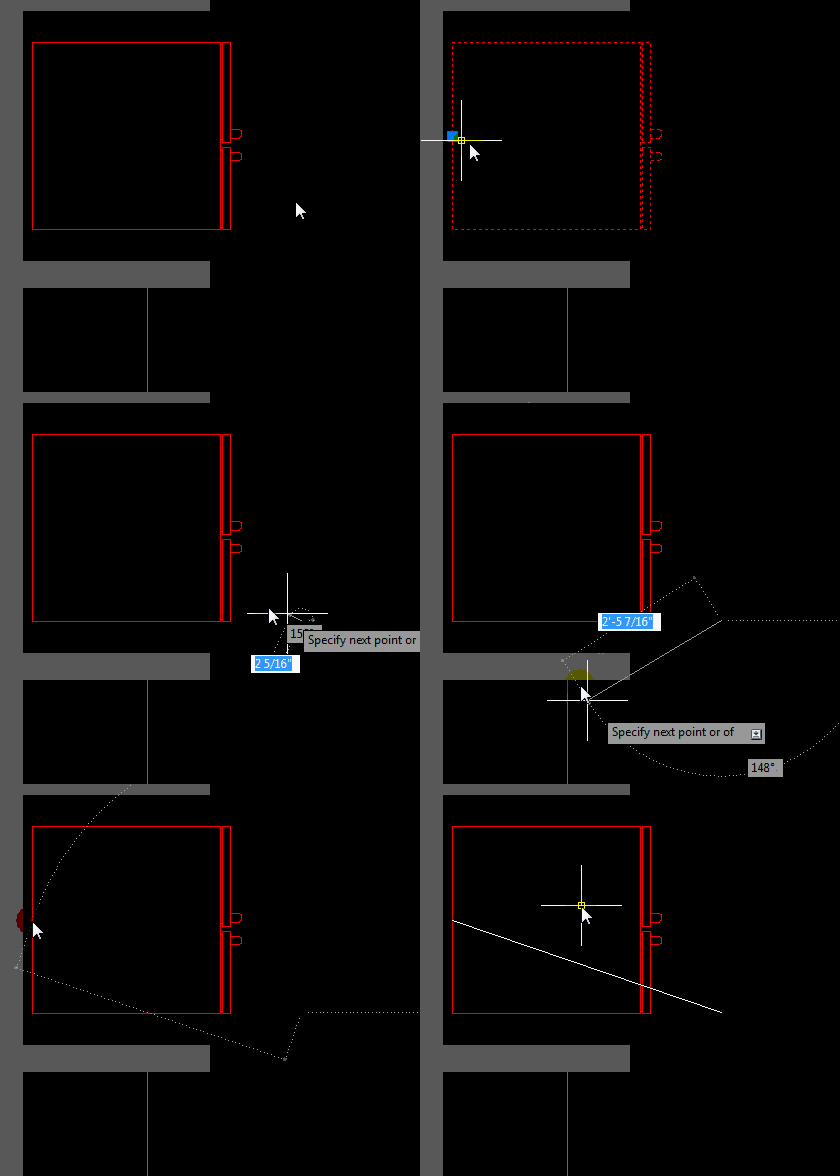
The Example below shows the Insert OSNAP for both DTEXT & MTEXT

Posted in BASICS, Blocks, Text, TIPS, XREFs | 1 Comment

Layer Naming Restrictions

Here are some layer naming restrictions when creating or editing layers while in the Layer Properties Manager…

  • 1) The most obvious restriction is that you cannot have 2 layers named that have the same name.
  • 2) Certain characters are restricted; <>/\”:;?*|,=’
  • 3) Limits of 255 characters (as tested in AutoCAD 2012)
Posted in BASICS, Layers | Leave a comment

Easy Way to Clear a Selection Set

Quick tip:

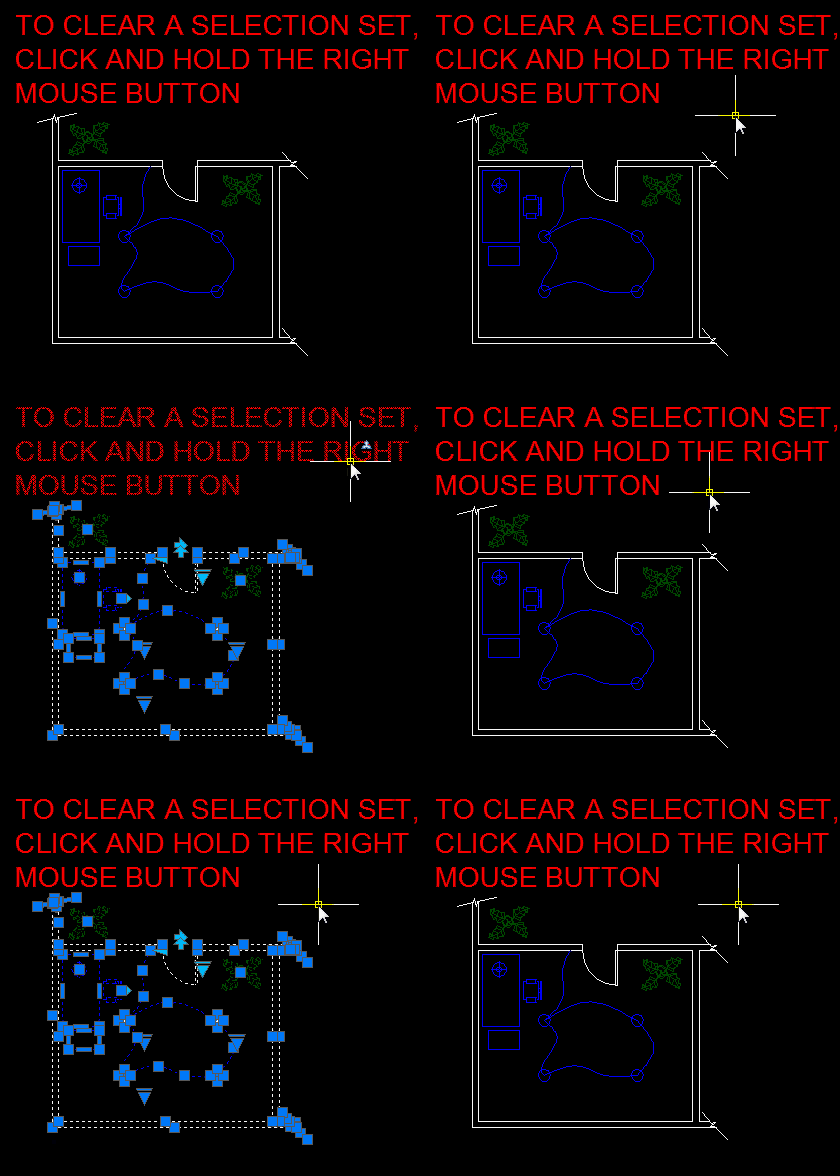
Instead of hitting the ESC button multiple times to clear a selection set, try holding the right mouse button for a few seconds.

Posted in BASICS, TIPS | 2 Comments

Layout Tab Cooridinates

After spending the time to set up a layout tab you may have encountered the frustration of inserting your title block onto the layout tab and it not inserting correctly.

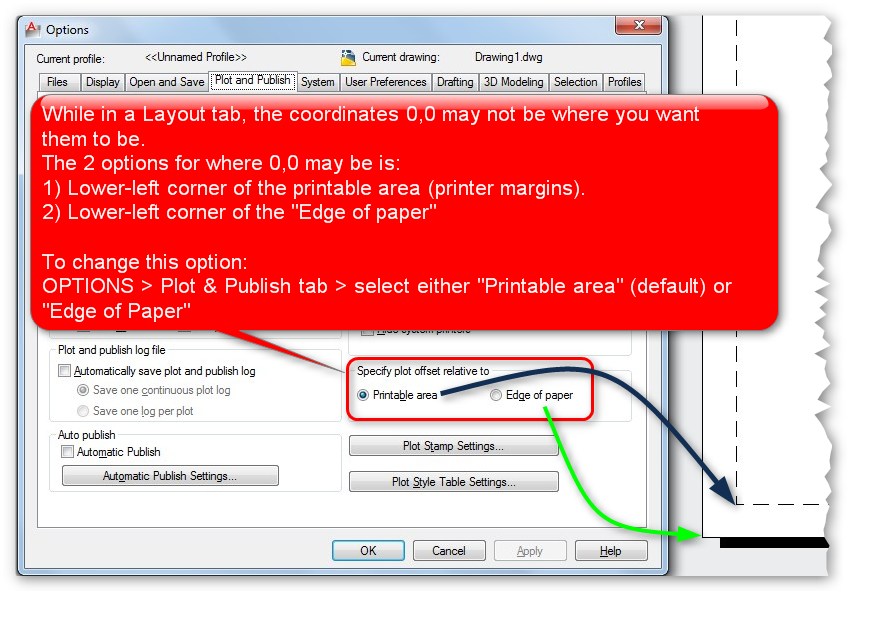
This is because the X,Y coordinates of 0,0 (zero,zero) are not where you want them to be. The frustrating thing is that the default position for a layout tab is in relation to the “Printable area” which is represented by the dashed lines in the layout tab. The printable area is determined by the printer/plotter that is selected. But each printer/plotter has a different printable area, so you can imagine the confusion…

Luckily, there is a simple solution to this. You can specify whether 0,0 = either:

1) Lower-left corner of the printable area
Or
2) Lower-left corner of the actual paper

Here’s how:

  • OPTIONS dialog box > Plot and Publish tab > select either 1) “Printable Area” or 2) “Edge of Paper”


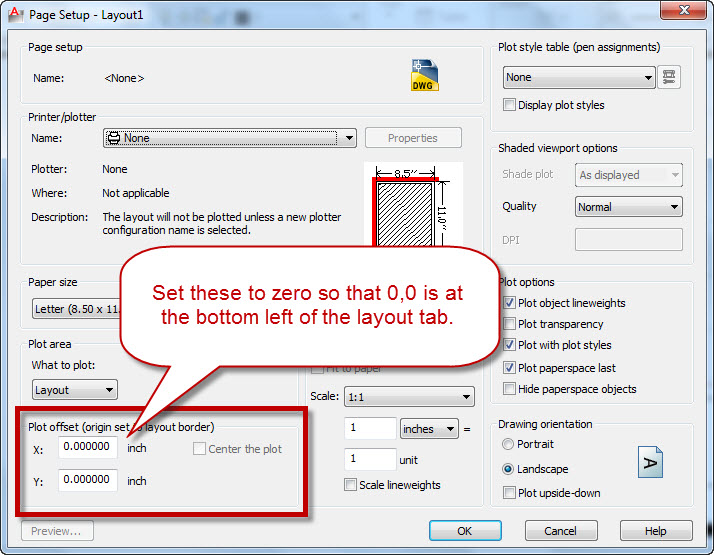
After selecting the “Edge of Paper” option, you will need to change one more setting before you see the results that you are looking for. Remember that the setting that you changed in the OPTIONS dialog changes the offset. So where is this offset defined?

The offset is define in the PLOT dialog while plotting and also the “Page Setup manager.”

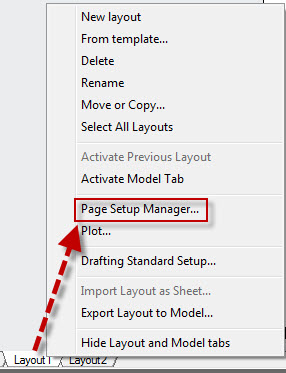
To open the Page Setup manager, simply right click on a layout tab and select “Page Setup Manager” from the right click menu.


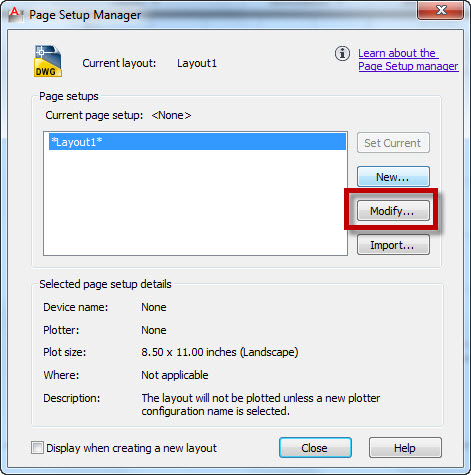
Select the layout tab that you want to shange the settings for and then click “Modify”


Then change the offset values to zero for both the X and Y direction.

Posted in BASICS, Customization, Layout, Paper Space, TIPS | 9 Comments

AutoLISP: Align Attributes

Here is a useful routine for aligning attributes in a block.

Here’s how:

  • AATTR <enter> to start (Align ATTRibute)
  • Specify the alignment direction Vertical or Horizontal
  • Select the Attribute that the others will be aligned to
  • Select the rest of the attributes that are to be aligned.

(The attributes will be aligned to the text grip that is associated with how the attribute text is justified (i.e. left or center justified)…


;*
;* AlignAttr.lsp
;*
;* Written by: Steve Kemp
;*
;* This routine will allow the user to align attributes on either Vertically or Horizontally on either the same block or different block
;* in the active drawing.
;*
;* THIS AUTOLISP ROUTINE IS PROVIDED 'AS IS' AND WITH ALL FAULTS.
;* THE OPERATION OF THIS ROUTINE IS NOT GUARANTEED IN ANY WAY TO BE ERROR FREE.
;*
;* To run this routine, type in AATTR at the command prompt.  You will be asked 'Select Attribute to align with'  this will be the 'master'
;* attribute that all other attributes will align with.  You will also be able to switch between Vertical (default) or Horizontal alignment
;* at this time.
;*
;* After selecting the 'master' attribute, you will be prompted 'Select Attributes to align'.  This will allow you to select multiple attribute
;* to align with the 'master' attributes insertion point.
;*
;*
;* NOTE: This routine does not work with 'ALIGN' or 'FIT' justified attributes and the routine will exit if one of these types is selected.
;*
(setvar 'cmdecho 0)
(defun c:AAttr (/ TextJust ParentAttr  ChildAttrList TempAttr TempData TempInsPt TempAdPt NewInsPt NewAdPt BlkEntName AttrOrientation AttrData AttrInsPt AttrAdPt AttrHeight GuideLineLen GuideLineStartPt GuideLineEndPt x )
   (command ".undo" "BE")
   (setq
      CurErr *error*
      *error* AAttrErr  ;* Redefine the error function
      ParentAttr  "Vertical"
      tempAttr T
   )
   (while (or (= ParentAttr "Vertical") (= ParentAttr "Horizontal"))
      (initget "Horizontal Vertical")
      (if (= ParentAttr "Vertical")
         (setq
            ParentAttr (nentsel "\nSelect Attribute to align with (Horizontal/<Vertical>): ") ;* Select Master Attribute
            AttrOrientation "Vertical"
         )
         ;else
         (setq
            ParentAttr (nentsel "\nSelect Attribute to align with (Vertical/<Horizontal>): ") ;* Select Master Attribute
            AttrOrientation "Horizontal"
         )
      )
   )
   (if (/= ParentAttr nil)
      (progn
         (setq
            AttrData (entget (car ParentAttr))
         )
         (if (= (cdr (assoc 0 AttrData)) "ATTRIB")  ;* Make sure entity selected was an attribute
            (progn
               ;*
               ;* If this is Align or Fit justified text, exit since these are non-supported justifications
               ;*
               (if (or (= (GetTextJust AttrData) "Align") (= (GetTextJust AttrData) "Fit"))
                  (progn
                     (alert "Unsupported attribute justification.\nAlign and Fit justifications not supported")
                     ;*
                     ;* Redefine the error function back to original
                     ;*
                     (setq
                        *error* CurErr
                        CurErr nil
                     )
                     (command ".undo" "E")
                     (redraw)
                     (exit)
                  )
               )
               ;*
               ;* Draw highlight box around selected attribute
               ;*
               (DrawBox AttrData)
               (setq
                  AttrInsPt (cdr (assoc 11 AttrData)) ;* This is the user selected insertion point, if middle justified, then this is the middle of the text.  If left justified, then this is all zeros
                  AttrAdPt (cdr (assoc 10 AttrData)) ;* This is the Acad adjusted point (attr starting point, alway the lower left of text even on justifications like Middle).
                  AttrHeight (cdr (assoc 40 AttrData))
                  GuideLineLen (* 25 AttrHeight)
               )
               ;*
               ;* If this is lower left justtified text, then use the AttrAdPt for both AttrInsPt and AttrAdPt because in Left justified text, the
               ;* AttrInsPt value will be all zeros
               ;*
               (if (= (GetTextJust AttrData) "Left")
                  (setq
                     AttrInsPt AttrAdPt
                  )
               )
               ;*
               ;* Draw guide line
               ;*
               (if (= AttrOrientation "Vertical")
                  (progn
                     (setq
                        GuideLineStartPt (list (car AttrInsPt) (+ (cadr AttrInsPt) GuideLineLen))
                        GuideLineEndPt (list (car AttrInsPt) (- (cadr AttrInsPt) GuideLineLen))
                     )
                     (grdraw GuideLineStartPt GuideLineEndPt -1 1)
                  )
                  ;else Horizontal
                  (progn
                     (setq
                        GuideLineStartPt (list (- (car AttrInsPt) GuideLineLen) (cadr AttrInsPt))
                        GuideLineEndPt (list (+ (car AttrInsPt) GuideLineLen) (cadr AttrInsPt))
                     )
                     (grdraw GuideLineStartPt GuideLineEndPt -1 1)
                  )
               )
               ;*
               ;* Select all attributes to align with the parent selected above and add the attribute entname and the block
               ;* entname to a list in format ( (AttrEntName BlkEntName) (AttrEntName BlkEntName) (AttrEntName BlkEntName) )
		(setq ChildAttrList (catchwindow))
;;;               (while (/= TempAttr nil)
;;;                  (setq
;;;                     TempAttr (nentsel "\nSelect Attributes to align: ")
;;;                  )
;;;                  (if (/= TempAttr nil)
;;;                     (progn
;;;                        (setq
;;;                           TempData (entget (car TempAttr))
;;;                        )
;;;                        (if (= (cdr (assoc 0 TempData)) "ATTRIB")  ;* Make sure entity selected was an attribute
;;;                           ;*
;;;                           ;* If this is Align or Fit justified text, skip this attribute since these are non-supported justifications
;;;                           ;*
;;;                           (if (or (= (GetTextJust TempData) "Align") (= (GetTextJust TempData) "Fit"))
;;;                              (alert "Unsupported attribute justification.\nAlign and Fit justifications not supported")
;;;                              ;else
;;;                              (progn
;;;                                 (setq
;;;                                    BlkEntName (ssname (ssget (cadr TempAttr)) 0)
;;;                                    ChildAttrList (cons (list (car TempAttr) BlkEntName) ChildAttrList)
;;;                                 )
;;;                                 ;*
;;;                                 ;* Draw highlight box around selected attribute
;;;                                 ;*
;;;                                 (DrawBox TempData)
;;;                              )
;;;                           )
;;;                        )
;;;                     )
;;;                  )
;;;               )
               ;*
               ;* Step through all the attributes to align with the parent and align them
               ;*


               (foreach x ChildAttrList
                  (setq
                     TempData (entget (car x))
                     TempInsPt (assoc 11 TempData)
                     TempAdPt (assoc 10 TempData)
                     TextJust (GetTextJust TempData)
                  )
                  ;*
                  ;* If Vertical allignment, then make the X value of TempInsPt and TempAdPt match the X value of AttrInsPt and AttrAdPt
                  ;*
                  (if (= AttrOrientation "Vertical")
                     ;*
                     ;* This might seem weird, but if the attribute to align is Left justified, I need to use the AttrInsPt (user selected point)
                     ;* in the calculation of the NewAdPt since the AttrInsPt was the actual user selected point and that is the one I want
                     ;* to align with.  Also I only need to set the NewAdPt since the NewInsPt (dxf 11) is not used when left justified.
                     ;*
                     (if (= TextJust "Left")
                        (setq
                           NewAdPt (cons (car AttrInsPt) (cddr TempAdPt))
                           NewAdPt (cons 10 NewAdPt)
                        )
                        ;else
                        (setq
                           NewInsPt (cons (car AttrInsPt) (cddr TempInsPt))
                           NewInsPt (cons 11 NewInsPt)
                           NewAdPt (cons (car AttrAdPt) (cddr TempAdPt))
                           NewAdPt (cons 10 NewAdPt)
                        )
                     )
                     ;else Horizontal
                     ;*
                     ;* This might seem weird, but if the attribute to align is Left justified, I need to use the AttrInsPt (user selected point)
                     ;* in the calculation of the NewAdPt since the AttrInsPt was the actual user selected point and that is the one I want
                     ;* to align with.  Also I only need to set the NewAdPt since the NewInsPt (dxf 11) is not used when left justified.
                     ;*
                     (if (= TextJust "Left")
                        (setq
                           NewAdPt (cons (cadr TempAdPt) (cdr AttrInsPt))
                           NewAdPt (cons 10 NewAdPt)
                        )
                        ;else
                        (setq
                           NewInsPt (cons (cadr TempInsPt) (cdr AttrInsPt))
                           NewInsPt (cons 11 NewInsPt)
                           NewAdPt (cons (cadr TempAdPt) (cdr AttrAdPt))
                           NewAdPt (cons 10 NewAdPt)
                        )
                     )
                  )
                  ;*
                  ;* Update the alignment of the attribute.  If the attribute is lower left justified, then only update the Acad adjusted point (dxf 10)
                  ;* if any other justification update both the attr insertion point and the Acad adjusted point
                  ;*
                  (if (= TextJust "Left")
                     (setq
                        TempData (subst NewAdPt TempAdPt TempData)
                     )
                     ;else
                     (setq
                        TempData (subst NewInsPt TempInsPt TempData)
                        TempData (subst NewAdPt TempAdPt TempData)
                     )
                  )
                  (entmod TempData)
                  (entupd (cadr x))
               )
            )
         )
      )
   )
   ;*
   ;* Redefine the error function back to original
   ;*
   (setq
      *error* CurErr
      CurErr nil
   )
   (command ".undo" "E")
   (redraw)
   (princ)
)
;*
;* Function to draw highlight box around the selected attribute
;*
(defun DrawBox ( Ent / )
   ;*
   ;* Set the USC to the selected entity so the box gets drawn corectly
   ;*
   (command ".ucs" "Entity" (cdr (assoc -1 Ent)))
   (setq
      GblUcsChg T
      TextBoxPts (textbox Ent)
      LowerLeft (car TextBoxPts)
      UpperRight (cadr TextBoxPts)
      UpperLeft (list (car LowerLeft) (cadr UpperRight) 0.0)
      LowerRight (list (car UpperRight) (cadr LowerLeft) 0.0)
   )
   (grvecs (list -1 UpperLeft UpperRight -1 UpperRight LowerRight -1 LowerRight LowerLeft -1 LowerLeft UpperLeft))
   ;*
   ;* Set the USC back to its previous setting
   ;*
   (command ".ucs" "P")
   (setq
      GblUcsChg nil
   )
)
;*
;* Function to return justification of atribute of it is lower Left, Align of Fit.  These justifications are special cases.
;*
(defun GetTextJust ( EntData / Ret )
   (cond
         ((and (= (cdr (assoc 72 EntData)) 0) (= (cdr (assoc 74 EntData)) 0))
            (setq Ret "Left")
         )
         ((and (= (cdr (assoc 72 EntData)) 3) (= (cdr (assoc 74 EntData)) 0))
            (setq Ret "Align")
         )
         ((and (= (cdr (assoc 72 EntData)) 5) (= (cdr (assoc 74 EntData)) 0))
            (setq Ret "Fit")
         )
         (setq Ret nil)
   )
   (setq Ret Ret)
)
;*
;* My Error handler
;*
(defun AAttrErr (msg)
   (redraw)
   ;*
   ;* If an error happened in while the UCS was changed to draw the box around the attribute, set the UCS back to previou setting
   ;*
   (if GblUcsChg
      (progn
         (command ".ucs" "P")
         (setq
            GblUcsChg nil
         )
      )
   )
   ;*
   ;* Redefine the error function back to original
   ;*
   (setq
      *error* CurErr
      CurErr nil
   )
   (command ".undo" "E")
   (princ "\n")
   (princ msg)
)


(defun catchwindow ( / Inside-p _HiLow of blks atlist )(vl-load-com)
;;;	 pbe Oct 17 2012	;;;  
(defun Inside-p (a b c)
;;; http://mathforum.org/library/drmath/view/54386.html ;;;
;;; (.5)(x1*y2 - y1*x2 -x0*y2 + y0*x2 + x0*y1 - y0*x1)	;;;
	 (* (- (+ (+ (- (- (* (car b) (cadr c)) (* (cadr b) (car c)))
		     (* (car a) (cadr c))
		  )  (* (cadr a) (car c))
	       ) (* (car a) (cadr b))
	    ) (* (cadr a) (car b))
	 ) 0.5)
  )
(defun _HiLow  (lev lev2 lst)
      (list (apply lev (mapcar 'car lst))
            (apply lev2 (mapcar 'cadr lst))
            ))     
(setq atlist nil)  
  (while (progn (princ "\nSelect Objects: ")
    (if (and (setq fc (getpoint))
		 (setq oc (getcorner  fc " Specify opposite corner:"))
		 (setq blks (ssget "C" fc oc '((0 . "INSERT")(66 . 1)))))
      	(progn
	  (setq pts (list (_hilow 'min 'min (setq lst (list fc oc)))
		      (_hilow 'max 'min lst)(_hilow 'max 'max lst)
		      (_hilow 'min 'max lst)))
	  	(repeat (sslength blks)
		  	 (setq at_ (entnext (setq prnt (ssname blks 0))))
			     (while (not (eq (setq etyp (cdr (assoc 0 (setq e (entget at_))))) "SEQEND"))
			        (if (eq etyp "ATTRIB") (progn
				 (setq pt (cdr (assoc 10 e)))	
				 (if (not (vl-some '(lambda (k) (minusp k))
					   (mapcar '(lambda (j)
						      (Inside-p (car j) (cadr j) pt))
						   (mapcar '(lambda (q w)
							      (list q w) ) pts
							   (append (cdr pts) (list (car pts)))
							   ))))
					  (setq atlist (cons (list at_ prnt) atlist)
						box (DrawBox  (entget at_)) ))
				 	)
				  ) 
			       (setq at_ (entnext at_))
			       )
		  (ssdel  prnt blks)
		  ))))
    		)
		atlist
  	)
			       
(princ "\nTo run the command, type in: AATTR")
Posted in Attributes, AutoLISP, Blocks, Modifying | 1 Comment

Easily Move or Copy Layout Tabs

Here is yet another improvement upon a previous post (found here).

After you have a layout tab set up, this tip the fastest way that I have found to either move/rearrange the new layout tab or copy it.

To move/rearrange the layout tab:

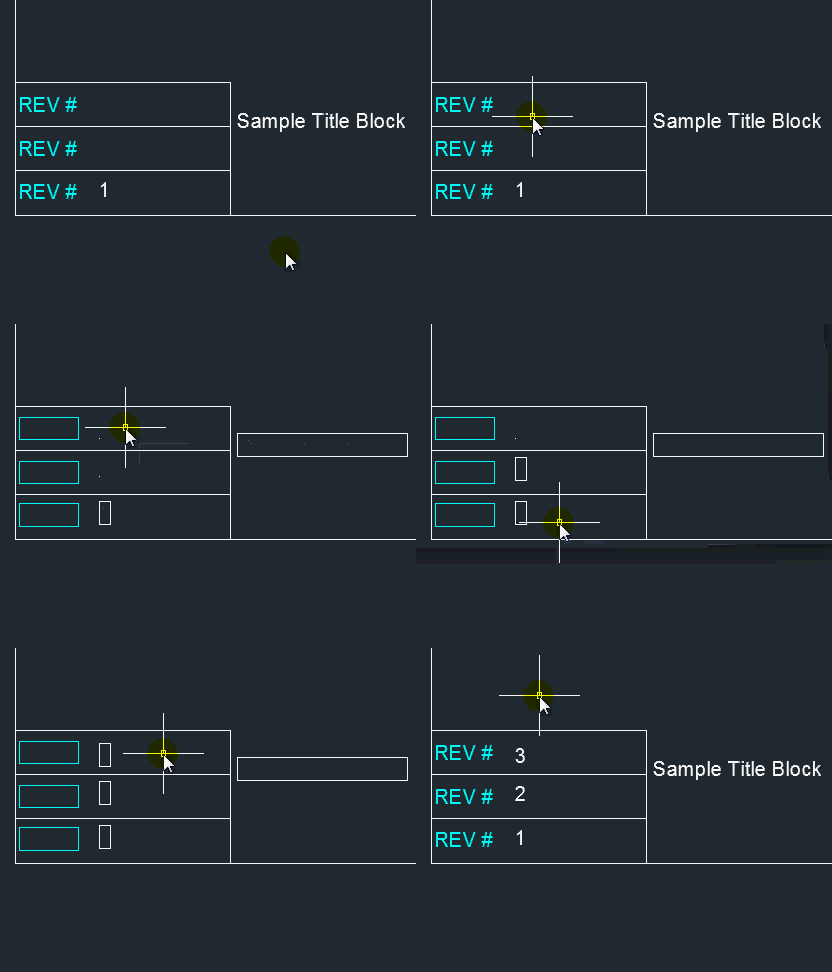
  • Click & hold the layout tab with the left mouse button until an icon appears next to your cursor
  • Drag the layout tab to a new position and release the mouse button where the arrow is pointing. (arrow not shown in the below picture because of software)

To copy a layout tab:

  • Click & hold with the left mouse button until you see an icon appear next your cursor.
  • Press & hold the CTRL button. A plus sign will appear next to the icon next to your cursor. This shows you that you are in the “copy” mode.
  • Drag your cursor among the layout tabs to position the new copy and release the mouse button. Where the arrow is pointing is where the copy will be placed. (arrow not shown in the below picture because of software)

Posted in Layout, Modifying, Paper Space | 3 Comments

QTEXT to Select Empty Text or Attributes

I have previously posted about using the QTEXT command to temporarily hide your text in order to speed up performance in case you are working on a large drawing…

Well, Here’s another use for QTEXT. If you have empty text boxes or attributes, wouldn’t it be nice to be able to select it so that you can modify it (like delete it)?…

Here’s how:

  • QTEXT <enter>
  • ON <enter>
  • RE <enter> for REGEN ( to regenerate the drawing and make the QTEXT changes visible)
  • Double-click the text object. Note: Expty Text and Attributes will show as a dot.
  • You can also select the text objects by using ED <enter> (for Edit Text) then selecting the text object.

~enjoy

Posted in Attributes, Modifying, Text, TIPS | 6 Comments

How To Use Stretch With an Angle

I have previously explained how to use the STRETCH command (found here). But all of the examples that I used were orthogonal (horizontal/vertical). And that’s not how the real world works – we work with angled drawings and components all of the time. So here’s how you can use it at any angle.

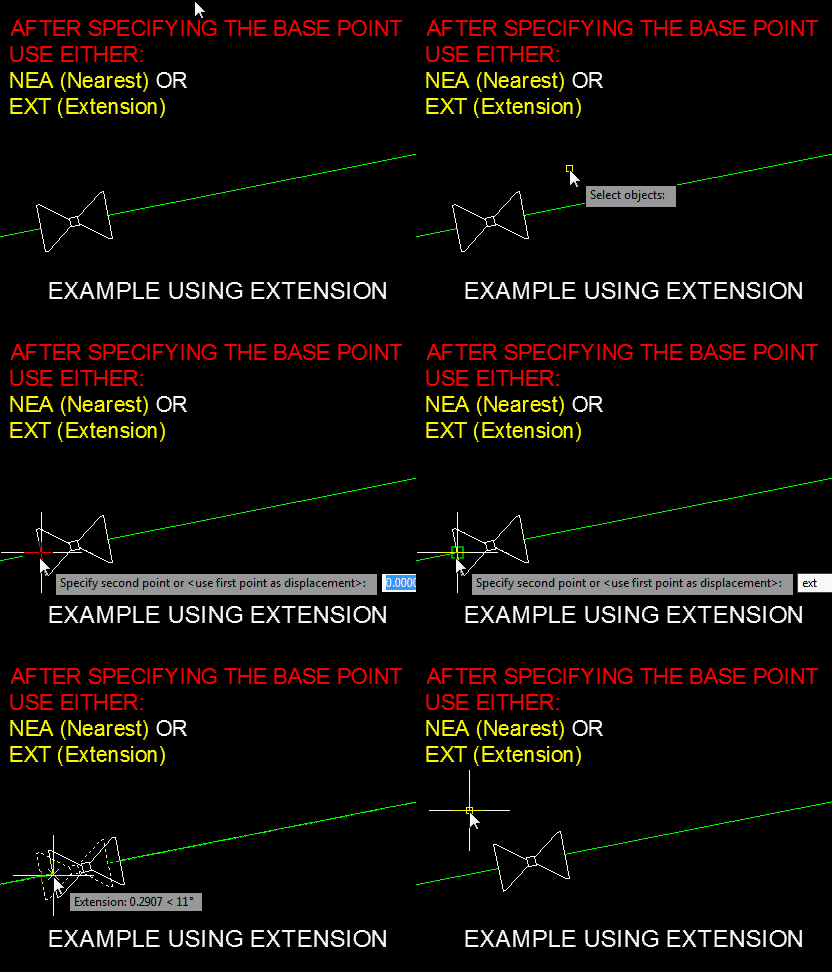
The beauty of the stretch command is that you move what is with the window and stretch what the window crosses (as explained in the previous post). The trick with dealing with angles is keeping that angle at the specified angle. To do this with the STRETCH command you need to have a reference.

There are other ways to achieve this, here are my suggestions: After specifying the base point, use either the NEAREST (NEA) temporary OSNAP or the EXTENSION (EXT) temporary OSNAP. This can be done by either entering the 3-letters in the middle of the command or Shift-Right-click in the middle of the command.
Note: the EXTENSION osnap needs a reference – once the osnap is active, hover over the end point of the line until you see the reference line appear.

Here’s how:

  • STRETCH <enter> to start
  • Make the selection set (refer to the other post)
  • Specify the base point
  • Turn on the temporary OSNAP (NEA or EXT)
  • Specify the distance for the stretch <enter>

Posted in Modifying, TIPS | Leave a comment

AutoLISP: Break At Distance

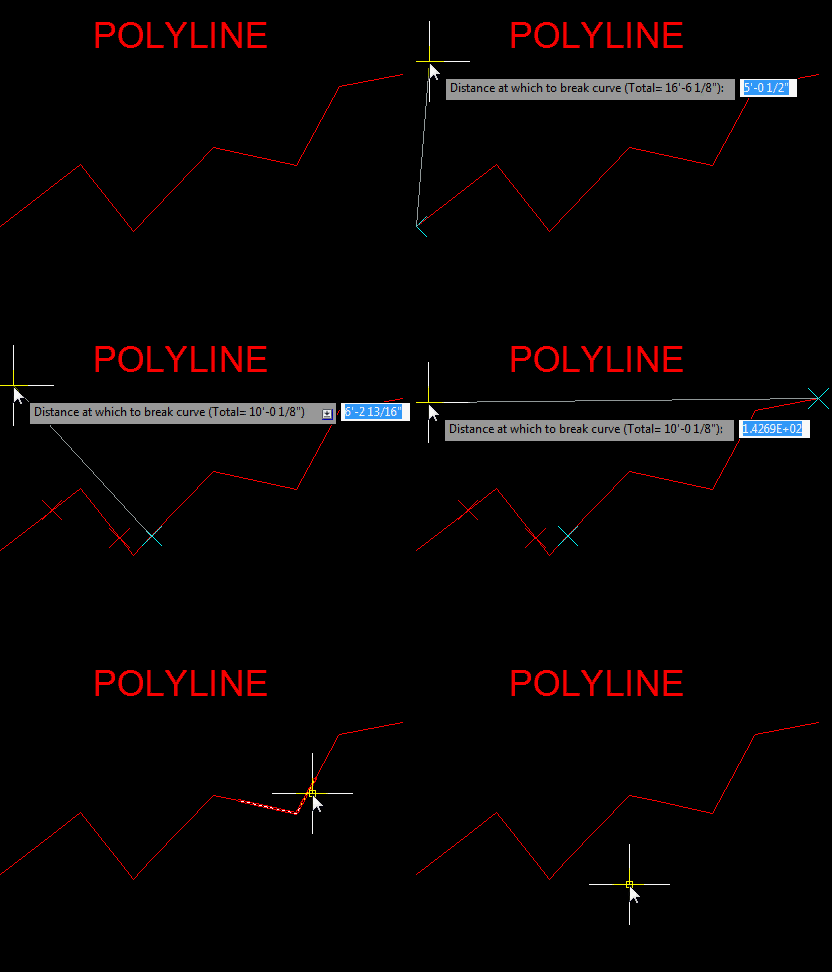
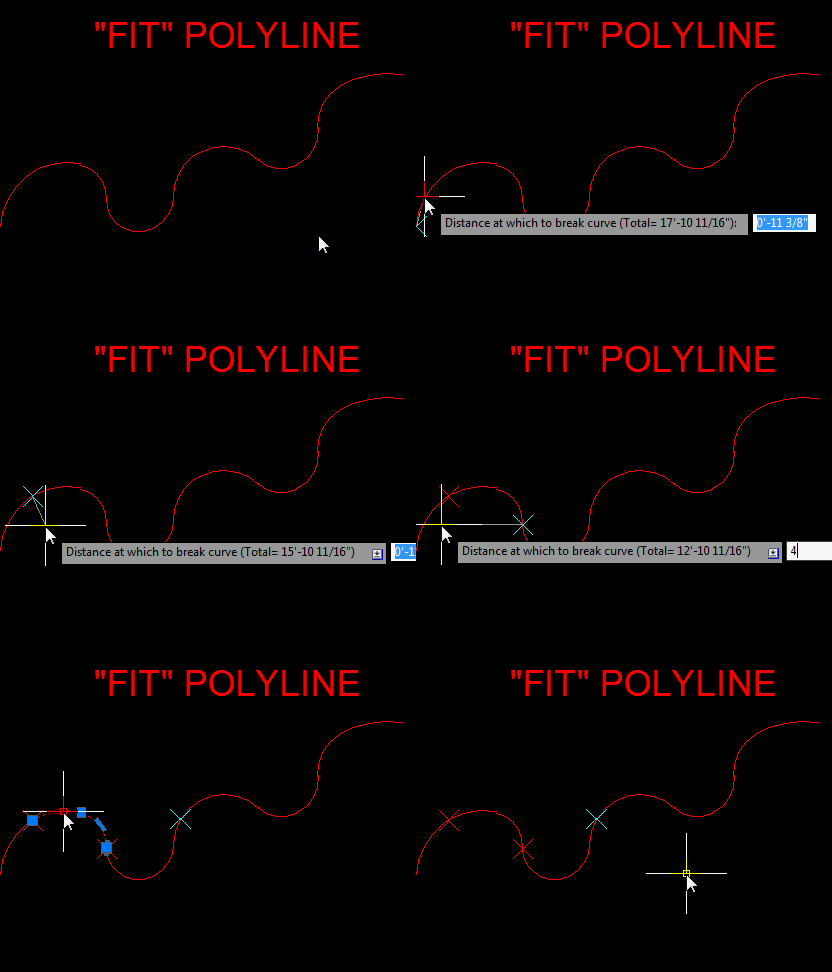
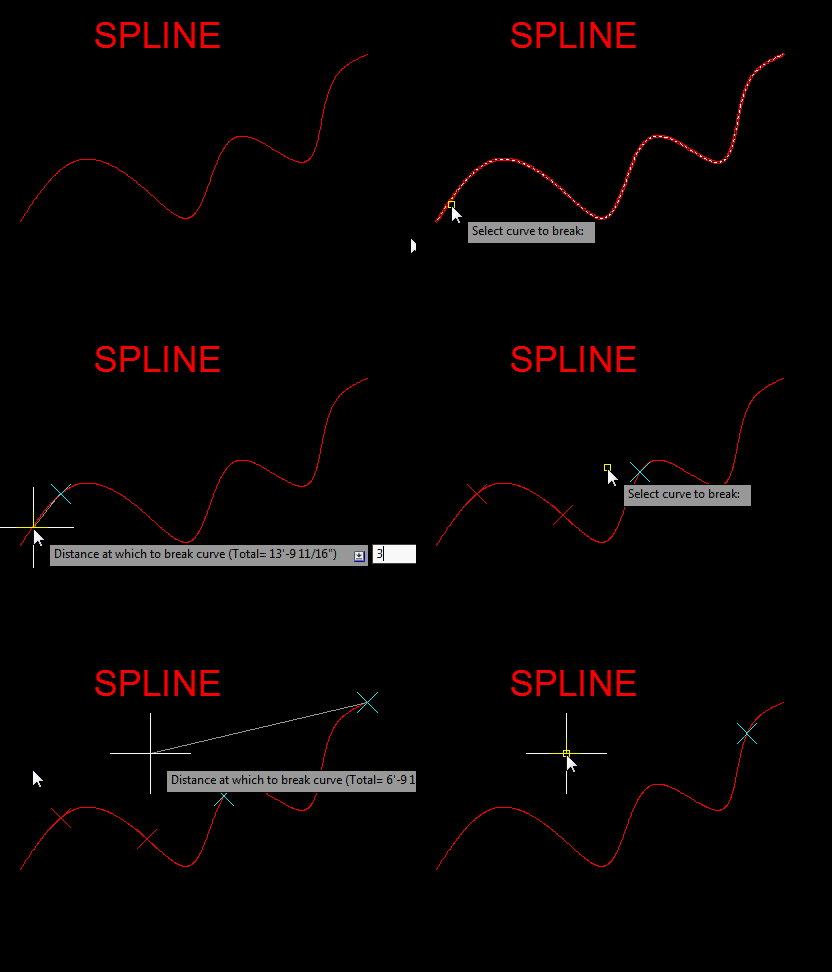
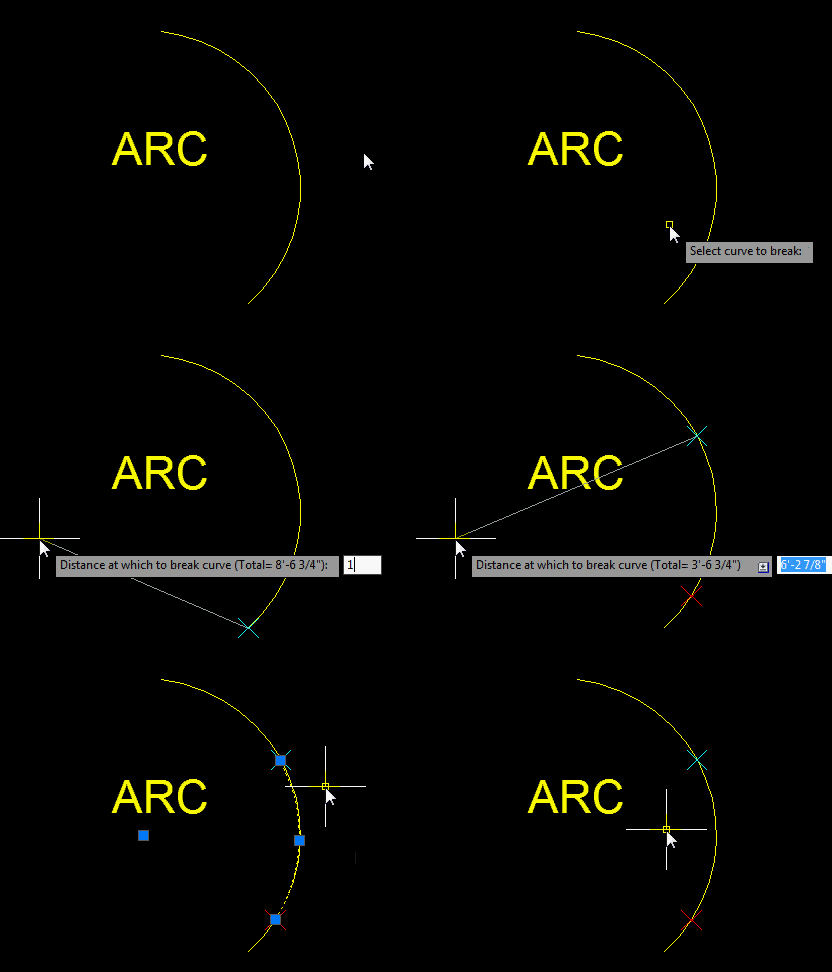
Even though this routine prompts you to select a curve, this routine can be used on other objects as well.

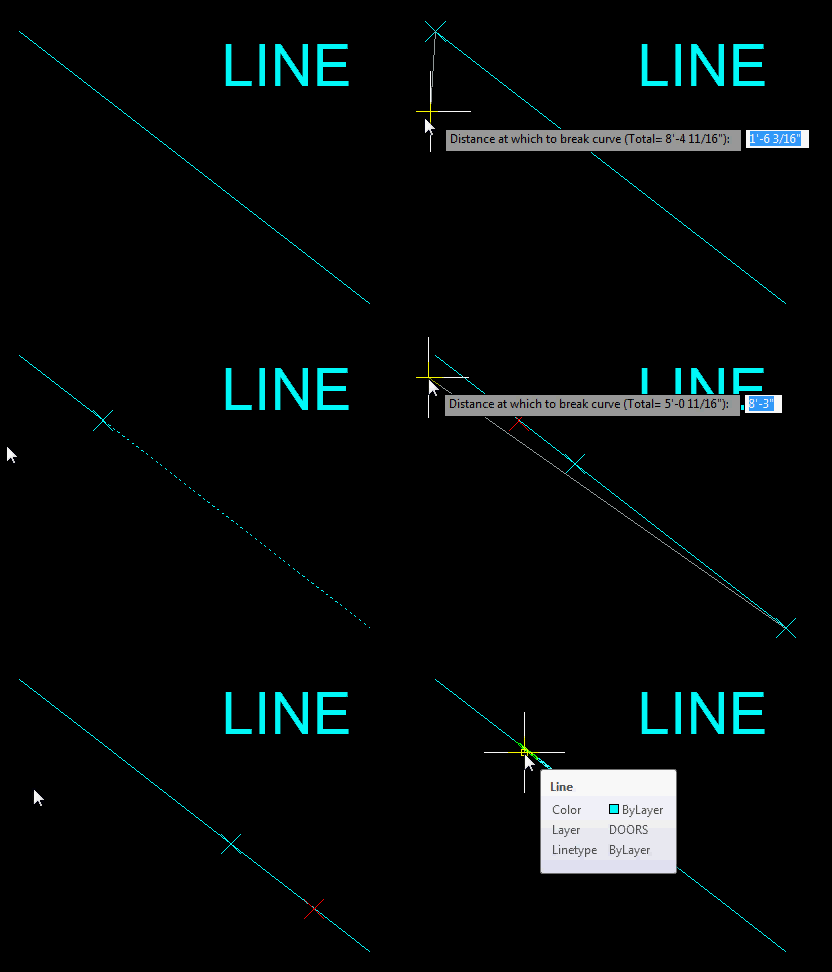
You simply select an object near the endpoint where you want to start from then specify a distance along the object. This routine will break the object at that distance and create a temporary X to mark where the break is. As soon as you either do a REGEN (RE) <enter> the Xs will go away.

This routine doesn’t not work on closed objects like Rectangles, Polygons or closed Polylines/Splines.

Here’s how:

  • BAD <enter> to start Break At Distance
  • Select the end point start from.
  • Enter the distance away from the start point to create a break.
  • Continue by entering another distance away from the previous break point
  • When you are finished, hit <enter> to end.


(defun c:BAD (/ *error* AT:GetSel AT:DrawX _getDist ent pnt cmd undo total add dist break)
  ;; Break curve At Distance
  ;; Alan J. Thompson, 09.21.11
  ;; http://www.theswamp.org/index.php?topic=39550.0;all
  (vl-load-com)

  (defun *error* (msg)
    (and cmd (setvar 'CMDECHO cmd))
    (and *AcadDoc* (vla-endundomark *AcadDoc*))
    (if (and msg (not (wcmatch (strcase msg) "*BREAK*,*CANCEL*,*QUIT*,")))
      (princ (strcat "\nError: " msg))
    )
  )

  (defun AT:GetSel (meth msg fnc / ent)
    ;; meth - selection method (entsel, nentsel, nentselp)
    ;; msg - message to display (nil for default)
    ;; fnc - optional function to apply to selected object
    ;; Ex: (AT:GetSel entsel "\nSelect arc: " (lambda (x) (eq (cdr (assoc 0 (entget (car x)))) "ARC")))
    ;; Alan J. Thompson, 05.25.10
    (setvar 'ERRNO 0)
    (while
      (progn (setq ent (meth (cond (msg)
                                   ("\nSelect object: ")
                             )
                       )
             )
             (cond ((eq (getvar 'ERRNO) 7) (princ "\nMissed, try again."))
                   ((eq (type (car ent)) 'ENAME)
                    (if (and fnc (not (fnc ent)))
                      (princ "\nInvalid object!")
                    )
                   )
             )
      )
    )
    ent
  )

  (defun AT:DrawX (P C)
    ;; Draw and "X" vector at specified point
    ;; P - Placement point for "X"
    ;; C - Color of "X" (must be integer b/w 1 & 255)
    ;; Alan J. Thompson, 10.31.09
    (if (vl-consp P)
      ((lambda (d)
         (grvecs (cons C
                       (mapcar (function (lambda (n) (polar P (* n pi) d)))
                               '(0.25 1.25 0.75 1.75)
                       )
                 )
         )
         P
       )
        (* (getvar 'viewsize) 0.02)
      )
    )
  )

  (defun _getDist (total point / dist)
    (and undo (initget "Undo"))
    (cond ((not (setq dist (getdist (AT:DrawX point 4)
                                    (strcat
                                      "\nDistance at which to break curve (Total= "
                                      (rtos total)
                                      (if undo
                                        ") [Undo]: "
                                        "): "
                                      )
                                    )
                           )
                )
           )
           nil
          )
          ((eq dist "Undo") dist)
          ((not (< 0. dist total))
           (princ (strcat "\nValue must be between 0.0 and and " (rtos total) "!"))
           (_getDist total point)
          )
          (dist)
    )
  )

  (vla-startundomark
    (cond (*AcadDoc*)
          ((setq *AcadDoc* (vla-get-activedocument (vlax-get-acad-object))))
    )
  )


  (if (setq ent (AT:GetSel
                  entsel
                  "\nSelect curve to break: "
                  (lambda (x)
                    (and (wcmatch (cdr (assoc 0 (entget (car x))))
                                  "ARC,LINE,*POLYLINE,SPLINE"
                         )
                         (not (vlax-curve-isClosed (car x)))
                    )
                  )
                )
      )
    (progn
      (setq pnt (trans (cadr ent) 1 0)
            ent (car ent)
            cmd (getvar 'CMDECHO)
      )
      (setvar 'CMDECHO 0)
      (while
        (setq
          dist (_getDist (setq total (vlax-curve-getDistAtParam ent (vlax-curve-getEndParam ent)))
                         (setq pnt
                                (trans (if (> (vlax-curve-getParamAtPoint
                                                ent
                                                (vlax-curve-getClosestPointToProjection ent pnt '(0. 0. 1.))
                                              )
                                              (vlax-curve-getParamAtDist ent (/ total 2.))
                                           )
                                         (progn (setq add total) (vlax-curve-getEndPoint ent))
                                         (progn (setq add 0.) (vlax-curve-getStartPoint ent))
                                       )
                                       0
                                       1
                                )
                         )
               )
        )
         (if (eq dist "Undo")
           (progn (vl-cmdf "_.U")
                  (setq ent  (caar undo)
                        pnt  (cadar undo)
                        undo (cdr undo)
                  )
           )
           (progn
             (setq break (trans (vlax-curve-getPointAtDist ent (abs (- add dist))) 0 1))
             (command-s "_.break" ent "_F" "_non" break "_non" break)
             (setq undo (cons (list ent pnt) undo))
             (and (zerop add) (setq ent (entlast)))
           )
         )
         (redraw)
         (foreach p (vl-remove (last undo) undo) (AT:DrawX (cadr p) 1))
      )
    )
  )
  (*error* nil)
  (princ)
)

Posted in AutoLISP, Modifying, Polylines | 6 Comments

AutoLISP: Break Polyline at Vertex

You can always explode a Polyline if you need to break your polyline into individual segments. This method will make the polyline into individual lines. But what if you would like these individual segments to remain individual polylines? That’s where this routine comes in handy.

Here’s how:

  • BPV <enter> to start Break Polyline Vertex
  • Select the polyline(s) <enter>


(defun c:BPV (/ _chop ss i e)

;; Break lwPolyline at each Vertex

;; Alan J. Thompson, 09.14.11

(vl-load-com)

(defun _chop (lst e)

(if (vlax-curve-isClosed e)

(cdr lst)

(reverse (cdr (reverse (cdr lst))))

)

)

(if (setq ss (ssget "_:L" '((0 . "LWPOLYLINE") (-4 . ">") (90 . 2))))

(repeat (setq i (sslength ss))

(foreach point (_chop (apply 'append

(mapcar '(lambda (x)

(if (eq (car x) 10)

(list (trans (cdr x) 0 1))

)

)

(entget (setq e (ssname ss (setq i (1- i)))))

)

)

e

)

(vl-cmdf "_.break" e "_F" "_non" point "_non" point)

(setq e (entlast))

)

)

)

(princ)

)


Posted in AutoLISP, Modifying, Polylines | 1 Comment