Tool Palette Icons

I thought that this was an interesting tip. especially after seeing some CAD users who have many palettes open at once and how much screen-real-estate that these palettes take up.

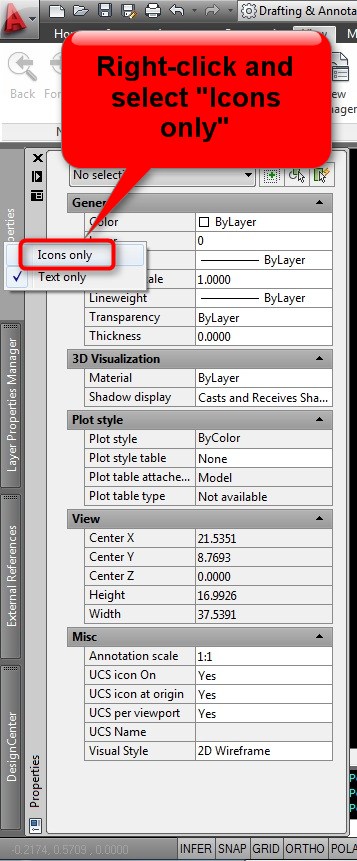
If you have multiple palettes open, you can do a simple customization to these palettes so that they take up less space on your screen. In the picture below, I have four palettes opened at once and they are all docked at the left of my screen. When I hover over a given palette, it will expand…

In the picture below: I right click over a palette and select ‘Icons only”

In the picture below: This is the condensed Tool Palettes as represented by their “Icons”

Posted in Customization, Tool Palletes | 2 Comments

Lengthen Polyline Endpoint & Vertex

I have previously posted about using the LENGTHEN command, which is helpful, but the LENGTHEN command doesn’t work on polylines. Here’s how to lengthen a polyline segment whether it is an endpoint or a vertex.

The examples shown in this tip use the dynamic grips that are available in AutoCAD 2011 & 2012 by hovering over a grip.

Here’s how:

Polyline Endpoint:

  • Select the polyline
  • Hover over the endpoint grip that you want lengthened
  • Select “Stretch” or “Stretch Vertex” (depending on version)
  • B <enter> to specify a base point
  • Select the endpoint grip where you initially hovered over
  • Either enter EXT <enter> or shift right-click and select the “extension” osnap
  • hover over the end point and pull in the direct that you want to lengthen (you should see the dotted line that shows you that your are aligned with the line).
  • Enter the distance to be lengthened <enter>

Polyline Vertex: (middle of polyline)

  • Select the polyline
  • Hover over a vertex grip that you want lengthened
  • Select “Stretch” or “Stretch Vertex” (depending on version)
  • B <enter> to specify a base point
  • Select the endpoint grip where you initially hovered over
  • Either enter EXT <enter> or shift right-click and select the “extension” osnap
  • Hover over the end point and pull in the direct that you want to lengthen. You should see the dotted line that shows you that your are aligned with the line. Because a vertex shares 2 line segments there are 2 extension options (as seen below). Simply move your cursor in the direction to specify which line segment you want to lengthen.
  • Enter the distance to be lengthened <enter>


Posted in BASICS, Modifying, New in 2011, New in 2012, Polylines | 2 Comments

Customize the Open Folders Location

While in AutoCAD, we usually need to open another drawing. there are ways to set the default location where AutoCAD looks to open a drawing but this tip is how to customize the dialog box that lets you search your computer to open another drawing. The great thing is that you can customize this to list multiple locations.

Here’s how:

Use any of the various methods to open a drawing:

  • OPEN <enter>
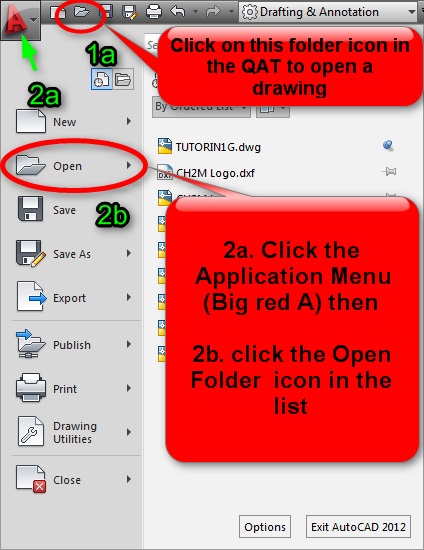
  • Click the folder icon in the Quick Access Toolbar (QAT)
  • Click the Application Menu (Big Red A) then click the folder icon that says “Open” next to it.

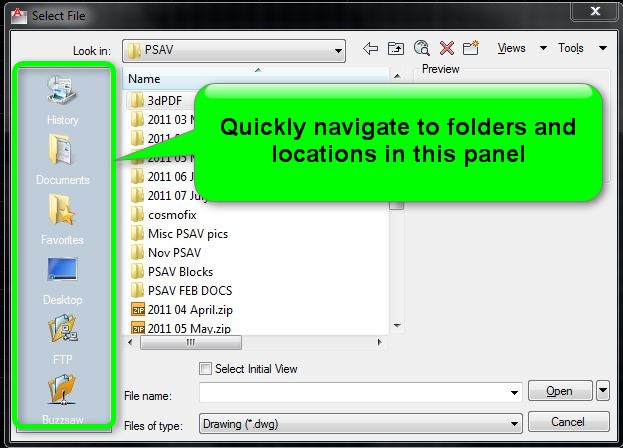
Picture below: Normal view of how you select a file

Picture below: Drag & Drop from the list of folders to the list on the left

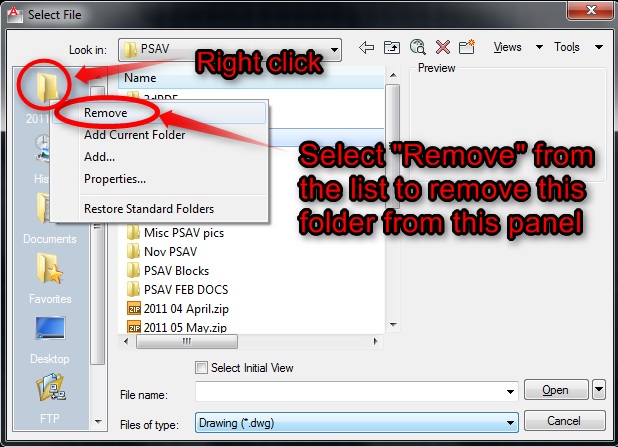
Picture below: If you no longer need the folder/location to appear in the list on the left, Right click and select “Remove”

Posted in BASICS, Customization, TIPS | Leave a comment

OPTIONS dialog box Current Drawing Settings

Have you ever wondered why you have set the VIEWRES in one drawing and then when you open another drawing, it has changed even though you may have changed it using the OPTIONS dialog box?

There are some settings that are only saved in the current drawing and then there are others that are saved to the “registry” that will take effect in the next drawing that you open. If you want any of these “current drawing” settings to be set for you automatically, this is where saving your drawing as a template (.dwt) is very helpful.

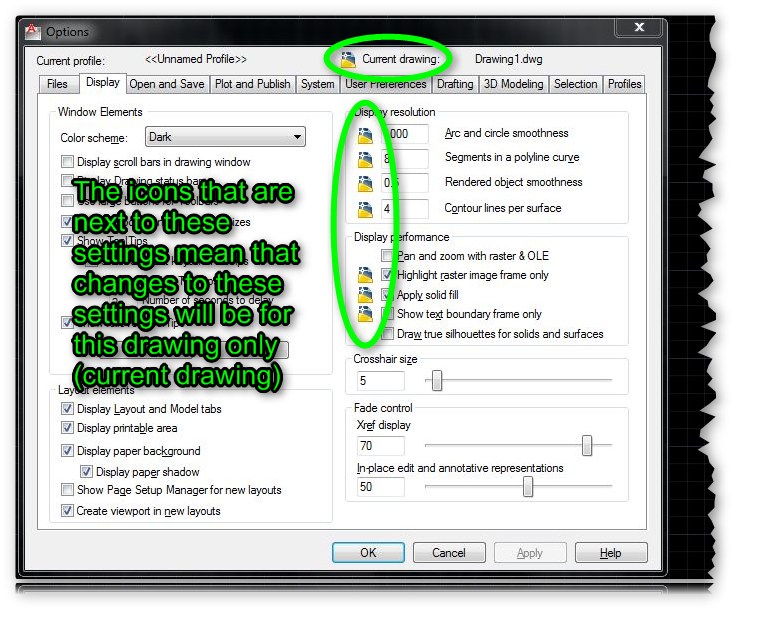
In the OPTIONS dialog box, if there is a little (.dwg) symbol next to the setting, that means that any changes to that setting will only be saved for the current drawing. Also notice at the top to the OPTIONS dialog box, that there is the symbol next to the text that says “current drawing”…

The next time you are in the OPtions dialog box, have a look around and notice what settings are for the “current drawing.”

Posted in BASICS, Customization, Settling In, TIPS | 3 Comments

Open the Welcome Screen

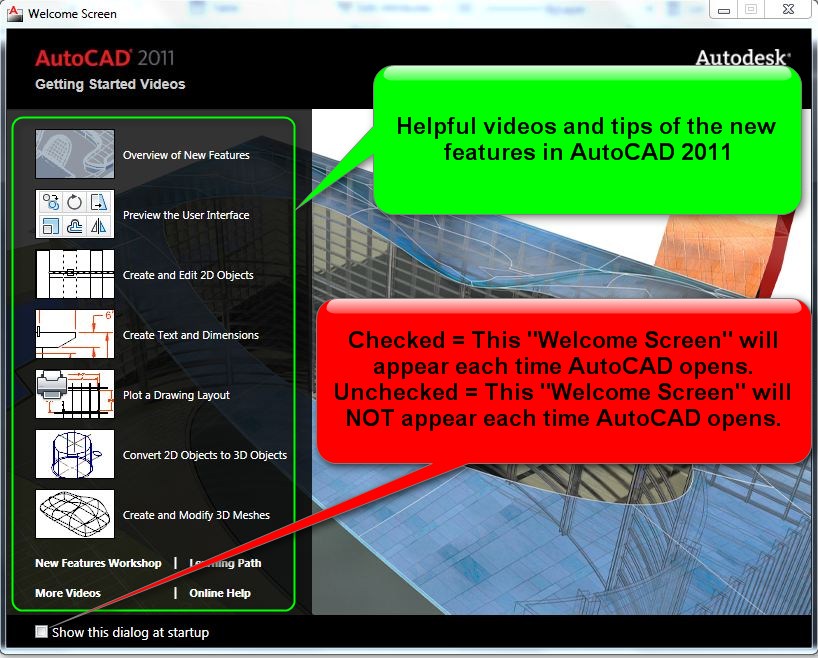
We have all done this – we uncheck the box that tells AutoCAD to show the “Welcome Screen” each time AutoCAD opens. But what if you want to open it again and check out some of the “New Features” videos?

Here’s how for AutoCAD 2011:

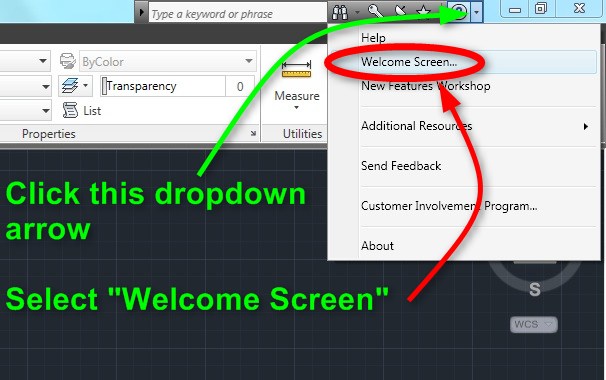
  • Click the drop-down arrow in the info center
  • Select “Welcome Screen” from the list

(Picture below: How to open the 2011 Welcome Screen)

(Picture below: Default 2011 Welcome Screen)


Here’s how for AutoCAD 2012:

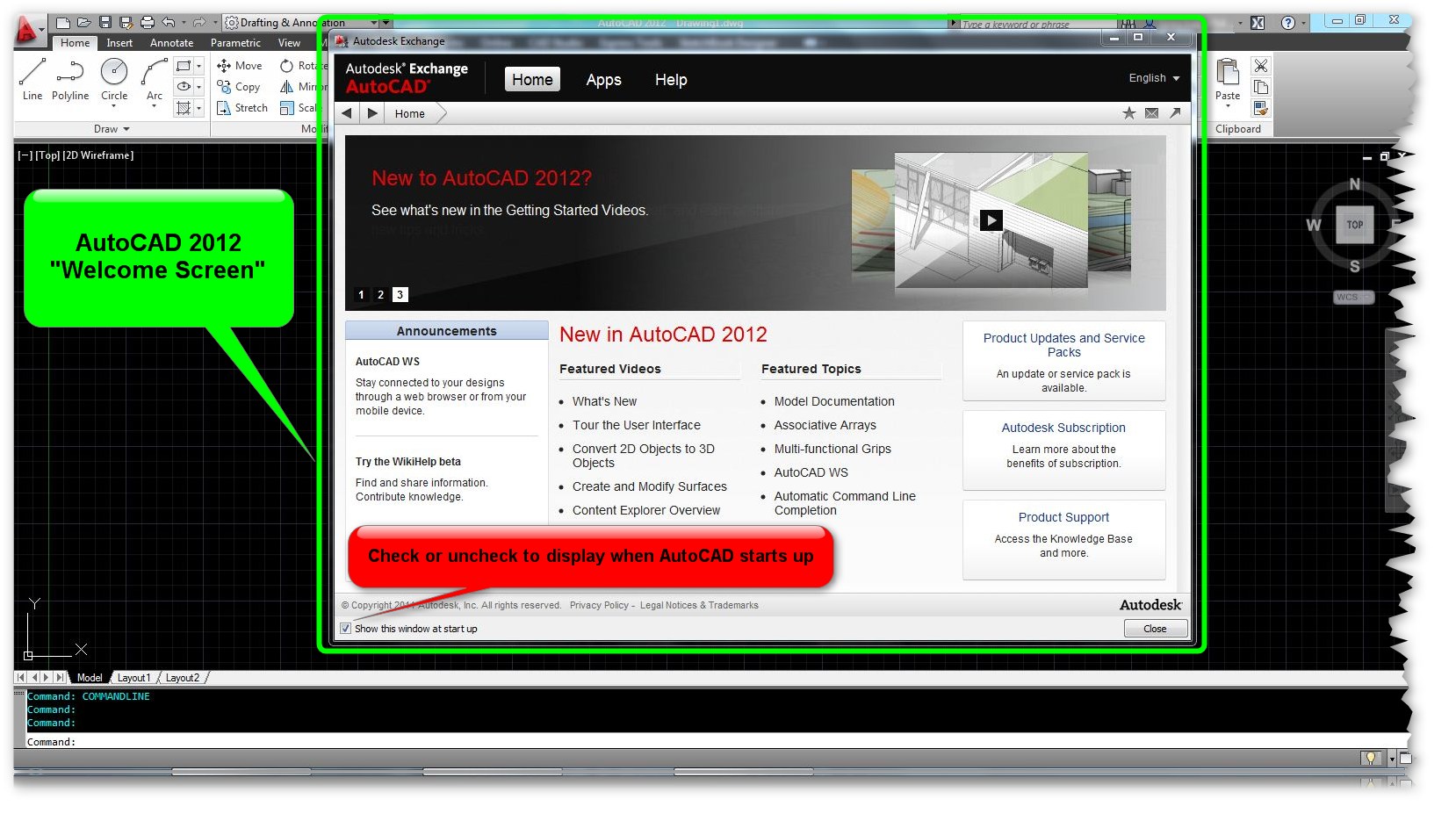
The Welcome Screen for 2012 is integrated into the “Help” menu. So use any of the following methods to open the help menu:

  • F1
  • HELP <enter> or click the help button or “info center” button (exchange button)
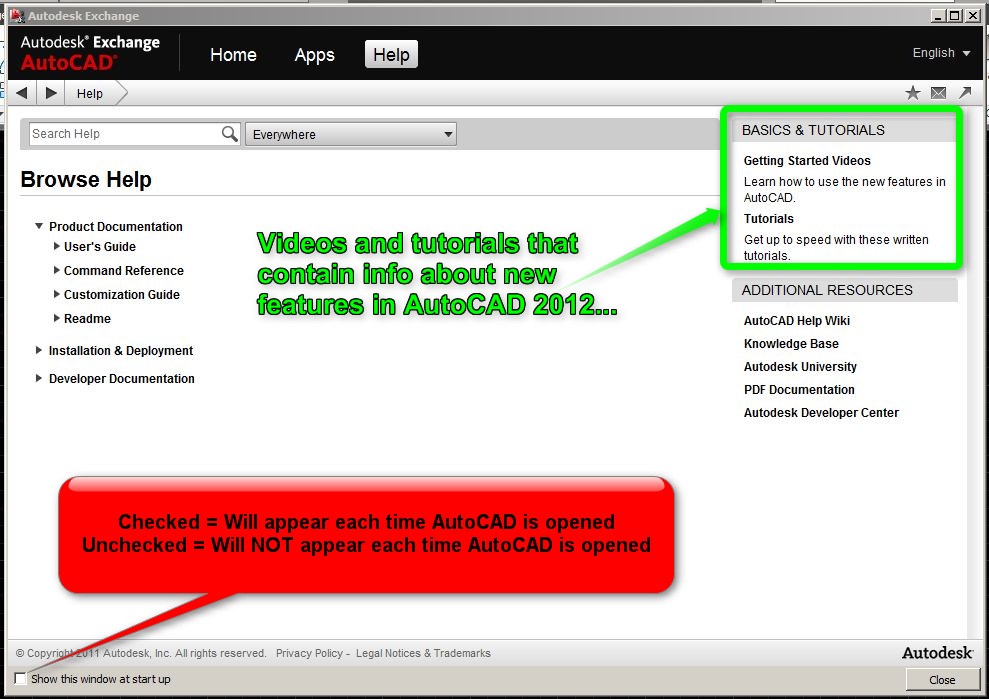
  • Check the box in the lower corner of  Help menu in order to see the default “Welcome screen” the next time you open AutoCAD 2012. Otherwise, the same content is available in the upper right area of the help menu

(Picture below: Help menu in 2012)

(Picture below: How the default 2012 “Welcome Screen” appears)

Posted in BASICS, New in 2011, New in 2012, Settling In, TIPS | 2 Comments

AutoLISP: Remove Binding Prefixes from XREFs

After you have bound an XREF to a drawing you know the nastiness that comes into your drawing – Layers, Blocks and styles now a have a prefix added to the front of their names.

This routine (I wish I knew who to give credit to…) removes these prefixes from a number of objects/entities after you have bound them to your drawing. These objects include:

  • Layers
  • Blocks
  • Styles (various, text dimensions…)
  • UCS
  • Saved Views

Here’s how:

After using the BIND command to bind an XREF

  • RBP <enter> to start Remove Bind Prefixes

That’s it…

~enjoy

(defun c:RBP(/ ActDoc Name NewName)

; RemoveBindPrefixes

; Renames layers, blocks, dimension styles, text styles, user coordinate systems, and views

; by taking out the bind as bind prefix

; Example Drawing1$0$Layer1 -> Layer1

(vl-load-com)

(defun RemoveBindPrefix (String / Pos LastPos)

(if (setq Pos (vl-string-search "$" String))

(progn

(setq LastPos Pos)

(while (setq Pos (vl-string-search "$" String (1+ Pos)))

(setq LastPos Pos)

)

(substr String (+ 2 LastPos))

)

String

)

)

;---------------------------------------------------------

(setq ActDoc (vla-get-ActiveDocument (vlax-get-Acad-Object)))

(vlax-for Obj (vla-get-Layers ActDoc)

(setq Name (vla-get-Name Obj))

(if (/= (setq NewName (RemoveBindPrefix Name)) Name)

(if (vl-catch-all-error-p (vl-catch-all-apply 'vla-put-Name (list Obj NewName)))

(prompt (strcat "\n Layer: " Name " was not renamed."))

)

)

)

(vlax-for Obj (vla-get-Blocks ActDoc)

(setq Name (vla-get-Name Obj))

(if (/= (setq NewName (RemoveBindPrefix Name)) Name)

(if (vl-catch-all-error-p (vl-catch-all-apply 'vla-put-Name (list Obj NewName)))

(prompt (strcat "\n Block: " Name " was not renamed."))

)

)

)

(vlax-for Obj (vla-get-TextStyles ActDoc)

(setq Name (vla-get-Name Obj))

(if (/= (setq NewName (RemoveBindPrefix Name)) Name)

(if (vl-catch-all-error-p (vl-catch-all-apply 'vla-put-Name (list Obj NewName)))

(prompt (strcat "\n Text style: " Name " was not renamed."))

)

)

)

(vlax-for Obj (vla-get-Views ActDoc)

(setq Name (vla-get-Name Obj))

(if (/= (setq NewName (RemoveBindPrefix Name)) Name)

(if (vl-catch-all-error-p (vl-catch-all-apply 'vla-put-Name (list Obj NewName)))

(prompt (strcat "\n View: " Name " was not renamed."))

)

)

)

(vlax-for Obj (vla-get-UserCoordinateSystems ActDoc)

(setq Name (vla-get-Name Obj))

(if (/= (setq NewName (RemoveBindPrefix Name)) Name)

(if (vl-catch-all-error-p (vl-catch-all-apply 'vla-put-Name (list Obj NewName)))

(prompt (strcat "\n UCS: " Name " was not renamed."))

)

)

)

(vlax-for Obj (vla-get-DimStyles ActDoc)

(setq Name (vla-get-Name Obj))

(if (/= (setq NewName (RemoveBindPrefix Name)) Name)

(if (vl-catch-all-error-p (vl-catch-all-apply 'vla-put-Name (list Obj NewName)))

(prompt (strcat "\n Dimension style: " Name " was not renamed."))

)

)

)

(princ)

)
Posted in AutoLISP, Blocks, Layers, Modifying, Text, TIPS, XREFs | 4 Comments

AutoLISP: Perpendicular to Entity

Here’s a handy routine that lets you draw many perpendicular lines to any type of object. This can be done manually by using the perpendicular Osnap, but this routine lets you do this quickly.

Very handy for curved objects. As seen in the picture below, I used Splines, Polylines and an arc. One draw back is that the LISP routine looks for the closest part of the selected object.

Here’s how:

  • PERP2ENT <enter> to start
  • Select the object that you want the lines to be drawn to
  • Pick points where you want the line drawn from

;; by sinc @ the Swamp 07/22/2004
;; Repeatedly draws a line from a pick point perpendicular
;; to a selected object
(defun c:perp2ent (/ entity pt)
(while (setq entity (car (entsel "\nSelect entity: ")))
(while
(setq pt (getpoint "\nSelect point to draw perpendicular from: "))
(entmake (list '(0 . "LINE") (cons 10 (trans pt 1 0))
(cons 11 (vlax-curve-getClosestPointTo entity (trans pt 1 0)))) ;_ list
) ;_ entmake
) ;_ while
) ;_ while
(princ)
) ;_ defun
Posted in AutoLISP, Polylines, TIPS | Leave a comment

AutoLISP: Spline Split

I don’t know how useful this routine is – but it is still pretty cool.

Someone requested it for a landscaping project and Lee-Mac came to the rescue.

What it does – Lets you draw a spline that intersects itself and then after placing the spline, offset the spline on both sides and trim out the intersections and erase the middle (original spline).

Here’s how:

  • SPLIT <enter> to start
  • Draw spline that intersects itself
  • Specify the offset distance

;LEE-MAC

(defun c:Split ( / d e ) (vl-load-com)

(setq e (entlast))

(command "_.spline")

(while (= 1 (boole 1 1 (getvar 'CMDACTIVE))) (command pause))

(if

(and

(not (equal e (setq e (entlast))))

(setq d (getdist "\nSpecify Offset: "))

)

(progn

(setq e (vlax-ename->vla-object e))

(vlax-invoke e 'offset d)

(vlax-invoke e 'offset (- d))

(vla-delete e)

)

)

(princ)

)
Posted in AutoLISP, Modifying, TIPS | 2 Comments

AutoLISP: Make and Save Custom Hatch Pattern

This Routine has been featured on Cadalyst’s website and is very handy. If you have ever wondered how to make a custom hatch pattern and then looked at the coding that is required, you will really appreciate this routine. The only drawback that I have come across is that it will only accept line and point entities… This can be over come by drawing your curved objects and then using other LISP routines to convert arcs and circles to line entities. Or use the “SEGS” LISP routine to convert the curved objects to polylines and then explode the polyline. This will turn the polyline segments into line segments.

There are 2 commands:

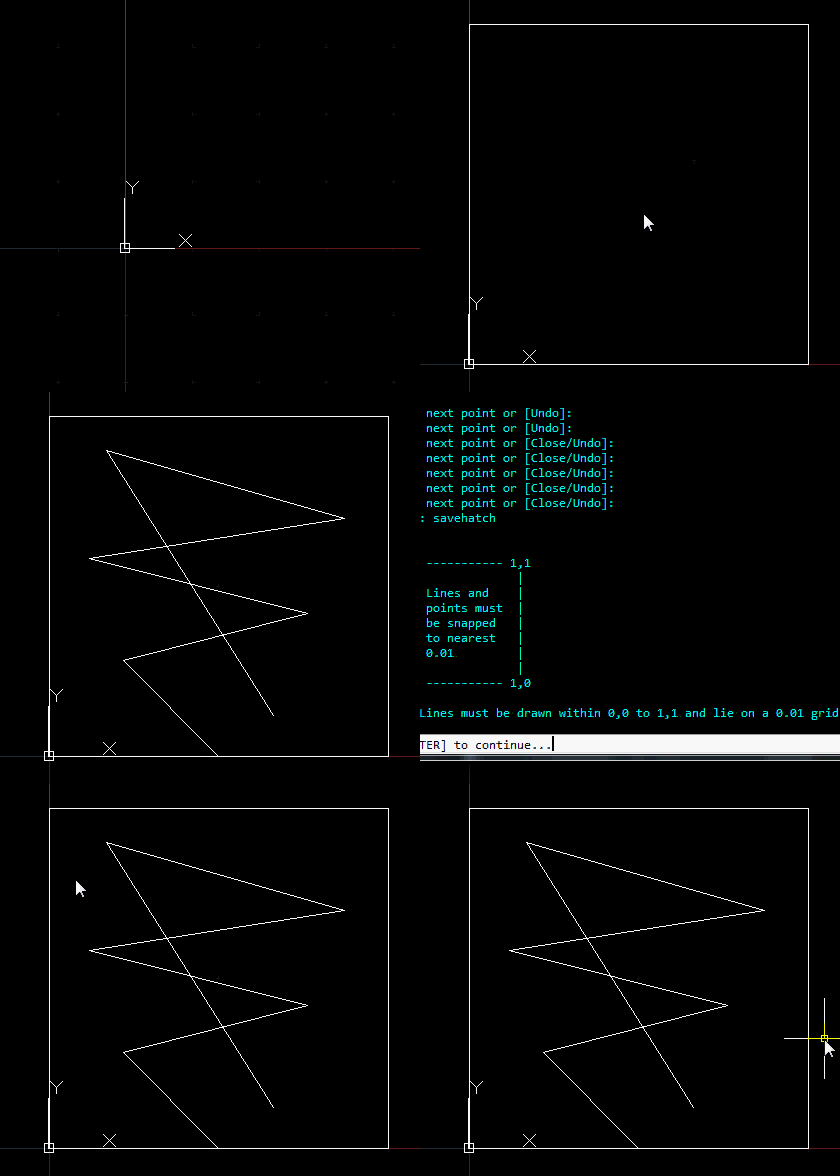
1) DRAWHATCH <enter> creates a 1X1 square in which you draw your custom hatch pattern

After you have drawn your hatch pattern:

2) SAVEHATCH <enter> lets you name your hatch Pattern and save it as a .pat file.

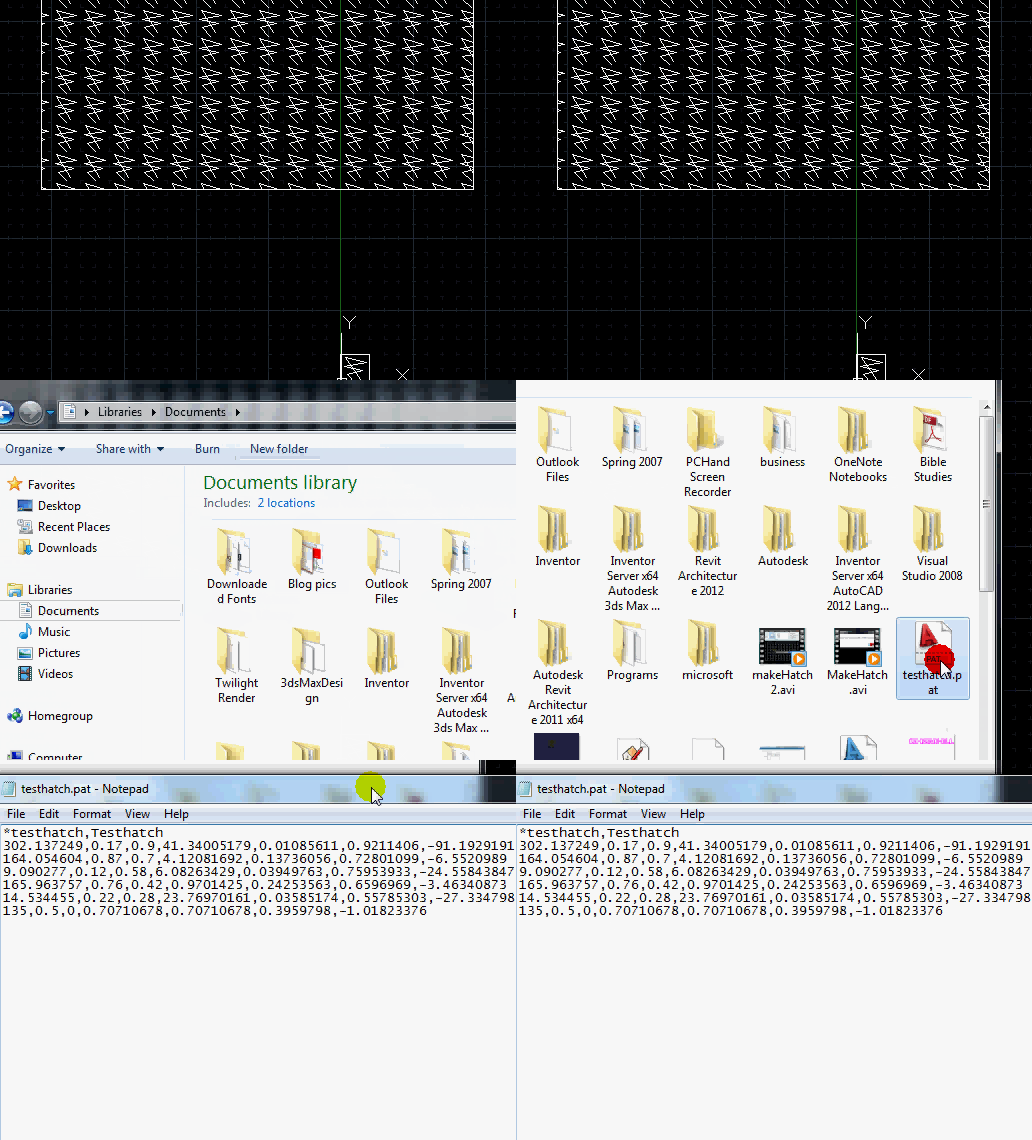
Saving the .pat file (hatch pattern) allows you to copy the contents and save it in your support file or even add it to your acad.pat file where all of your default patterns are stored.

Picture below: DRAWHATCH & SAVEHATCH in action
Picture below: Applying the newly created hatch

Picture below: Opening the .pat file created by the SAVEHATCH command

;;;CADALYST 10/05 Tip 2065: HatchMaker.lsp	Hatch Maker	(c) 2005 Larry Schiele

;;;* ======   B E G I N   C O D E   N O W    ======   
;;;* HatchMaker.lsp written by Lanny Schiele at TMI Systems Design Corporation
;;;* Lanny.Schiele@tmisystems.com
;;;* Tested on AutoCAD 2002 & 2006. -- does include a 'VL' function -- should work on Acad2000 on up.
 
(defun C:DrawHatch (/)
  (command "undo" "be")
  (setq os (getvar "OSMODE"))
  (setvar "OSMODE" 0)
  (command "UCS" "w")
  (command "PLINE" "0,0" "0,1" "1,1" "1,0" "c")
  (command "zoom" "c" "0.5,0.5" 1.1)
  (setvar "OSMODE" os)
  (setvar "SNAPMODE" 1)
  (setvar "SNAPUNIT" (list 0.01 0.01))
  (command "undo" "e")
  (alert
    "Draw pattern within 1x1 box using LINE or POINT entities only..."
  )
  (princ)
)
 
(defun C:SaveHatch (/      round    dxf      ListToFile
      user     SelSet   SelSetSize ssNth
      Ent      EntInfo  EntType  pt1 pt2
      Dist     AngTo    AngFrom  XDir YDir
      Gap      DeltaX   DeltaY   AngZone Counter
      Ratio    Factor   HatchName  HatchDescr
      FileLines       FileLines  FileName
      Scaler   ScaledX  ScaledY  RF x
      y      h       _AB      _BC _AC
      _AD      _DE      _EF      _EH _FH
      DimZin
     )
;;;* BEGIN NESTED FUNCTIONS
 
  (defun round (num)
    (if (>= (- num (fix num)) 0.5)
      (fix (1+ num))
      (fix num)
    )
  )
 
  (defun dxf (code EnameOrElist / VarType)
    (setq VarType (type EnameOrElist))
    (if (= VarType (read "ENAME"))
      (cdr (assoc code (entget EnameOrElist)))
      (cdr (assoc code EnameOrElist))
    )
  )
 

  (defun ListToFile (TextList    FileName  DoOpenWithNotepad
       AsAppend    /   TextItem
       File    RetVal
      )
    (if (setq File (open FileName
    (if AsAppend
      "a"
      "w"
    )
     )
 )
      (progn
 (foreach TextItem TextList
   (write-line TextItem File)
 )
 (setq File (close File))
 (if DoOpenWithNotepad
   (startapp "notepad" FileName)
 )
      )
    )
    (FindFile FileName)
  )
 
;;;* END NESTED FUNCTIONS
  
  (princ
    (strcat
      "\n."
      "\n    0,1 ----------- 1,1"
      "\n     |               | "
      "\n     |  Lines and    | "
      "\n     |  points must  | "
      "\n     |  be snapped   | "
      "\n     |  to nearest   | "
      "\n     |  0.01         | "
      "\n     |               | "
      "\n    0,0 ----------- 1,0"
      "\n."
      "\nNote:  Lines must be drawn within 0,0 to 1,1 and lie on a 0.01 grid."
     )
  )
  (textscr)
  (getstring "\nHit [ENTER] to continue...")
 
  (princ
    "\nSelect 1x1 pattern of lines and/or points for new hatch pattern..."
  )
  (while (not (setq SelSet (ssget (list (cons 0 "LINE,POINT")))))
  )
  (setq ssNth    0
 SelSetSize (sslength SelSet)
 DimZin    (getvar "DIMZIN")
  )
  (setvar "DIMZIN" 11)
  (if (> SelSetSize 0)
    (princ "\nAnalyaing entities...")
  )
  (while (< ssNth SelSetSize)
    (setq Ent   (ssname SelSet ssNth)
   EntInfo (entget Ent)
   EntType (dxf 0 EntInfo)
   ssNth   (+ ssNth 1)
    )
    (cond
      ((= EntType "POINT")
       (setq pt1      (dxf 10 EntInfo)
      FileLine (strcat "0,"
         (rtos (car pt1) 2 6)
         ","
         (rtos (cadr pt1) 2 6)
         ",0,1,0,-1"
        )
       )
       (princ (strcat "\n" FileLine))
       (setq FileLines (cons FileLine FileLines))
      )
      ((= EntType "LINE")
       (setq pt1     (dxf 10 EntInfo)
      pt2     (dxf 11 EntInfo)
      Dist    (distance pt1 pt2)
      AngTo   (angle pt1 pt2)
      AngFrom (angle pt2 pt1)
      IsValid nil
       )
       (if
  (or (equal (car pt1) (car pt2) 0.0001)
      (equal (cadr pt1) (cadr pt2) 0.0001)
  )
   (setq DeltaX 0
  DeltaY 1
  Gap (- Dist 1)
  IsValid T
   )
   (progn
     (setq Ang   (if (< AngTo pi)
       AngTo
       AngFrom
     )
    AngZone (fix (/ Ang (/ pi 4)))
    XDir   (abs (- (car pt2) (car pt1)))
    YDir   (abs (- (cadr pt2) (cadr pt1)))
    Factor  1
    RF   1
     )
     (cond
       ((= AngZone 0)
        (setq DeltaY (abs (sin Ang))
       DeltaX (abs (- (abs (/ 1.0 (sin Ang))) (abs (cos Ang)))
       )
        )
       )
       ((= AngZone 1)
        (setq DeltaY (abs (cos Ang))
       DeltaX (abs (sin Ang))
        )
       )
       ((= AngZone 2)
        (setq DeltaY (abs (cos Ang))
       DeltaX (abs (- (abs (/ 1.0 (cos Ang))) (abs (sin Ang)))
       )
        )
       )
       ((= AngZone 3)
        (setq DeltaY (abs (sin Ang))
       DeltaX (abs (cos Ang))
        )
       )
     )
     (if (not (equal XDir YDir 0.001))
       (progn
  (setq Ratio  (if (< XDir YDir)
          (/ YDir XDir)
          (/ XDir YDir)
        )
        RF     (* Ratio Factor)
        Scaler (/ 1
    (if (< XDir YDir)
      XDir
      YDir
    )
        )
  )
  (if (not (equal Ratio (round Ratio) 0.001))
    (progn
      (while
        (and
   (<= Factor 100)
   (not (equal RF (round RF) 0.001))
        )
         (setq Factor (+ Factor 1)
        RF     (* Ratio Factor)
         )
      )
      (if (and (> Factor 1) (<= Factor 100))
        (progn
   (setq _AB (* XDir Scaler Factor)
         _BC (* YDir Scaler Factor)
         _AC (sqrt (+ (* _AB _AB) (* _BC _BC)))
         _EF 1
         x   1
   )
   (while (< x (- _AB 0.5))
     (setq y (* x (/ YDir XDir))
    h (if (< Ang (/ pi 2))
        (- (+ 1 (fix y)) y)
        (- y (fix y))
      )
     )
     (if (< h _EF)
       (setq _AD x
      _DE y
      _AE (sqrt (+ (* x x) (* y y)))
      _EF h
       )
     )
     (setq x (+ x 1))
   )
   (if (< _EF 1)
     (setq _EH (/ (* _BC _EF) _AC)
    _FH (/ (* _AB _EF) _AC)
    DeltaX (+ _AE
        (if (> Ang (/ pi 2))
          (- _EH)
          _EH
        )
     )
    DeltaY (+ _FH)
    Gap (- Dist _AC)
    IsValid T
     )
   )
        )
      )
    )
  )
       )
     )
     (if (= Factor 1)
       (setq Gap     (- Dist (abs (* Factor (/ 1 DeltaY))))
      IsValid T
       )
     )
   )
       )
       (if
  IsValid
   (progn
     (setq FileLine
     (strcat
       (angtos AngTo 0 6)
       ","
       (rtos (car pt1) 2 8)
       ","
       (rtos (cadr pt1) 2 8)
       ","
       (rtos DeltaX 2 8)
       ","
       (rtos DeltaY 2 8)
       ","
       (rtos Dist 2 8)
       ","
       (rtos Gap 2 8)
     )
     )
     (princ (strcat "\n" FileLine))
     (setq FileLines (cons FileLine FileLines))
   )
   (princ (strcat "\n * * *  Line with invalid angle "
    (angtos AngTo 0 6)
    (chr 186)
    " omitted.  * * *"
   )
   )
       )
      )
      ((princ
  (strcat "\n * * *  Invalid entity " EntType " omitted.")
       )
      )
    )
  )
  (setvar "DIMZIN" DimZin)
  (if
    (and
      FileLines
      (setq HatchDescr
      (getstring T
   "\nBriefly describe this hatch pattern: "
      )
      )
      (setq FileName (getfiled "Hatch Pattern File"
          "I:\\Acad\\Hatch\\"
          "pat"
          1
       )
      )
    )
     (progn
       (if (= HatchDescr "")
  (setq HatchDescr "Custom hatch pattern")
       )
       (setq HatchName (vl-filename-base FileName)
      FileLines (cons (strcat "*" HatchName "," HatchDescr)
        (reverse FileLines)
         )
       )
       (princ
  "\n============================================================"
       )
       (princ
  (strcat "\nPlease wait while the hatch file is created...\n"
  )
       )
       (ListToFile FileLines FileName nil nil)
       (command "delay" 1500)  ;delay required so file can be created and found (silly, but req.)
       (if (findfile FileName)
  (progn
    (setvar "HPNAME" HatchName)
    (princ (strcat "\nHatch pattern '"
     HatchName
     "' is ready to use!"
    )
    )
  )
  (progn
    (princ "\nUnable to create hatch pattern file:")
    (princ (strcat "\n  " FileName))
  )
       )
     )
     (princ
       (if FileLines
  "\nCancelled."
  "\nUnable to create hatch pattern from selected entities."
       )
     )
  )
  (princ)
)
 
(princ "\n ************************************************************** ")
(princ "\n**                                                            **")
(princ "\n*  HatchMaker.lsp written by Lanny Schiele -- enjoy!           *")
(princ "\n*                                                              *")
(princ "\n*  Type in DRAWHATCH to have the environment created to draw.  *")
(princ "\n*  Type in SAVEHATCH to save the pattern you created.          *")
(princ "\n**                                                            **")
(princ "\n ************************************************************** ")
(princ)
Posted in AutoLISP, Customization, Hatch, TIPS | 47 Comments

AutoLISP: Break Polyline Segments

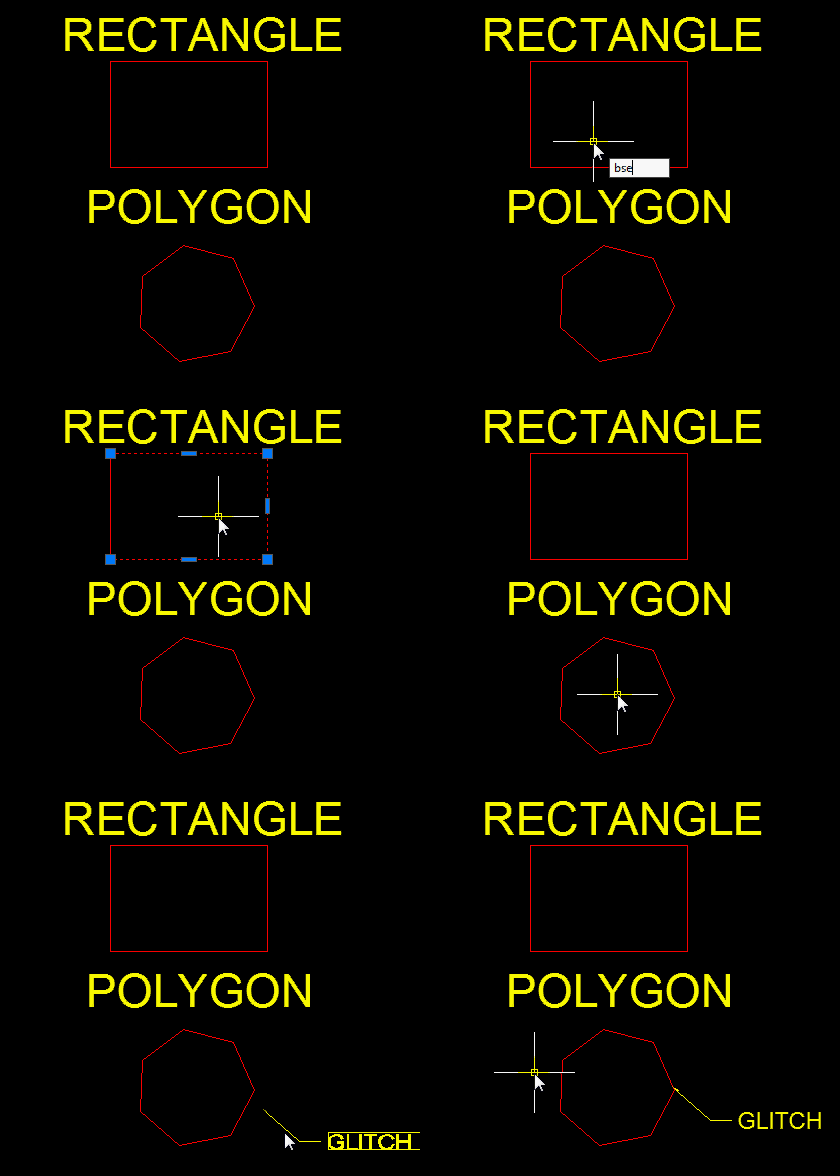
Here’s a great routine that lets you break a polyline segment. Simply select the segment that you want to be a separate polyline entity from the ones that it was initially created with. This routine works on closed polylines line rectangles… But there is one glitch that I have found. When used on polygons, it creates an extra break.

Here’s how to use it:

  • BSEG <enter> to start
  • Select the segment on a polyline to break
  • That’s it

Below is an example of the routine used on a polyline

Below is an example of the routine used on closed polylines and a polygon

(defun c:BSeg (/ *error* AT:GetSel _isLocked ent seg)

;; Break polyline Segment

;; Alan J. Thompson, 06.16.11

(vl-load-com)

(defun *error* (msg)

(and *AcadDoc* (vla-endundomark *AcadDoc*))

(if (and msg (not (wcmatch (strcase msg) "*BREAK*,*CANCEL*,*QUIT*,")))

(princ (strcat "\nError: " msg))

)

)

(defun AT:GetSel (meth msg fnc / ent)

;; meth - selection method (entsel, nentsel, nentselp)

;; msg - message to display (nil for default)

;; fnc - optional function to apply to selected object

;; Ex: (AT:GetSel entsel "\nSelect arc: " (lambda (x) (eq (cdr (assoc 0 (entget (car x)))) "ARC")))

;; Alan J. Thompson, 05.25.10

(setvar 'ERRNO 0)

(while

(progn (setq ent (meth (cond (msg)

("\nSelect object: ")

)

)

)

(cond ((eq (getvar 'ERRNO) 7) (princ "\nMissed, try again."))

((eq (type (car ent)) 'ENAME)

(if (and fnc (not (fnc ent)))

(princ "\nInvalid object!")

)

)

)

)

)

ent

)

(defun _isUnLocked (layer) (/= 4 (logand 4 (cdr (assoc 70 (entget (tblobjname "LAYER" layer)))))))

(vla-startundomark

(cond (*AcadDoc*)

((setq *AcadDoc* (vla-get-activedocument (vlax-get-acad-object))))

)

)

(if (setq ent

(car (AT:GetSel entsel

"\nSelect polyline segment to break: "

(lambda (x / d p)

(if (and (_isUnLocked (cdr (assoc 8 (setq d (entget (car x))))))

(wcmatch (cdr (assoc 0 d)) "*POLYLINE")

(>= (cdr (assoc 90 d)) 3)

)

(setq seg (list (trans (vlax-curve-getPointAtParam

(car x)

(setq p (fix (vlax-curve-getParamAtPoint

(car x)

(vlax-curve-getClosestPointTo

(car x)

(trans (cadr x) 1 0)

)

)

)

)

)

0

1

)

(trans (cond ((vlax-curve-getPointAtParam (car x) (1+ p)))

((vlax-curve-getPointAtParam (car x) (1- p)))

)

0

1

)

)

)

)

)

)

)

)

(progn (vl-cmdf "_.break" ent "_F" "_non" (car seg) "_non" (car seg))

(vl-cmdf "_.break" (entlast) "_F" "_non" (cadr seg) "_non" (cadr seg))

)

)

(*error* nil)

(princ)

)
Posted in AutoLISP, Modifying, Polylines | 2 Comments