AutoLISP: Capital Text – Choose Some Not All

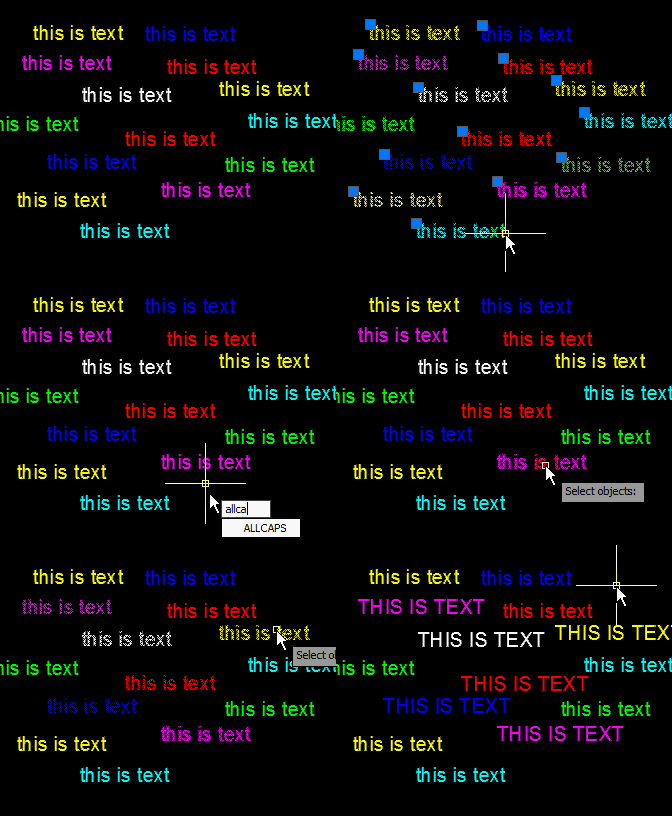
This routine is great because not every text object in a drawing needs to be capitalized and this routine lets you simply select the text objects that you want to be capitalized.

It’s that simple…

BTW – it works with DTEXT as well as MTEXT

Here’s how:

  • ALLCAPS <enter> to start
  • Select text objects that are to be capitalized
  • <enter> when finished selecting objects


;|

;************************************************************

;ALLCAPS.LSP - (c) 1997-2001 Tee Square Graphics

;

;Converts selected text strings to all upper case characters.

; Written 08/21/97 for F&K Engineers.

; Updated 04/01/98 for AutoCAD R14.

; Modified 02/15/99 - minor improvements.

; Removed extra leading ";" from posted version 12/4/01.

;************************************************************

;|;

(defun C:ALLCAPS (/ cmd ss n txt strg)

(command "_.undo" "_be")

(setq cmd (getvar "cmdecho"))

(prompt "\nSelect Text String(s) to modify: ")

(setq ss (ssget '((0 . "TEXT,MTEXT")))

n (sslength ss)) ; Count items.

(while (> n 0) ; While more to do,

(setq n (1- n) ; decrement count,

txt (entget (ssname ss n)) ; get entity,

strg (strcase (cdr (assoc 1 txt))) ; force to caps,

txt (subst (cons 1 strg)(assoc 1 txt) txt)) ; update entity,

(entmod txt)) ; change in dwg.

(setvar "cmdecho" cmd)

(command "_.undo" "_e")

(princ) ; Done!

)

;(alert (strcat

; "** ALLCAPS.LSP - (c) 1997-2001 Tee Square Graphics **\n\n"

; "Type ALLCAPS at the AutoCAD Command: line to start."))

;(princ)


Posted in AutoLISP, Modifying, Text, TIPS | Leave a comment

AutoLISP: Polar Array

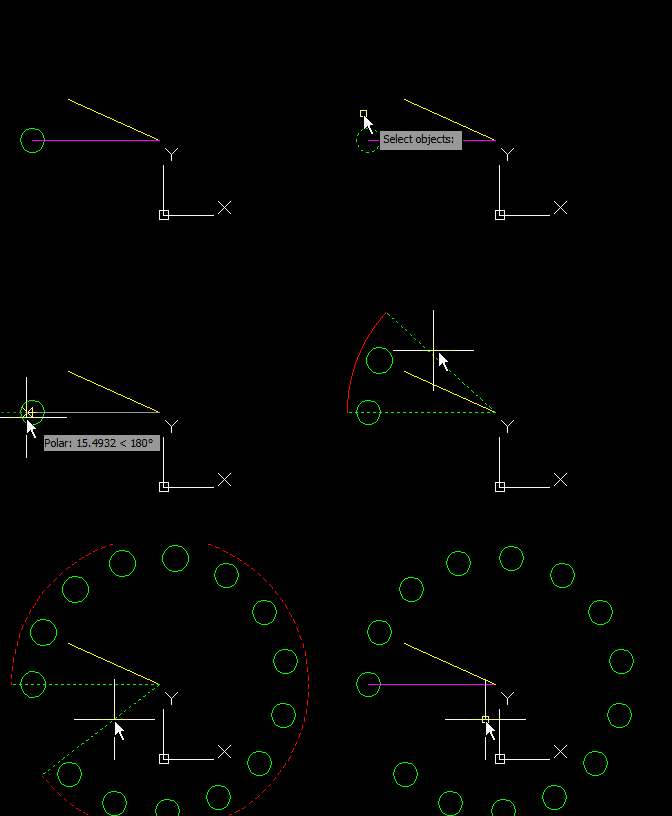
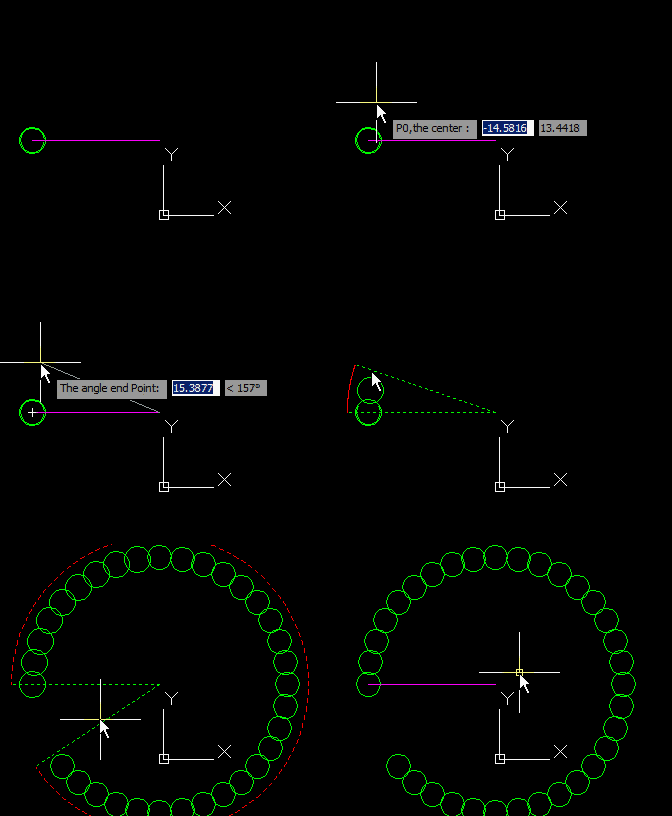
I recently posted some alternatives to the new ARRAY commands that are in AutoCAD 2012 and forgot to post this one. It allows you to create a polar array.

Here’s How:

  • POLAR <enter> to start
  • Select Objects <enter> when done selecting
  • Specify the center point of the rotation
  • Specify the start point of the rotation
  • Specify the rotation angle: 2 ways shown
    • 1) With Dynamic Input enabled, I hit the TAB button on the keyboard and specify the angle degree
    • 2) Create a line the specifies the desired angle.

After you have made the Polar Array and like the results, do a REGEN (RE <enter>) to regenerate the model and get rid of the temporary dashed lines that were created while running the command.
;;; ========================================================================

;;; the following code are writen by CHEN QING JUN ;

;;; Civil engineering Department, South China University of Technology ;

;;; Purpose: To dynamic copy Object in polar ;

;;; Version v 1.0 2011.03.16 ;

;;; Http://chenqj.blogspot.com ;

;;; ========================================================================

;;; =======================================================================;

;;; The main function ;

;;; =======================================================================;

(vl-load-com)

(defun c:polar( / ang angnow gr oang p0 px px1 ss ss1)

(setq ss (std-sslist (ssget))

p0 (getpoint "\nP0,the center :") px (getpoint p0 "\nThe angle start Point:")

px1 (getpoint p0 "\nThe angle end Point:")

ang (- (angle p0 px1)(setq oang (angle p0 px)))

)

(prompt "\nThe rotation point:")

(while (= (car (setq gr (grread nil 5 0))) 5)

(if ss1 (mapcar 'vla-delete ss1))

(redraw)

(setq angnow (- (angle p0 (cadr gr)) oang))

(if (and (< ang 0)(> angnow 0)) (setq angnow (- angnow (* 2 pi))))

(if (and (> ang 0)(< angnow 0)) (setq angnow (+ (* 2 pi) angnow)))

(setq ss1 (q:ss:dyngenpolar ss (fix (/ angnow ang)) p0 ang))

(q:grdraw:arc p0 (/ (getvar "viewsize") 4.0) oang angnow)

)

(princ)

)

;;; =======================================================================;

;;; by qjchen, grdraw circle arc ;

;;; =======================================================================;

(defun q:grdraw:arc(cen r ang angadd / angdiv n)

(grdraw cen (polar cen ang r) 3 1)

(grdraw cen (polar cen (+ ang angadd) r) 3 1)

(setq n 100 angdiv (/ angadd n))

(repeat n

(grdraw (polar cen ang r)(polar cen (setq ang (+ ang angdiv)) r) 1 1)

)

)

;;; =======================================================================;

;;; by qjchen, copy ss according to the direction and vector ;

;;; =======================================================================;

(defun q:ss:dyngenpolar (sslst n cen ang / i obj1 ss xobj)

(setq ss nil)

(foreach x sslst

(setq xobj (vlax-ename->vla-object x) i 1)

(repeat n

(setq ss (cons (setq obj1 (vla-copy xobj)) ss))

(Vla-rotate obj1 (vlax-3d-point cen) (* ang i))

(setq i (1+ i))

)

)

ss

)

;;; =======================================================================;

;;; selection to list, by Reini Urban ;

;;; =======================================================================;

(defun std-sslist (ss / n lst)

(if (eq 'pickset (type ss))

(repeat (setq n (fix (sslength ss))) ; fixed

(setq lst (cons (ssname ss (setq n (1- n))) lst))))

)

(princ "by qjchen@gmail.com, To dynamic rotate copy object, the command is Test")
Posted in AutoLISP, Modifying, TIPS | Leave a comment

AutoLISP: Making a PolyLine Spiral

I found this thinking that someday I would need it. So now I share it with you in case you too need it. After all without it, how else can you easily make a spiral in AutoCAD?

This routine is from 1985 and shows that old AutoLISP routines still work after a 26 years.

Here’s how it works:

  • SPIRAL <enter> to start
  • Specify center point of the spiral
  • Specify # of rotations
  • Specify the spacing between the rotations
  • Specify how many polyline segments in each rotation (the more segments, the rounder the polyline will appear)

; This is a programming example.

;

; Designed and implemented by Kelvin R. Throop in January 1985

;

; This program constructs a spiral. It can be loaded and called

; by typing either "spiral" or the following:

; (cspiral <# rotations> <base point> <growth per rotation>

; <points per circle>).

;

(defun cspiral (ntimes bpoint cfac lppass / ang dist tp ainc dinc circle bs cs)

(setq cs (getvar "cmdecho")) ; save old cmdecho and blipmode

(setq bs (getvar "blipmode"))

(setvar "blipmode" 0) ; turn blipmode off

(setvar "cmdecho" 0) ; turn cmdecho off

(setq circle (* 3.141596235 2))

(setq ainc (/ circle lppass))

(setq dinc (/ cfac lppass))

(setq ang 0.0)

(setq dist 0.0)

(command "pline" bpoint) ; start spiral from base point and...

(repeat ntimes

(repeat lppass

(setq tp (polar bpoint (setq ang (+ ang ainc))

(setq dist (+ dist dinc))))

(command tp) ; continue to the next point...

)

)

(command) ; until done.

(setvar "blipmode" bs) ; restore saved blipmode

(setvar "cmdecho" cs) ; restore saved cmdecho

nil

)

;

; Interactive spiral generation

;

(defun C:SPIRAL ( / nt bp cf lp)

(initget 1) ; bp must not be null

(setq bp (getpoint "\nCenter point: "))

(initget 7) ; nt must not be zero, neg, or null

(setq nt (getint "\nNumber of rotations: "))

(initget 3) ; cf must not be zero, or null

(setq cf (getdist "\nGrowth per rotation: "))

(initget 6) ; lp must not be zero or neg

(setq lp (getint "\nPoints per rotation <30>: "))

(cond ((null lp) (setq lp 30)))

(cspiral nt bp cf lp)

)

Posted in AutoLISP, Polylines, TIPS | 2 Comments

Using Burst To Explode a Block

I ran into a problem today and thought that I’d share it here because I found a solution.

I have a dynamic block of a door that I needed to explode and then trim. But every time I tried to explode it using the EXPLODE command, the block would disappear. I was able to successfully explode the block by using the BURST command. Even though this command is meant for blocks with attributes, it worked perfect for this problem. So if you run into this problem as well, use BURST.

(Note: The BURST command is an “Express Tool” so it is not available in AutoCAD LT)


Posted in Blocks, Express Tools, Modifying, TIPS | 1 Comment

AutoLISP: Add a QRCODE To Your Drawing

Lately, these high tech barcodes called “qrcodes” are becoming very popular. With certain cell phone apps, you can take a picture with your smart phone and the phone will quickly process the qrcode and can direct you to a website or present text.

I don’t care much for the novelty of these codes. But what I think can be useful about them is that they can be a way to insert a “secret signature” into your drawing to protect your drawing. You can insert your name or website, without overtly inserting text throughout your drawing.

Here’s How:

  • QRCODE <enter> to start
  • Enter text or a website address to be hidden within the code
  • <enter> when finished entering text.
  • Click to specify insertion point for the QRCODE  as a block

The QRCODE is inserted as a block so the following questions are typical questions concerning blocks.

  • Specify the X scale factor – Default is 1 so I just accept this <enter>
  • Specify the Y scale factor – Default is 1 so I also accept this <enter>
  • Specify “Rotation Angle” – Default is 0 so I also also accept this <enter>
;*********************************************************************************

; QRCODE for Autocad

; © 2010 swisscad / Ian Vogel

; V 0.91 released 2010.08.22

;*********************************************************************************

(defun c:QRcode ( / str)

(cond

((not (validstr (setq str (getstring "\nEnter Text to encode :" T))))

(princ "\nNo text entered")

)

((QRcode str (setq name "QRCode") 0)

(command "_REGENALL")

(command "_INSERT" name)

)

)

(princ)

)

(defun QRcode (string ; string to encode

blockname ; name of the block to create

options ; options

; 1 = perform only if block already exists

/ QR x y startx row)

(vl-load-com)

(cond

((not (validstr blockname)))

((or (zerop (logand 1 options))

(tblsearch "BLOCK" blockname)

)

(setq baseurl "www.xcad.ch/tests/getqrcode.php")

(setq QR (valstr (gethttp (strcat baseurl"%3Fstring=" (urlencode(urlencode string))) 0)))

(cond

((eq (substr QR 1 6) "111111");response OK

(setq QR (split QR "-")

y 0)

;create Qrcode block

(entmake (list '(0 . "BLOCK")

(cons 2 blockname)

'(8 . "0")

'(70 . 0)

'(10 0.0 0.0 0.0)

)

)

(foreach row QR

(setq x 0)

(while (< x (strlen row))

(cond

((eq (substr row (1+ x) 1) "1")

;memorize start of filled zone

(if (not startx)(setq startx x))

(if (not (eq (substr row (+ x 2) 1) "1"))

(progn

;draw filled zone

(entmake (list (cons 0 "SOLID")

(cons 8 "0")

(cons 10 (list startx y))

(cons 11 (list (1+ x) y))

(cons 12 (list startx (1- y)))

(cons 13 (list (1+ x)(1- y)))

(cons 62 0)

)

)

(setq startx nil)

))

))

(setq x (1+ x))

)

(setq y (1- y))

)

;end of block

(setq bl_a (entmake '((0 . "ENDBLK"))))

)

)

T

))

)

;-------------------------------------------------------

; Get an URL

;-------------------------------------------------------

(defun gethttp (lien

opt

/ fi line tmp util content)

(setq util (vla-get-Utility

(vla-get-ActiveDocument (vlax-get-acad-object))

)

)

(if (eq (vla-isurl util lien) :vlax-true)

(if (vl-catch-all-error-p

(vl-catch-all-apply

'vla-GetRemoteFile

(list util lien 'tmp :vlax-true)

)

)

(princ "\nError getting http file.")

(progn

(setq fi (open tmp "r")

content "")

(while (setq line (read-line fi))

(setq content (strcat content line))

)

(close fi)

)

)

)

content

)

;-------------------------------------------------------

; Turn any var to a string

;-------------------------------------------------------

(defun valstr (val)

(cond

((eq (type val) 'STR) val)

((eq (type val) 'REAL) (rtos val))

((eq (type val) 'INT) (itoa val))

(T "")

))

;-------------------------------------------------------

; Check that a string is not empty

;-------------------------------------------------------

(defun validstr (str / tmp)

(if (> (strlen (setq tmp (trim (valstr str)))) 0) tmp nil)

)

;-------------------------------------------------------

; Remove blanks from a string

;-------------------------------------------------------

(defun trim ( str / )

(setq str (valstr str))

(while (eq (substr str 1 1) " ")

(setq str (substr str 2))

)

(while (and (> (strlen str) 1)

(eq (substr str (strlen str) 1) " ")

)

(setq str (substr str 1 (- (strlen str) 1)))

)

str

)

;-------------------------------------------------------

; Split a string

;-------------------------------------------------------

(defun split (str ; string to split

cara ; separator

/ n portion xstring seqstart chrcode portion)

(cond

((and (= (type str)(type cara) 'STR)(eq (strlen cara) 1))

(setq n -1 seqstart 1 chrcode (ascii cara))

(while (setq n (vl-string-position chrcode str (+ n 1) nil))

(setq xstring (append xstring (list (substr str seqstart (- n seqstart -1)))) seqstart (+ n 2) )

)

(setq xstring (append xstring (list (substr str seqstart))))

(if xstring xstring (list str))

)

((= (type str)(type cara) 'STR)

(setq portion "" n 1)

(if (<= (strlen cara) (strlen str))

(progn

(while (<= n (strlen str))

(if (eq (substr str n (strlen cara)) cara)

(setq xstring (append xstring (list portion))

portion ""

n (+ n (strlen cara))

)

(setq portion (strcat portion (substr str n 1))

n (+ 1 n)

)

)

)

(if (or (> (strlen portion) 0)

(eq (substr str (abs (- (strlen str)(strlen cara) -1))) cara)

)

(setq xstring (append xstring (list portion)))

)

)

(setq xstring (list str))

)

(if xstring xstring (list ""))

)

(T (list nil))

)

)

;----------------------------------------------------------

; See PHP function

; http://ch2.php.net/manual/fr/function.htmlentities.php

;----------------------------------------------------------

(defun urlencode (str / result n len )

(setq result ""

n 1

len (strlen str))

(while (<= n len)

(setq result (strcat result (urlenc (substr str n 1)))

n (+ 1 n))

)

result

)

(defun urlenc (ch)

(cond

((eq ch " ") " ");+

((eq ch "!") "%21")

((eq ch "\"") "%22")

((eq ch "#") "%23")

((eq ch "$") "%24")

((eq ch "%") "%25")

((eq ch "&") "%26")

((eq ch "'") "%27")

((eq ch "(") "%28")

((eq ch ")") "%29")

((eq ch "*") "%2A")

((eq ch "+") "%2B")

((eq ch ",") "%2C")

((eq ch "/") "%2F")

((eq ch ":") "%3A")

((eq ch ";") "%3B")

((eq ch "<") "%3C")

((eq ch "=") "%3D")

((eq ch ">") "%3E")

((eq ch "?") "%3F")

((eq ch "@") "%40")

((eq ch "[") "%5B")

((eq ch "\\") "%5C")

((eq ch "]") "%5D")

((eq ch "^") "%5E")

((eq ch "`") "%60")

((eq ch "{") "%7B")

((eq ch "|") "%7C")

((eq ch "}") "%7D")

((eq ch "~") "%7E")

((eq ch "‘") "%91")

((eq ch "’") "%92")

((eq ch "¡") "%A1")

((eq ch "¢") "%A2")

((eq ch "£") "%A3")

((eq ch "¤") "%A4")

((eq ch "¥") "%A5")

((eq ch "¦") "%A6")

((eq ch "§") "%A7")

((eq ch "¨") "%A8")

((eq ch "©") "%A9")

((eq ch "ª") "%AA")

((eq ch "«") "%AB")

((eq ch "¬") "%AC")

((eq ch "­") "%AD")

((eq ch "®") "%AE")

((eq ch "¯") "%AF")

((eq ch "°") "%B0")

((eq ch "±") "%B1")

((eq ch "²") "%B2")

((eq ch "³") "%B3")

((eq ch "´") "%B4")

((eq ch "µ") "%B5")

((eq ch "¶") "%B6")

((eq ch "·") "%B7")

((eq ch "¸") "%B8")

((eq ch "¹") "%B9")

((eq ch "º") "%BA")

((eq ch "»") "%BB")

((eq ch "¼") "%BC")

((eq ch "½") "%BD")

((eq ch "¾") "%BE")

((eq ch "¿") "%BF")

((eq ch "À") "%C0")

((eq ch "Á") "%C1")

((eq ch "Â") "%C2")

((eq ch "Ã") "%C3")

((eq ch "Ä") "%C4")

((eq ch "Å") "%C5")

((eq ch "Æ") "%C6")

((eq ch "Ç") "%C7")

((eq ch "È") "%C8")

((eq ch "É") "%C9")

((eq ch "Ê") "%CA")

((eq ch "Ë") "%CB")

((eq ch "Ì") "%CC")

((eq ch "Í") "%CD")

((eq ch "Î") "%CE")

((eq ch "Ï") "%CF")

((eq ch "Ð") "%D0")

((eq ch "Ñ") "%D1")

((eq ch "Ò") "%D2")

((eq ch "Ó") "%D3")

((eq ch "Ô") "%D4")

((eq ch "Õ") "%D5")

((eq ch "Ö") "%D6")

((eq ch "×") "%D7")

((eq ch "Ø") "%D8")

((eq ch "Ù") "%D9")

((eq ch "Ú") "%DA")

((eq ch "Û") "%DB")

((eq ch "Ü") "%DC")

((eq ch "Ý") "%DD")

((eq ch "Þ") "%DE")

((eq ch "ß") "%DF")

((eq ch "à") "%E0")

((eq ch "á") "%E1")

((eq ch "â") "%E2")

((eq ch "ã") "%E3")

((eq ch "ä") "%E4")

((eq ch "å") "%E5")

((eq ch "æ") "%E6")

((eq ch "ç") "%E7")

((eq ch "è") "%E8")

((eq ch "é") "%E9")

((eq ch "ê") "%EA")

((eq ch "ë") "%EB")

((eq ch "ì") "%EC")

((eq ch "í") "%ED")

((eq ch "î") "%EE")

((eq ch "ï") "%EF")

((eq ch "ð") "%F0")

((eq ch "ñ") "%F1")

((eq ch "ò") "%F2")

((eq ch "ó") "%F3")

((eq ch "ô") "%F4")

((eq ch "õ") "%F5")

((eq ch "ö") "%F6")

((eq ch "÷") "%F7")

((eq ch "ø") "%F8")

((eq ch "ù") "%F9")

((eq ch "ú") "%FA")

((eq ch "û") "%FB")

((eq ch "ü") "%FC")

((eq ch "ý") "%FD")

((eq ch "þ") "%FE")

((eq ch "ÿ") "%FF")

(T ch)

)

)

(princ "\nType QRCODE")

(princ)


Posted in AutoLISP, Blocks, Customization, Text, TIPS | 5 Comments

AutoLISP: Adding A Suffix to Layer Names

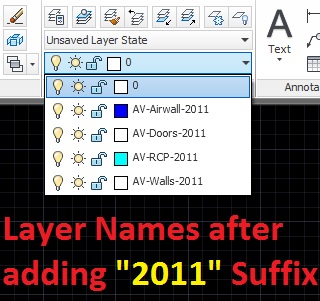
To go along with the previous post which adds a Prefix to layer names, this one allows you to add a suffix to layer names.

Here’s How:

  • RL2 <enter> to start
  • Enter text string to be added to the end of the layer names (My example was -2011 to show what layers were drawn in 2011)

;This routine will place a Suffix at the end of all Layer names and rename them.

;Of course, it will not rename Layer "0" or "Defpoints".

(prompt "\nType RL2 to run.........")

(defun C:RL2 ( / acadDocument theLayers layName pre)

(vl-load-com)

(setq pre (getstring "\nEnter Layer Suffix : "))

(setq acadDocument (vla-get-activedocument (vlax-get-acad-object)))

(setq theLayers (vla-get-layers acadDocument))

(vlax-map-collection theLayers 'layer-mod)

(princ)

);defun

(defun layer-mod (theLayer)

(setq layName (vlax-get-property theLayer 'Name))

(if (not (member layName '("0" "Defpoints")))

(vla-put-Name thelayer (strcat layName pre))

) ;if

);defun

(princ)


Posted in AutoLISP, Customization, Layers, Modifying, TIPS | Leave a comment

AutoLISP: Add A Prefix To Layer Names

This routine is a great little routine that allows you to add a prefix to all layer names. Although, It does not allow you add a prefix that already exists in at least one layer name like “A-.” I will try to tweak that in the future.

Here’s how:

RL <enter> to Rename Layer by adding a prefix

Enter the new Prefix (for my example, since I work for an Audio-Visual company, I added “AV-” to my layers)

;This routine will place a Prefix in front of all Layer names ;and rename them.

;Of course, it will not rename Layer "0" or "Defpoints".

(prompt "\nType RL to run.........")

(defun C:RL ( / acadDocument theLayers layName pre)

(vl-load-com)

(setq pre (getstring "\nEnter Layer Prefix : "))

(setq acadDocument (vla-get-activedocument (vlax-get-acad-object)))

(setq theLayers (vla-get-layers acadDocument))

(vlax-map-collection theLayers 'layer-mod)

(princ)

);defun

(defun layer-mod (theLayer)

(setq layName (vlax-get-property theLayer 'Name))

(if (not (member layName '("0" "Defpoints")))

(vla-put-Name thelayer (strcat pre layName))

) ;if

);defun

(princ)
Posted in AutoLISP, Customization, Layers, Modifying, TIPS | 1 Comment

AutoLISP: Spline to Polyline

Keeping with the theme of the previous posts about modifying Splines and Polylines…

Here is a routine that lets you change Splines into Polylines. I will warn you though, that this routine doesn’t let you escape or cancel out from the program. So you just have to finish the routine and then undo in order to make changes….

Here’s how it works:

  • S2P <enter> to start (Spline 2 Polyline)
  • Select the Splines that you want to change to Polylines
  • <enter> when finished selecting
  • Specify the amount of segments. The more the segments, the smoother the curve. but too many segments may be difficult to work with.

~enjoy


;;CADALYST 12/03 AutoLISP Solutions SPLINE-TO-PLINE.LSP

;;(c) 2003 Tony Hotchkiss

(defun spline-to-pline (/ i)

(vl-load-com)

(setq *thisdrawing* (vla-get-activedocument

(vlax-get-acad-object)

) ;_ end of vla-get-activedocument

*modelspace* (vla-get-ModelSpace *thisdrawing*)

) ;_ end of setq

(setq spline-list (get-spline))

(setq i (- 1))

(if spline-list

(progn

(setq msg "\nNumber of segments <100>: ")

(initget 6)

(setq num (getint msg))

(if (or (= num 100) (= num nil))

(setq num 100)

) ;_ end of if

(repeat (length spline-list)

(setq splobj (nth (setq i (1+ i)) spline-list))

(convert-spline splobj num)

) ;_ end of repeat

) ;_ end of progn

) ;_ end of if

) ;_ end of spline-to-pline

(defun get-spline (/ spl-list obj spline no-ent i)

(setq spl-list nil

obj nil

spline "AcDbSpline"

selsets (vla-get-selectionsets *thisdrawing*)

ss1 (vlax-make-variant "ss1")

) ;_ end of setq

(if (= (vla-get-count selsets) 0)

(setq ssobj (vla-add selsets ss1))

) ;_ end of if

(vla-clear ssobj)

(setq no-ent 1)

(while no-ent

(prompt "\nSelect splines: ")

(vla-Selectonscreen ssobj)

(if (> (vla-get-count ssobj) 0)

(progn

(setq no-ent nil)

(setq i (- 1))

(repeat (vla-get-count ssobj)

(setq

obj (vla-item ssobj

(vlax-make-variant (setq i (1+ i)))

) ;_ end of vla-item

) ;_ end of setq

(cond

((= (vlax-get-property obj "ObjectName") spline)

(setq spl-list

(append spl-list (list obj))

) ;_ end of setq

)

) ;_ end-of cond

) ;_ end of repeat

) ;_ end of progn

(prompt "\nNo entities selected, try again.")

) ;_ end of if

(if (and (= nil no-ent) (= nil spl-list))

(progn

(setq no-ent 1)

(prompt "\nNo splines selected.")

(quit)

) ;_ end of progn

) ;_ end of if

) ;_ end of while

(vla-delete (vla-item selsets 0))

spl-list

) ;_ end of get-spline

(defun convert-spline (splobj n / i)

(setq point-list nil

2Dpoint-list nil

z-list nil

spl-lyr (vlax-get-property splobj 'Layer)

startSpline (vlax-curve-getStartParam splobj)

endSpline (vlax-curve-getEndParam splobj)

i (- 1)

) ;_ end of setq

(repeat (+ n 1)

(setq i (1+ i))

(setq p (vlax-curve-getPointAtParam

splobj

(* i

(/ (- endspline startspline) n)

) ;_ end of *

) ;_ end of vlax-curve-getPointAtParam

) ;_ end of setq

(setq 2Dp (list (car p) (cadr p))

2Dpoint-list (append 2Dpoint-list 2Dp)

point-list (append point-list p)

z (caddr p)

z-list (append z-list (list z))

) ;_ end of setq

) ;_ end of repeat

(setq summ (apply '+ z-list))

(setq arraySpace

(vlax-make-safearray

vlax-vbdouble ; element type

(cons 0

(- (length point-list) 1)

) ; array dimension

) ;_ end of vlax-make-safearray

) ;_ end of setq

(setq vert-array (vlax-safearray-fill arraySpace point-list))

(vlax-make-variant vert-array)

(if (and (= :vlax-true (vlax-get-property splobj 'IsPLanar))

(= summ 0.0)

) ;_ end of and

(setq plobj (add-polyline

2Dpoint-list

vla-AddLightweightPolyline

) ;_ end of add-polyline

) ;_ end of setq

(setq plobj (add-polyline

point-list

vla-Add3DPoly

) ;_ end of add-polyline

) ;_ end of setq

) ;_ end of if

(vlax-put-property plobj 'Layer spl-lyr)

(vla-delete splobj)

(vlax-release-object splobj)

) ;_ end of convert-spline

(defun add-polyline (pt-list poly-func)

(setq arraySpace

(vlax-make-safearray

vlax-vbdouble

(cons 0

(- (length pt-list) 1)

) ; array dimension

) ;_ end of vlax-make-safearray

) ;_ end of setq

(setq vertex-array

(vlax-safearray-fill arraySpace pt-list)

) ;_ end of setq

(vlax-make-variant vertex-array)

(setq plobj (poly-func

*modelspace*

vertex-array

) ;_ end of poly-func

) ;_ end of setq

) ;_ end of add-polyline

(defun c:s2p ()

(spline-to-pline)

(princ)

) ;_ end of c:s2p

(prompt

"SPLINE-TO-PLINE by Tony Hotchkiss. Enter S2P to start"

) ;_ end of prompt

Posted in AutoLISP, Modifying, Polylines, TIPS | 4 Comments

AutoLISP: Polyline to Spline

Here is a routine that allows you to turn a “Fit Curve” Polyline into a Spline.

The key to remember with this routine is that the PolyLine has to be a “fit curve” otherwise, the routine will not work. Click HERE to learn how to make a “fit curve.”

Here’s how the routine works:

  • PL2SP <enter> to start
  • Select Polyline(s) (with Fit Curve)
  • <enter> when finished selecting
(I do not remember where I got this routine or who made it)

; Converts Polylines into Splines.

; Only works if the Polylines have been modified to a "fit-curve"

(defun pl_sel ( / orig_selset pl_selset count)

(prompt "\nSelect Polylines: ")

(setq

orig_selset (ssget)

pl_selset (ssadd)

count -1

)

(repeat (sslength orig_selset)

(setq count (1+ count))

(if (= (cdr (assoc 0 (entget (ssname orig_selset count)))) "POLYLINE")

(ssadd (ssname orig_selset count) pl_selset)

)

)

pl_selset

)

(defun vertex ( sset / count ent_sup act_ent spl_list)

(setq count 0)

(repeat (sslength sset)

(setq

ent_sup (ssname sset count)

act_ent (entnext ent_sup)

count (1+ count)

spl_list nil

)

(while (/= (cdr (assoc 0 (entget act_ent ))) "SEQEND")

(if

(or

(= (cdr (assoc 70 (entget act_ent))) 0)

(= (cdr (assoc 70 (entget act_ent))) 16)

)

(setq

spl_list

(cons (cons 11 (cdr (assoc 10 (entget act_ent)))) spl_list)

)

)

(setq

act_ent (entnext act_ent)

)

)

(setq spl_list (reverse spl_list))

(foreach

cod

(list

(assoc 8 (entget ent_sup))

(cons 74 (length spl_list))

(cons 71 3)

(cons 100 "AcDbSpline")

(cons 100 "AcDbEntity")

(cons 0 "SPLINE")

)

(setq spl_list (cons cod spl_list))

)

(entmake spl_list)

(entdel ent_sup)

)

)

;;Command line function

(defun c:pl2sp ( / oce)

(setq oce (getvar "cmdecho"))

(setvar "cmdecho" 0)

(vertex (pl_sel))

(redraw)

(setvar "cmdecho" oce)

(princ)

)

;;----------------END PROGRAM-----------------------

Posted in AutoLISP, Modifying, Polylines, TIPS | 2 Comments

Polyline (Fit Curve)

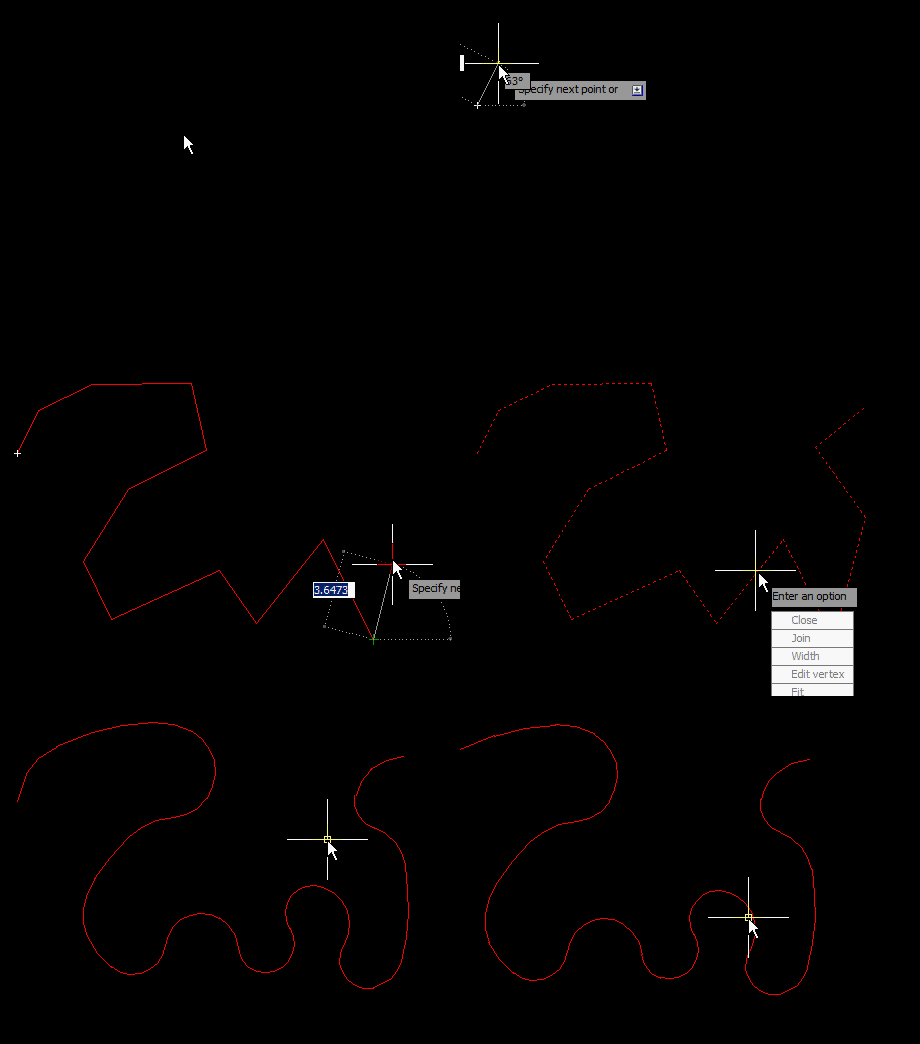
Here is a helpful tip that will let you make Polylines look like splines. Splines are great, but sometimes they are a little hard to adjust.

Here’s how:

  • Make a Polyline
  • Double-click the Polyline to enter its (PEDIT) function. Or use the command PEDIT <enter> and select the polyline.
  • Choose “FIT” from the list or simply type in F <enter> to make the selected Polyline into a “Fit Curve”
(Warning: Some AutoLISP functions won’t work with these types of modified Polylines so use as needed)

~Enjoy

Posted in BASICS, Modifying, Polylines, TIPS | 1 Comment