AutoLISP: ViewPort Lock & Unlock

Here is another short but sweet LISP routine by Lee-Mac found at the AUGI forums.

This one is great because it does 4 functions. You can Lock or Unlock viewports byselecting them or you can Lock or Unlock all of the viewports throughout the drawing. I have been using the option to lock all of the viewports throughout the drawing before closing a drawing.

  • VPL – Lock selected viewport
  • VPU – Unlock selected viewport
  • VPLA – Lock ALL viewports
  • VPUA – Unlock ALL viewports

~enjoy

If you have a chance, check out Lee’s website. And if you find anything useful make a donation to his site. He make all of his LISP routines on his website free and he helps many people with their LISP coding questions & problems. www.lee-mac.com

; By Lee-Mac found at the Augi forums

;; Lock Selected Viewport

(vl-load-com)

(defun c:vpl nil

(if (SSVPLock (ssget "_+.:E:S:L" '((0 . "VIEWPORT"))) :vlax-true)

(princ "\n--> Viewport Locked.")

)

(princ)

)

;; Unlock Selected Viewport

(defun c:vpu nil

(if (SSVPLock (ssget "_+.:E:S:L" '((0 . "VIEWPORT"))) :vlax-false)

(princ "\n--> Viewport Unlocked.")

)

(princ)

)

;; Lock All Viewports

(defun c:vpla nil

(SSVPLock (ssget "_X" '((0 . "VIEWPORT"))) :vlax-true)

(princ "\n--> All Viewports Locked.")

(princ)

)

;; Unlock All Viewports

(defun c:vpua nil ;; changed "VPLU" to "VPUA" to be consistant with the above function

(SSVPLock (ssget "_X" '((0 . "VIEWPORT"))) :vlax-false)

(princ "\n--> All Viewports UnLocked.")

(princ)

)

(defun SSVPLock ( ss lock / i )

(if ss

(repeat (setq i (sslength ss))

(vla-put-displaylocked (vlax-ename->vla-object (ssname ss (setq i (1- i)))) lock) t

)

)

)
Posted in AutoLISP, Layout, Modifying, Viewports | 2 Comments

AutoLISP: Walk Blocks

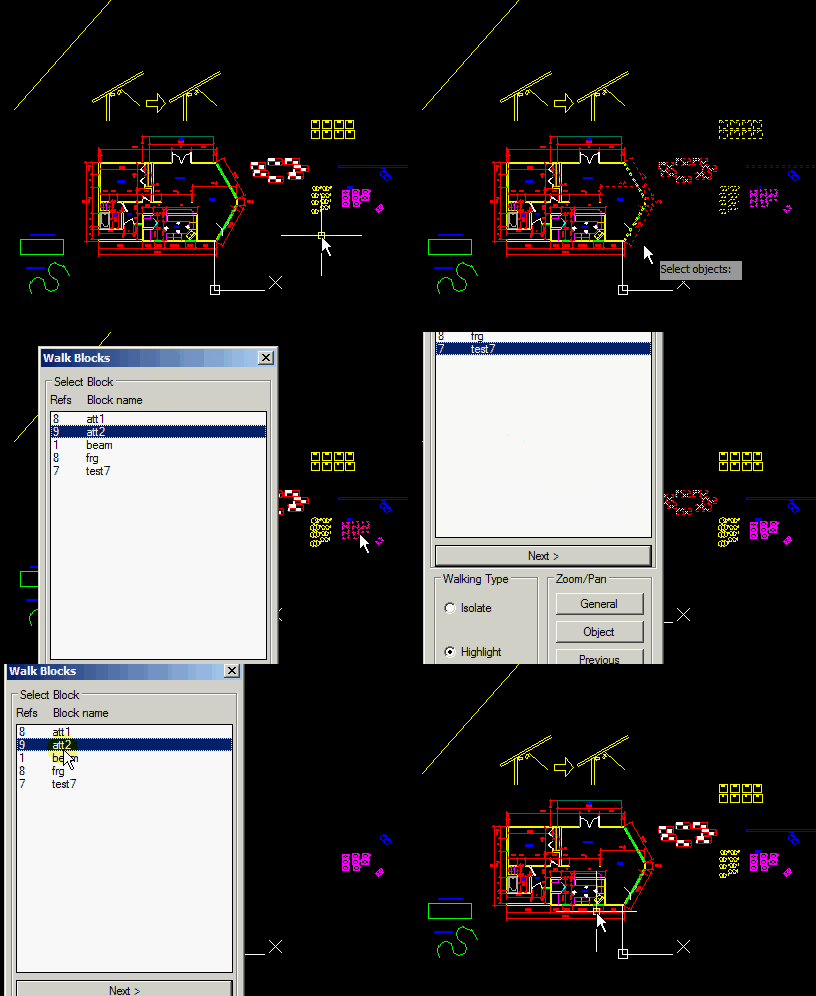
This is one of the coolest LISP programs because it takes the same idea and the LAYWALK command which lets you isolate objects that reside on a given layer. In regards to blocks – This lets you locate blocks in your drawing. You can isolate them or zoom in to them and select them so that you know where to start you editing. There are a lot of options with this one, so try it out and as always…

~enjoy

  • WB <enter> to start
  • Make a selection set that contains the blocks (Can use ALL <enter> to select all blocks in the drawing)
  • Try it out on your own from there…

;;;=============================================================

;;; Walk Blocks by Some Buddy for the CAD community. found at the autodesk forums

;;; This program is freeware. Use it, change it, improve it, hack it as you wish :)

;;; Functions HIDEOTHERS and SHOWALL provided by balisteor

;;;===================================================================

(defun walk_blocks (

/

activedoc

layers

getblocks

matched_blocks

hideothers

showall

highlightit

bbox->points

write_dcl_code_to

implied_selection

user_selection

tempfile

dclfile

what_next

dcl_id1

xref_flag

blockslist

selvalue

walk_type

selblock

next_block

dcl_ok

yes_no

refresh_list

spinning_wheel

alter_layers

restore_layers

implied_selection

blocksdata

blockslist

blockslayerslist

do_the_walk_type

tabbed_selblock

action_tile_blocks_list

action_tile_walk_type

action_tile_pan_zoom

action_tile_zoom_object

action_tile_zoom_previous

action_tile_select

action_tile_next

action_tile_cancel

what_next

)

(vl-load-com)

(setq activedoc (vla-get-activedocument (vlax-get-acad-object)))

(setq layers (vla-get-layers activedoc))

(defun *error* (s)

(if *errdump* (vl-bt))

(if dcl_ok

(progn

(unload_dialog dcl_id1)

(vl-file-delete tempfile)

)

)

(showall user_selection nil)

(sssetfirst nil nil)

(restore_layers blockslayerslist)

(princ)

)

(defun sset->vlsset (argsset / ssets vlssets assoc_list max_vlsset vlsset safe_array index)

(setq ssets (vla-get-selectionsets activedoc))

(vlax-for sset ssets

(if (wcmatch (vla-get-name sset) "*`#VLSSET")

(setq vlssets (cons (vla-get-name sset) vlssets))

)

)

(foreach element vlssets

(setq assoc_list

(cons (cons (atoi element) element) assoc_list)

)

)

(if (zerop (length assoc_list))

(setq max_vlsset "0#VLSSET")

(setq max_vlsset

(cdr

(car

(vl-sort

assoc_list

'(lambda (x1 x2)(> (car x1)(car x2)))

)

)

)

)

)

(setq vlsset

(vla-add

ssets

(strcat (itoa (1+ (atoi max_vlsset))) "#VLSSET")

)

)

(setq safe_array

(vlax-make-safearray vlax-vbobject (cons 0 0))

)

(setq index 0)

(repeat (sslength argsset)

(vlax-safearray-put-element

safe_array

0

(vlax-ename->vla-object (ssname argsset index))

)

(vla-additems vlsset safe_array)

(setq index (1+ index))

)

vlsset

)

(defun countgroup (inlist / outlist existing_item)

(vl-sort

(foreach item inlist

(if (not (member (assoc item outlist) outlist))

(setq outlist (cons (cons item 1) outlist))

(progn

(setq existing_item

(car (member (assoc item outlist) outlist))

)

(setq outlist

(subst

(cons item (1+ (cdr existing_item)))

existing_item

outlist

)

)

)

)

)

'(lambda(x y)(< (car x)(car y)))

)

)

(defun addtabs (inlist / tabslist)

(foreach item inlist

(setq tabslist

(cons

(strcat

(itoa (cdr item))

"\t"

(car item)

)

tabslist

)

)

)

(reverse tabslist)

)

; (defun addtabs (inlist / tabslist)

; (foreach item inlist

; (setq tabslist

; (cons

; (strcat

; (chr 40)

; (cond

; ( (< (cdr item) 10)

; "__"

; )

; ( (and

; (>= (cdr item) 10)

; (< (cdr item) 100)

; )

; "_"

; )

; (T "")

; )

; (itoa (cdr item))

; (chr 41)

; "\t"

; (car item)

; )

; tabslist

; )

; )

; )

; (reverse tabslist)

; )

(defun striptab (string)

(substr string (+ (vl-string-position (ascii "\t") string) 2))

)

(defun getblocks (

selection

xref_flag

layeron_flag

freeze_flag

locked_flag

/

is_object_valid

blocknameslist

blocklayer

)

(defun is_object_valid (object xref_flag layeron_flag freeze_flag locked_flag)

(if xref_flag

(=

(vla-get-objectname object)

"AcDbBlockReference"

)

(and

(=

(vla-get-objectname object)

"AcDbBlockReference"

)

(=

(vla-get-isxref

(vla-item

(vla-get-blocks document)

(vla-get-effectivename object)

)

)

:vlax-false

)

)

)

)

(vlax-for object (sset->vlsset selection)

(if (is_object_valid object xref_flag layeron_flag freeze_flag locked_flag)

(progn

(setq blocknameslist

(cons

(vla-get-effectivename object)

blocknameslist

)

)

(setq blocklayer (vla-get-layer object))

(setq currlaystatus

(list

blocklayer

(cons "LayerOn" (vla-get-layeron (vla-item layers blocklayer)))

(cons "Freeze" (vla-get-freeze (vla-item layers blocklayer)))

(cons "Lock" (vla-get-lock (vla-item layers blocklayer)))

)

)

(if (not (member currlaystatus blockslayerslist))

(setq blockslayerslist (cons currlaystatus blockslayerslist))

)

)

)

)

(if blocknameslist

(list (acad_strlsort blocknameslist) blockslayerslist)

)

)

;;;*******************************************************************************

;;; Code provided by balisteor starts here

;;;*******************************************************************************

(defun hideothers (selection blockname / index ent object layer layermode effname)

(if selection

(progn

(set_tile "working" "Working: ")

(repeat (setq index (sslength selection))

(setq ent (ssname selection (1- index)))

(setq object (vlax-ename->vla-object ent))

(if

(setq effname

(vlax-property-available-p object 'effectivename)

)

(if

(=

(strcase blockname)

(strcase (vlax-get-property object 'effectivename))

)

(if (vlax-property-available-p object 'Visible)

(vlax-put-property object 'Visible -1)

)

(if (vlax-property-available-p object 'Visible)

(vlax-put-property object 'Visible 0)

)

)

(if (vlax-property-available-p object 'Visible)

(vlax-put-property object 'Visible 0)

)

)

(setq index (1- index))

(set_tile "spinning_wheel" (spinning_wheel (get_tile "spinning_wheel")))

)

)

)

(set_tile "working" "")

(set_tile "spinning_wheel" "")

(princ)

)

;;;***************************************************************

;;; Code provided by balisteor ends here

;;;***************************************************************

;;;***************************************************************

;;; Code provided by balisteor starts here

;;;***************************************************************

(defun showall (selection flag / index ent object layer layermode)

(if selection

(progn

(set_tile "working" "Working: ")

(repeat (setq index (sslength selection))

(setq ent (ssname selection (1- index)))

(setq object (vlax-ename->vla-object ent))

(if (vlax-property-available-p object 'visible)

(if (vlax-property-available-p object 'visible)

(vlax-put-property object 'visible -1)

)

)

(setq index (1- index))

(if flag

(set_tile "spinning_wheel" (spinning_wheel (get_tile "spinning_wheel")))

)

)

)

)

(if flag

(progn

(set_tile "working" "")

(set_tile "spinning_wheel" "")

)

)

(princ)

)

;;;*************************************************************

;;; Code provided by balisteor ends here

;;;*************************************************************

(defun highlightit (selection blockname flag / index ent object)

(if selection

(progn

(set_tile "working" "Working: ")

(repeat (setq index (sslength selection))

(setq ent (ssname selection (1- index)))

(setq object (vlax-ename->vla-object ent))

(if (vlax-property-available-p object 'effectivename)

(if

(=

(strcase blockname)

(strcase (vlax-get-property object 'effectivename))

)

(progn

(if flag

(vla-highlight object :vlax-true)

(vla-highlight object :vlax-false)

)

(setq matched_blocks(cons object matched_blocks))

)

)

)

(setq index (1- index))

(set_tile "spinning_wheel" (spinning_wheel (get_tile "spinning_wheel")))

)

)

)

(set_tile "working" "")

(set_tile "spinning_wheel" "")

(princ)

)

(defun bbox->points (object)

(if object

(progn

(vlax-invoke-method

object

'getboundingbox

'minpoint

'maxpoint

)

(list minpoint maxpoint)

)

)

)

(defun write_dcl_code_to (file)

(write-line

(strcat

"listbox:dialog{"

"label=\"Walk Blocks\";"

"width=28;"

": spacer{"

"height=0.01;"

"}"

": column{"

"label=\"Select Block\";"

": text{"

"label=\"Refs Block name\";"

"}"

": list_box{"

"key=\"blocks_list\";"

"allow_accept=true;"

"tabs=\"6\";"

"height=20;"

"}"

": button{"

"label=\" Next > \";"

"key=\"next\";"

"is_enabled=false;"

"is_default=true;"

"}"

"}"

": row {"

": boxed_radio_column{"

"label=\"Walking Type\";"

"key=\"walk_type\";"

": spacer{"

"height=0.01;"

"}"

": radio_button{"

"label=\"Isolate\";"

"key=\"isolate\";"

"}"

": spacer{"

"height=1;"

"}"

": radio_button{"

"label=\"Highlight\";"

"key=\"highlight\";"

"}"

": spacer{"

"height=0.01;"

"}"

"}"

": boxed_column{"

"label=\"Zoom/Pan\";"

"fixed_width=true;"

"width=16;"

": button{"

"label=\"General\";"

"key=\"pan_zoom\";"

"}"

": button{"

"label=\"Object\";"

"key=\"zoom_object\";"

"}"

": button{"

"label=\"Previous\";"

"key=\"zoom_previous\";"

"}"

"}"

"}"

": row {"

"alignment = centered;"

": spacer{"

"width=0.01;"

"}"

": button{"

"label=\" Select > \";"

"key=\"select\";"

"}"

": spacer{"

"width=1;"

"}"

": button{"

"label=\" Close \";"

"key=\"cancel\";"

"is_cancel=true;"

"}"

": spacer{"

"width=0.01;"

"}"

"}"

": row{"

": concatenation{"

": text_part{"

"key=\"working\";"

"width=9;"

"}"

": text_part{"

"key=\"spinning_wheel\";"

"}"

"}"

"}"

"}"

"yes_no:dialog{"

"label=\"Walk Blocks Question\";"

": text{"

"key=\"message1\";"

"alignment=centered;"

"width=37;"

"}"

": text{"

"key=\"message2\";"

"alignment=centered;"

"width=37;"

"}"

": row{"

"alignment=centered;"

"fixed_width=true;"

": button{"

"label=\"Yes\";"

"key=\"accept\";"

"fixed_width=true;"

"width=12;"

"}"

": button{"

"label=\"No\";"

"key=\"cancel\";"

"fixed_width=true;"

"width=12;"

"is_default=true;"

"is_cancel=true;"

"}"

"}"

"}"

)

file

)

)

(defun yes_no (message1 message2 / dcl_id2)

(setq dcl_id2 (load_dialog tempfile))

(if (not (new_dialog "yes_no" dcl_id2 "" yes_no_DCL_position))

(progn

(alert "Dialog definition not found.")

(vl-file-delete tempfile)

(exit)

)

)

(set_tile "message1" message1)

(set_tile "message2" message2)

(action_tile "accept" "(setq yes_no_DCL_position (done_dialog 1))")

(action_tile "cancel" "(setq yes_no_DCL_position (done_dialog 0))")

(setq answer (start_dialog))

(unload_dialog dcl_id2)

answer

)

(defun refresh_list (key lst)

(start_list key)

(mapcar 'add_list lst)

(end_list)

)

(defun spinning_wheel (wheel)

(cond

( (= wheel "|") "/")

( (= wheel "/") "-")

( (= wheel "-") "\\")

(T "|")

)

)

(defun alter_layers (blockslayerslist)

(setq current_layer (vla-get-activelayer activedoc))

(vla-add layers "temp")

(vla-put-activelayer activedoc (vla-item layers "temp"))

(foreach item blockslayerslist

(vla-put-layeron (vla-item layers (car item)) :vlax-true)

(vla-put-freeze (vla-item layers (car item)) :vlax-false)

(vla-put-lock (vla-item layers (car item)) :vlax-false)

)

)

(defun restore_layers (blockslayerslist / layer_temp)

(foreach item blockslayerslist

(vla-put-layeron (vla-item layers (car item))(cdr (assoc "LayerOn" (cdr item))))

(vla-put-freeze (vla-item layers (car item))(cdr (assoc "Freeze" (cdr item))))

(vla-put-lock (vla-item layers (car item))(cdr (assoc "Lock" (cdr item))))

)

(vla-put-activelayer activedoc current_layer)

(if

(not

(vl-catch-all-error-p

(setq layer_temp

(vl-catch-all-apply 'vla-item (list layers "temp"))

)

)

)

(vla-delete layer_temp)

)

)

(sssetfirst nil nil)

(setq implied_selection (ssgetfirst))

(if

(and

(not (setq user_selection (cadr implied_selection)))

(not (setq user_selection (car implied_selection)))

)

(setq user_selection (ssget))

)

(setq what_next 1)

(while (> what_next 0)

(if user_selection

(progn

(setq blocksdata (getblocks user_selection T nil nil nil))

(setq blockslist (addtabs (countgroup (car blocksdata))))

(setq blockslayerslist (cadr blocksdata))

(if blocksdata

(progn

(setq dcl_ok T)

(setq tempfile (vl-filename-mktemp "tempfile.dcl"))

(setq dclfile (open tempfile "w"))

(write_dcl_code_to dclfile)

(close dclfile)

(setq dcl_id1 (load_dialog tempfile))

(if (not (new_dialog "listbox" dcl_id1 "" walk_blocks_DCL_position))

(progn

(alert "Dialog definition not found.")

(vl-file-delete tempfile)

(exit)

)

)

(alter_layers blockslayerslist)

(refresh_list "blocks_list" blockslist)

(if selblock

(progn

(set_tile

"blocks_list"

(if (not (wcmatch selblock "*`\t*"))

(itoa (vl-position tabbed_selblock blockslist))

(itoa (vl-position selblock blockslist))

)

)

(mode_tile "next" 0)

)

)

(if (not walk_type)(setq walk_type "highlight"))

(set_tile "walk_type" walk_type)

(set_tile "working" "")

(set_tile "spinning_wheel" "")

;;(if xref_flag

;; (set_tile "include_xrefs" "1")

;; (set_tile "include_xrefs" "0")

;;)

(defun do_the_walk_type (walk_mode)

(if selblock

(if (= walk_mode "isolate")

(progn

(highlightit user_selection selblock nil)

(hideothers user_selection selblock)

)

(progn

(showall user_selection T)

(highlightit user_selection selblock T)

)

)

(progn

(set_tile "working" "")

(set_tile "spinning_wheel" "")

(alert "Nothing selected.")

)

)

)

(defun action_tile_blocks_list (value)

(setq selvalue value)

(setq tabbed_selblock (nth (atoi selvalue) blockslist))

(setq selblock (striptab (nth (atoi selvalue) blockslist)))

(mode_tile "next" 0)

(set_tile "working" "Working: ")

(do_the_walk_type walk_type)

)

(defun action_tile_walk_type (value)

(setq walk_type value)

(set_tile "working" "Working: ")

(do_the_walk_type walk_type)

)

;;(defun action_tile_include_xrefs (value)

;; (alert "value")

;;)

(defun action_tile_pan_zoom ()

(setq walk_blocks_DCL_position (done_dialog 1))

)

(defun action_tile_zoom_object ( / ll ur)

(if matched_blocks

(progn

(vla-getboundingbox (car matched_blocks) 'll 'ur)

(vla-zoomwindow (vlax-get-acad-object) ll ur)

)

(progn

(set_tile "working" "")

(set_tile "spinning_wheel" "")

(alert "Nothing selected.")

)

)

)

(defun action_tile_zoom_previous ()

(if matched_blocks

(vla-zoomprevious (vlax-get-acad-object))

(alert "Nothing selected.")

)

)

(defun action_tile_select ()

(if

(not

(zerop

(yes_no

"Do you really want to discard the current"

"selection set and make a new selection ?"

)

)

)

(setq walk_blocks_DCL_position (done_dialog 2))

)

)

(defun action_tile_next ( / item)

(set_tile "working" "Working: ")

(setq item (atoi (get_tile "blocks_list")))

(if (= item (1- (length blockslist)))

(progn

(set_tile "blocks_list" "0")

(setq tabbed_selblock (nth 0 blockslist))

(setq selblock (striptab (nth 0 blockslist)))

(do_the_walk_type walk_type)

)

(progn

(set_tile "blocks_list" (itoa (1+ item)))

(setq tabbed_selblock (nth (1+ item) blockslist))

(setq selblock (striptab (nth (1+ item) blockslist)))

(do_the_walk_type walk_type)

)

)

)

(defun action_tile_cancel ()

(setq walk_blocks_DCL_position (done_dialog 0))

)

(action_tile "blocks_list" "(action_tile_blocks_list $value)")

(action_tile "walk_type" "(action_tile_walk_type $value)")

;;(action_tile "include_xrefs" "(action_tile_include_xrefs $value)")

(action_tile "pan_zoom" "(action_tile_pan_zoom)")

(action_tile "zoom_object" "(action_tile_zoom_object)")

(action_tile "zoom_previous" "(action_tile_zoom_previous)")

(action_tile "select" "(action_tile_select)")

(action_tile "next" "(action_tile_next)")

(action_tile "cancel" "(action_tile_cancel)")

(setq what_next (start_dialog))

(cond

( (= what_next 1)

(getstring

"\nUse mouse wheel to Zoom and Pan, press [Enter] when done: "

)

(restore_layers blockslayerslist)

)

( (= what_next 2)

(showall user_selection nil)

(sssetfirst nil nil)

(setq selblock nil)

(setq blockslist nil)

(restore_layers blockslayerslist)

(setq blockslayerslist nil)

(setq user_selection (ssget))

)

)

)

(progn

(alert "No block found in the selection.")

(setq what_next 0)

)

)

)

(progn

(alert "Nothing selected.")

(setq what_next 0)

)

)

(unload_dialog dcl_id1)

)

(vl-file-delete tempfile)

(showall user_selection nil)

(sssetfirst nil nil)

(restore_layers blockslayerslist)

(princ)

)

;;;============================================================================================================================================================================

(defun c:wb ()(walk_blocks)(princ))

;;;=========================================================================

(prompt "\n *** Walk Blocks loaded. Type 'WB' to run the utility ***")(princ)

;;;===========================================================================
Posted in AutoLISP, Blocks, TIPS | 1 Comment

AutoLISP: Divide Polyline Segment

If youve ever tried the DIVIDE command on a Poly Line, You know the frustration that usually follows that adventure. Here is a great Routine that allows you to easily do this task.

Note that places “Points” as the division markers like the Divide command. So set your Point size and style with the command DDPTYPE prior to running this routine. It does not actually divide the polyline but rather marks the divisions with points. Also Note that this routine asks you to pick 2 points along the poly line, so this routine only works on straight segments of polylines. Then Specify the number of segments, not the number of points.

Here’s how:

  • DIVSIDE <enter>
  • Specify first point along poly line
  • Specify second point along poly line
  • Specify number of segments between the 2 picked points.

~enjoy

;divide a side of a polyline into segments

;by Thawart found at autocad forums.

(defun c:divside (/ p1 p2 v l pt)

(if

(and

(setq p1 (getpoint "\n Specify first point :"))

(setq p2 (getpoint p1 "\n Specify Second point :"))

(setq v (getint "\n Specify number of segments :")); changed "division points" to "segments"

)

(progn

(if (eq (getvar 'pdmode) 0)

(setvar 'pdmode 3)

)

(setq l (/ (distance p1 p2) v))

(repeat (- v 1)

(setq pt (polar p1 (angle p1 p2) l))

(entmakex (list (cons 0 "POINT") (cons 10 pt)))

(setq p1 pt)

)

)

(princ)

)

(princ)

)
Posted in AutoLISP, Modifying, TIPS | 3 Comments

AutoLISP: Add Leader to MTEXT or DTEXT

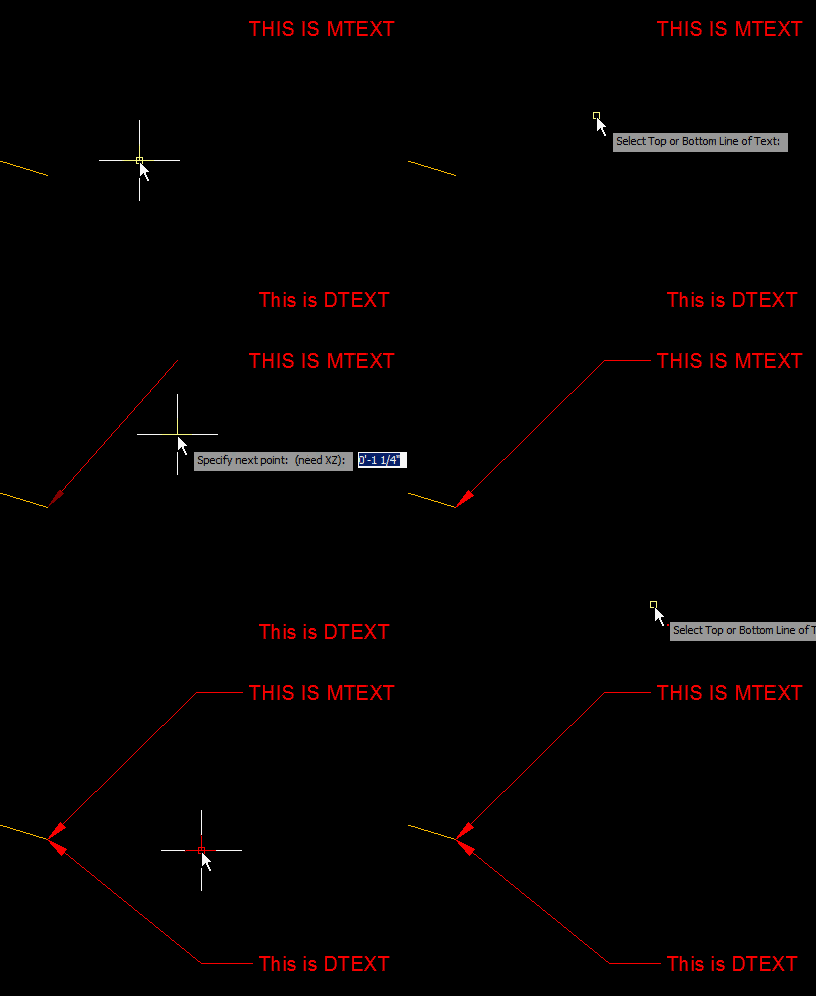
Here is a quickie that lets you attach a leader to an existing MTEXT or DTEXT object.

Here’s How:

  • TL <enter> to start “Text Leader”
  • Select Text object
  • Specify start point (arrow) of leader
  • Specify the angle of the leader

~enjoy

;;; ------------------------------------------------------------------------

;;; TEXTLEADER.LSP Version 1.2

;;;

;;; Copyright© August, 2007

;;; Timothy G. Spangler

;;;

;;; Permission to use, copy, modify, and distribute this software

;;; for any purpose and without fee is hereby granted, provided

;;; that the above copyright notice appears in all copies and

;;; that both that copyright notice and the limited warranty and

;;; restricted rights notice below appear in all supporting

;;; documentation.

;;;

;;; Add leader to text (Non Associating Leader).

;;;

;;; ------------------------------------------------------------------------

(defun C:TL (/) (C:TEXTLEADER)); Program Shortcut

;;; MAIN FUNCTION ;;;;;;;;;;;;;;;;;;;;;;;;;

(defun C:TEXTLEADER (/ *error* OldCmdecho OldOsmode OldOrthoMode OldClayer ExludeList)

;; Set Env

(TEXT_LEADER_SET_ENV)

;;; Error Handling Routine ;;;

(defun *error* (MSG)

(if(not(member MSG '("Function cancelled" "quit / exit abort")))

(princ (strcat "\n*** Program Error: " (strcase MSG) " ***"))

(princ "\n... Program Cancelled ...")

)

(while (< 0 (getvar "CMDACTIVE"))

(command)

)

(TEXT_LEADER_RESET_ENV)

(princ)

)

;; Main Code

(TEXT_LEADER_RUN)

)

;;; ------------ Begin Main Routine

(defun TEXT_LEADER_RUN (/ TextEnt TextEntList TextLayer DtextBox DtextEntList TextRotate MtextLine

DtextInsPoint TempPoint LeaderEnd)

;; Get text object from selection

(while (null (setq TextEnt (entsel "\n Select Top or Bottom Line of Text: ")))

(princ "\n Nothing Selected...")

)

;; Get entity list from text

(setq TextEntList (entget (car TextEnt)))

;; Get text layer

(setq TextLayer (cdr(assoc 8 TextEntList)))

;; Set layer to text layer

(setvar "CLAYER" TextLayer)

;; If selected text is "TEXT"

(if (= (cdr (assoc 0 TextEntList)) "TEXT")

(progn

(setq DtextBox (textbox (entget (car TextEnt))))

(setq DtextEntList (entget (car TextEnt)))

(setq TextRotate (cdr(assoc 50 DtextEntList)))

)

)

;; If selected text is "MTEXT"

(if (= (cdr (assoc 0 TextEntList)) "MTEXT")

(progn

(command "explode" TextEnt)

(setq MtextLine (ssget (cadr TextEnt)))

(setq DtextEntList (entget (ssname MtextLine 0)))

(setq DtextBox (textbox (entget (ssname MtextLine 0))))

(setq TextRotate (cdr(assoc 50 DtextEntList)))

(command "u")

)

)

;; If selected entity is not "TEXT" or "MTEXT"

(if (member (cdr (assoc 0 TextEntList)) ExludeList)

(progn

(alert "Selected entity is not TEXT or MTEXT")

(TEXT_LEADER_RUN)

)

)

;; Get insertion point of text

(setq DtextInsPoint (cdr (assoc 10 DtextEntList)))

;; Check the rotation of the text

(cond

((equal TextRotate 1.5708 0.0001)

;; Get center point of textbox (from 0,0)

(setq TempPoint

(list

(/ (+ (cadar DtextBox)(cadadr DtextBox)) 2.0)

(/ (+ (caadr DtextBox)(caar DtextBox)) 2.0)

(cadddr (assoc 10 DtextEntList))

)

)

;; Get the center point of the selected text object

(setq InsertPoint

(list

(- (car DtextInsPoint)(car TempPoint))

(+ (cadr DtextInsPoint)(cadr TempPoint))

(+ (caddr DtextInsPoint)(caddr TempPoint))

)

)

;; Set the leader end point

(setq LeaderEnd

(+ (/ (- (caadr DtextBox) (caar DtextBox)) 2.0)

(* 0.0625 (getvar "dimscale")) ;CHANGE THIS TO CHANGE GAT BETWEEN TEXT AND LEADER

)

)

;; Prompt to create the leader

(prompt "\n Select Leader Start and Bend Points: ")

;; Run the leader command with the point filter

(command "leader"

PAUSE

".X"

InsertPoint

PAUSE

(polar InsertPoint (angle InsertPoint (getvar "lastpoint")) LeaderEnd)

""

""

"n"

)

)

((equal TextRotate 0.0 0.0001)

;; Get center point of textbox (from 0,0)

(setq TempPoint

(list

(/ (+ (caadr DtextBox) (caar DtextBox)) 2.0)

(/ (+ (cadar DtextBox) (cadadr DtextBox)) 2.0)

(cadddr (assoc 10 DtextEntList))

)

)

;; Get the center point of the selected text object

(setq InsertPoint

(list

(+ (car DtextInsPoint) (car TempPoint))

(+ (cadr DtextInsPoint) (cadr TempPoint))

(+ (caddr DtextInsPoint) (caddr TempPoint))

)

)

;; Set the leader end point

(setq LeaderEnd

(+ (/ (- (caadr DtextBox) (caar DtextBox)) 2.0)

(* 0.0625 (getvar "dimscale")) ;CHANGE THIS TO CHANGE GAP BETWEEN TEXT AND LEADER

)

)

;; Prompt to create the leader

(prompt "\n Select Leader Start and Bend Points: ")

;; Run the leader command with the point filter

(command "leader"

PAUSE

".Y"

InsertPoint

PAUSE

(polar InsertPoint (angle InsertPoint (getvar "lastpoint")) LeaderEnd)

""

""

"n"

)

)

((/= (or (equal TextRotate 0.0 0.0001)(equal TextRotate 1.5708 0.0001)))

(alert "Selected text not at a suitable angle")

(TEXT_LEADER_RUN)

)

)

(TEXT_LEADER_RESET_ENV)

)

;;; ------------ Set Environment Settings

(defun TEXT_LEADER_SET_ENV (/)

&nbsp;

;; Set sysetem variables

(setq OldCmdecho (getvar "CMDECHO"))

(setq OldOsmode (getvar "OSMODE"))

(setq OldOrthoMode (getvar "ORTHOMODE"))

(setq OldClayer (getvar "CLAYER"))

(setvar "CMDECHO" 0)

(setvar "ORTHOMODE" 0)

(setvar "OSMODE" 513)

;;; Undo marker

(command "_UNDO" "BEGIN")

;; Set the exclusion list

(setq ExludeList (list "3DFACE" "3DSOLID" "ARC" "ATTDEF" "ATTRIB" "BODY" "CIRCLE" "DIMENSION" "ELLIPSE"

"HATCH" "IMAGE" "INSERT" "LEADER" "LINE" "LWPOLYLINE" "MLINE" "OLEFRAME" "OLE2FRAME" "POINT" "POLYLINE"

"RAY" "REGION" "SEQUEND" "SHAPE" "SOLID" "SPLINE" "TOLERANCE" "TRACE" "VERTEX" "VIEWPORT" "XLINE"))

;; Add program description to status line

(grtext -2 (strcat "Text Leader " "v1.2" " Copyright© 2007"))

)

;;; ------------ Reset Environment Settings

(defun TEXT_LEADER_RESET_ENV (/)

;;; Undo marker

(command "_UNDO" "END")

;; Reset system variable

(grtext -2 "")

(setvar "CLAYER" OldClayer)

(setvar "OSMODE" OldOsmode)

(setvar "ORTHOMODE" OldOrthoMode)

(setvar "CMDECHO" OldCmdecho)

(princ)

)

;;;

;;; Echos to the command line

(princ "\n Text Leader v1.2© \n Timothy Spangler, \nAugust, 2007....loaded.")

(terpri)

(princ "Type \"TL\" to run")

(print)

;;; End echo
Posted in AutoLISP, Leaders, Modifying, Text | 7 Comments

AutoLISP: Improved MLINE (Multiline)

For those of you who like to use the MLINE command, this is for you. For those who don’t know what the MLINE command is – It lets you create 2 parallel lines and you get to specify the distance between the 2 lines. And for anyone who doesn’t have the full version of AutoCAD and uses AutoCAD LT the DLINE does essentially the same thing. But to be honest, I really don’t like the MLINE command because it is hard to edit.

The featured LISP routine was made by LEE-Mac and acts like the MLINE command and even lets you use an existing MLINE style if you have one set up. But the great thing about this version of the MLINE command is that it creates two parallel Poly Lines. This makes it so much easier to edit than trying to edit an MLINE.

Here’s how:

  • ML2 <enter> to start
  • S <enter>  to set the “Scale” (width) of the new MLINE.
  • or
  • J <enter> to specify the “Justification” of the new MLINE.
  • Place your New & Improved MLINE

~enjoy

; Works like MLINE but it draws PLines instead

; way better than MLINE

; by LEE-MAC found at CADTutor.net

(defun c:ML2 ( / *error* vl ov LastEntity ent ss )

;; © Lee Mac ~ 19.06.10

(defun *error* ( msg )

(mapcar 'setvar vl ov)

(or (wcmatch (strcase msg) "*BREAK,*CANCEL*,*EXIT*")

(princ (strcat "\n** Error: " msg " **")))

(princ)

)

(setq vl '("CMDECHO" "PEDITACCEPT" "QAFLAGS")

ov (mapcar 'getvar vl))

(setq LastEntity (entlast))

(command "_.mline")

(while (= 1 (logand 1 (getvar 'CMDACTIVE)))

(command pause)

)

(if (not (equal LastEntity (setq ent (entlast))))

(progn

(mapcar 'setvar vl '(0 1 5))

(vl-cmdf "_.explode" ent "")

(setq ss (ssadd))

(mapcar '(lambda ( e ) (ssadd e ss)) (LM:EntnexttoEnd ent))

(vl-cmdf "_.pedit" "_M" ss "" "_J" "" "")

)

)

(mapcar 'setvar vl ov)

(princ)

)

(defun LM:EntnexttoEnd ( e )

(if (setq e (entnext e))

(cons e (LM:EntnexttoEnd e))

)

)
Posted in AutoLISP, TIPS | Leave a comment

Printer Margins

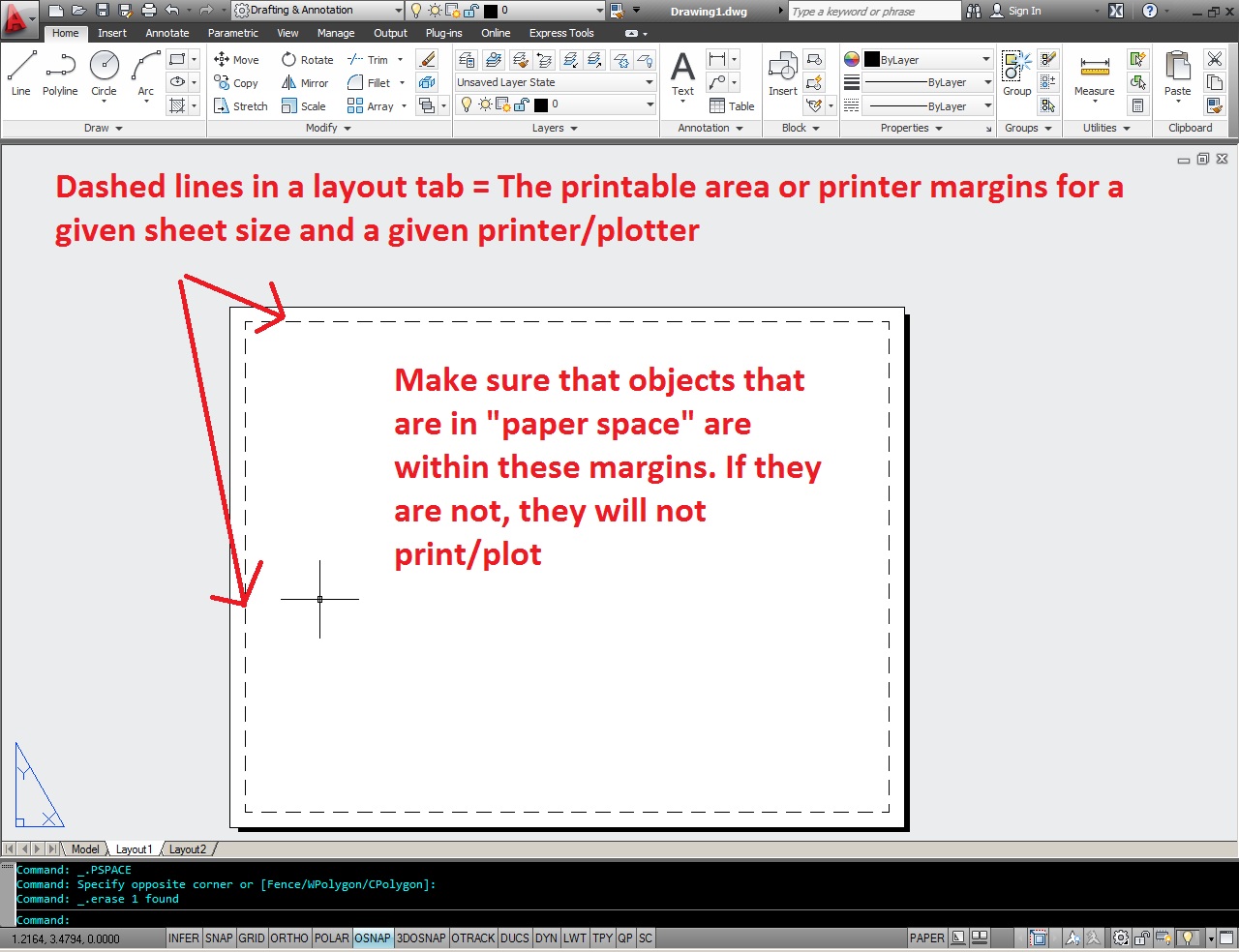
Some one asked me yesterday, “what are the dashed lines that I see when I am in a layout tab?”

Simplified answer: These are the boundary lines that show you the printable area of that Layout Tab’s sheet size and printer/plotter settings.

Depending on what printer and page size you have selected, these margins will change.

Posted in BASICS, Layout, Settling In | 8 Comments

AutoLISP: Connect Endpoints To Make PolyLine

I found this today and thought That I’d share it here because it is really cool.

If you need to make a POLYLINE of objects that continuously touch at their endpoints, this ones for you.

Here’s how:

  • EJA <enter> to start – (Entity Join All)
  • Select one object in the chain – can be a Line, Arc or Polyline.

That’s it.  The routine will check to see if the endpoints touch and if they do, it will join them for you.

The original post can be [found here] on the second page. It is also called PEJA.lsp

;Entity Join All
;Joins lines, arcs & Polylines at their endpoints automatically.
; All you have to do is select one object
; by Kent Cooper @ Autodesk forums
(defun C:EJA (/ peac cmde); = Polyline Edit: Join All
(setq peac (getvar ‘peditaccept))
(setvar ‘peditaccept 1)
(setq cmde (getvar ‘cmdecho))
(setvar ‘cmdecho 0)
(command“_.pedit” pause “_join”“_all”“”“”)
(setvar ‘peditaccept peac)
(setvar ‘cmdecho cmde)
(princ)
)

Posted in AutoLISP, Modifying, TIPS | 8 Comments

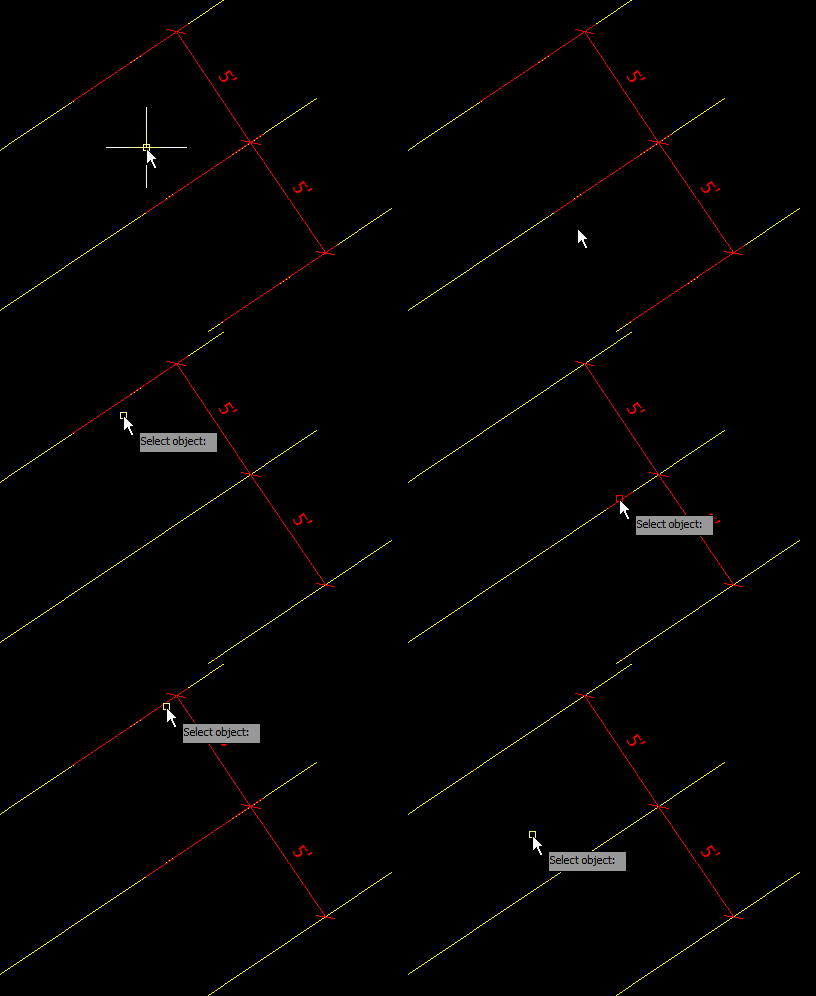
AutoLISP: Dimension Extension Line Toggle

Simple and sweet. This one is one that I use all of the time when I have dimension extension lines that overlap objects in my drawing. Before i found this LISP, I used the properties palette to achieve this. But now, I can do it in a matter of a single click of the mouse.

Here’s how:

  • XLTGL <enter> to start (Extension Line Toggle)
  • Click on the extension lines to toggle off.
  • Click on the dimension nearest the side to turn back on


;; ; XLTGL.LSP, Version 1.01
;;; By Walt Bedinger
;;; 08/14/2010
;;;
;;; This routine toggles dimension extension lines off and on.
;;; To use, select the dimension line toward the end where you want the extension line to be hidden or unhidden.
;;; To exit, pick away from any object.
;;;
;;; Occasionally the routine does not work. As best I tell, entsel isn't reporting a new object if the same point is picked
;;; twice in succession. It probably won't matter unless you are toggling the same dimsnsion line repeatedly just for fun.
;;;
;;; There is no error routine. Not much can go wrong. There is no provision for undoing, either: if you don't like the
;;; result, just pick the same dimension again to change it back. It's quicker and easier than an undo.
;;;
;;; Inspired by the work of Herman Mayfarth and Kent Cooper, published in Cadalyst Magazine as Tips 1572 and 1671
;;;
;;; Main Routine.
(defun C:XLTGL () (XLTGLSEL)) ; All this does is call the object selection subroutine,
; which in turn calls the action subroutine when it's needed.
;;; End of the main routine.
;;; Subroutines
(defun XLTGLSEL (/ obj objName objData pickPoint)
(graphscr)
(while (setq obj (entsel)) ; The routine will remain active so long as the user keeps
(setq objName (car obj) ; picking objects.
objData (entget objName '("ACAD"))
pickPoint (cadr obj)
)
(if (equal "DIMENSION" (cdr (assoc 0 objData)))
(XLTGLACT objName objData pickPoint)
) ; If a dimension was selected,
)
) ; call XLTGLACT.
(defun XLTGLACT (objName objData pickPoint /
distance1 distance2 side hideOverride
extenData extenList flag
)
(setq distance1 (distance pickPoint (cdr (assoc 10 objData)))
; Distance from pickPoint to the 2nd end of the dim line.
distance2 (/ (cdr (assoc 42 objData)) 2)
; Half of the dimension length.
)
(if (> distance1 distance2) ; If the pick point is dead center, this will give a false
(setq side "DIMSE1") ; result; but what are the chances of that?
(setq side "DIMSE2")
)
(setq hideOverride "ON") ; Assume that we want the extension line to be hidden.
; Then check that assumption.
(if (setq extenData (assoc -3 objData))
; If either extension line has previously been hidden,
(progn ; even if it is not hidden now, AutoCAD has appended
(setq extenList (cdadr extenData)); extended data to the object. This section looks at the
(foreach pair extenList ; extended data (if any); and if the extension line is
(if flag ; already hidden it tells the routine to unhide it.
(progn ; In the extended data, a (1070 . 75) or a (1070 . 76)
(setq flag nil) ; dotted pair means that the following dotted pair will
(if (equal (cdr pair) 1)
(setq hideOverride "OFF")
) ; indicate if the hide override is on or off. (1070 . 0)
)
) ; means it is off. (1070 . 1) means it is on. 75 refers to
(if (equal side "DIMSE1") ; extension line 1 and 76 to extension line 2.
(if (and (equal (car pair) 1070) (equal (cdr pair) 75))
(setq flag T)
)
(if (and (equal (car pair) 1070) (equal (cdr pair) 76))
(setq flag T)
)
)
)
)
)
(command ".dimoverride" side hideOverride "" objName "")
; This command does the job of hiding or unhiding.
)
;;; End of Subroutines.
;
(princ) ; Causes the routine to load without fanfare.


Posted in AutoLISP, Dimensions, Modifying, TIPS | 3 Comments

AutoLISP: Split Dimensions

This LISP routine is great for when you place a dimension and forgot to dimension some element in your drawing.

Here’s how:

  • SPLITDIMs <enter> to start
  • Select the dimension that you need to split.
  • Select the object where you’d like to split the dimension from.

(defun c:LegLengthMod ( / ss dimobjs)
;; codehimbelonga KerryBrown@theSwamp 2010.05.28
(vl-load-com)
(if (and (setq ss (ssget '((0 . "DIMENSION"))))
(setq dimobjs (mapcar 'vlax-ename->vla-object
(vl-remove-if 'listp (mapcar 'cadr (ssnamex ss)))
)
)
)
(foreach dim dimobjs
(vla-put-extlinefixedlensuppress dim :vlax-true)
(vla-put-extlinefixedlen dim (* 2 (vla-get-textheight dim)))
)
)
(princ)
)
(defun c:SplitDims (/ sel newpt ent edata elist)
;; codehimbelonga KerryBrown@theSwamp 2010.05.28
(if (and (setq sel (entsel "\nSelect Dimension to Split."))
(setq newpt (getpoint "\Select new Dim Point"))
)
(progn (setq ent (car sel)
edata (entget ent)
elist (vl-remove-if
'(lambda (pair)
(member (car pair)
(list -1 2 5 102 310 300 330 331 340 350 360 410)
)
)
edata
)
)
(entmod (subst (cons 14 newpt) (assoc 14 elist) edata))
(entmakex (subst (cons 13 newpt) (assoc 13 elist) elist))
)
)
(princ)
)
Posted in AutoLISP, Dimensions, Modifying | 1 Comment

How To Use STRETCH

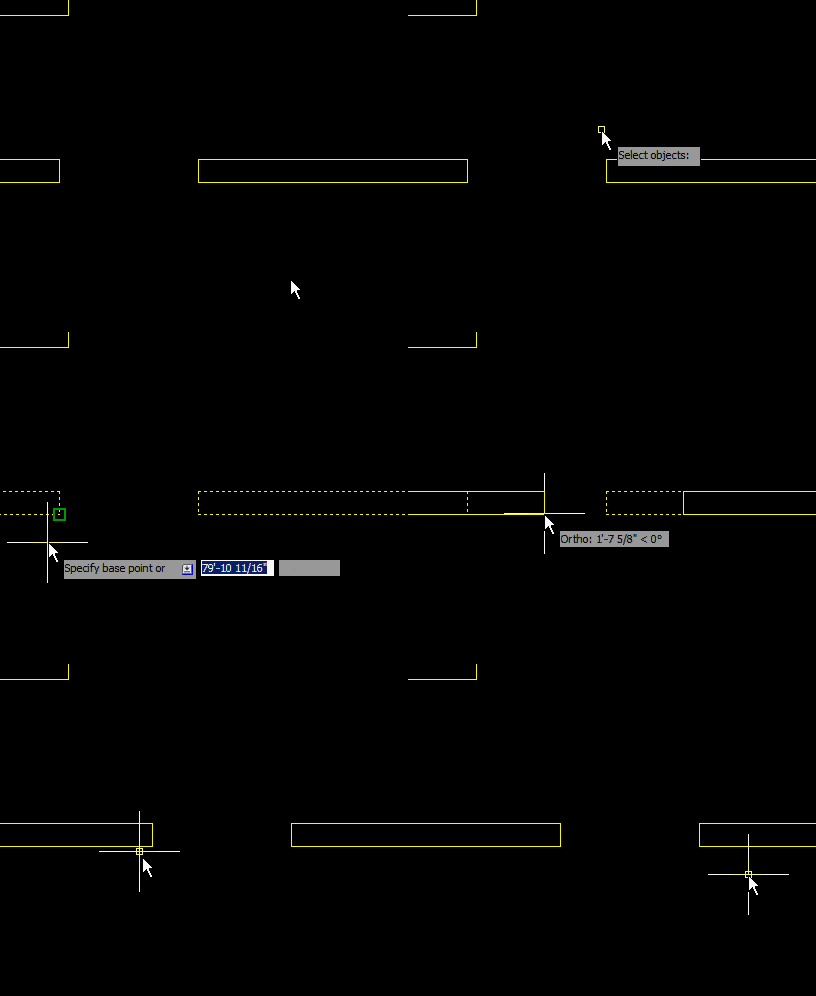
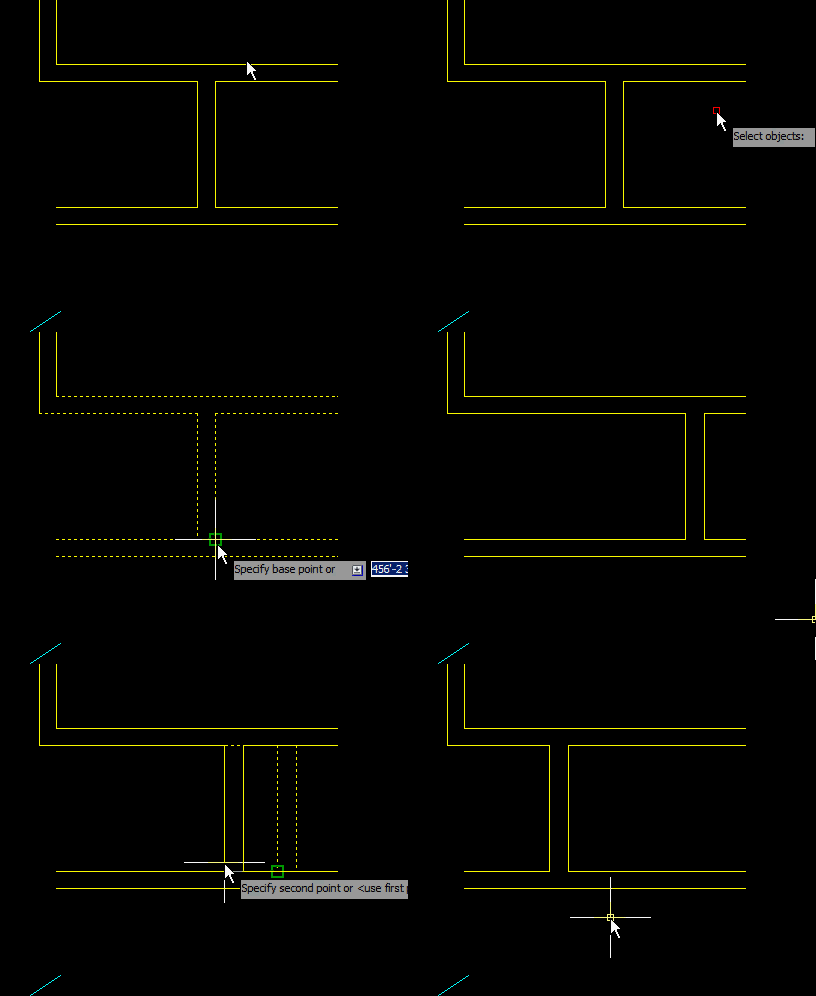
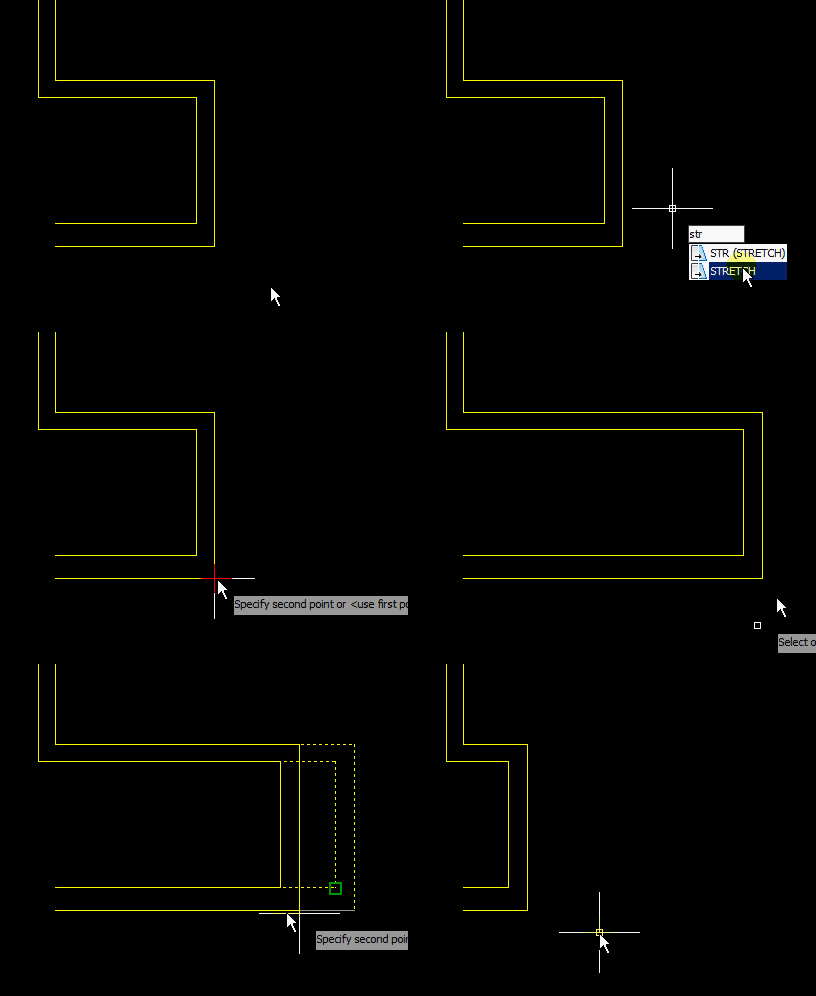
Here is a great tool that is underused and not understood by many. The STRETCH command will allow you to adjust/move objects like a window or door opening without having to do much effort on your part. The hard part is remembering that it requires a “crossing window.”

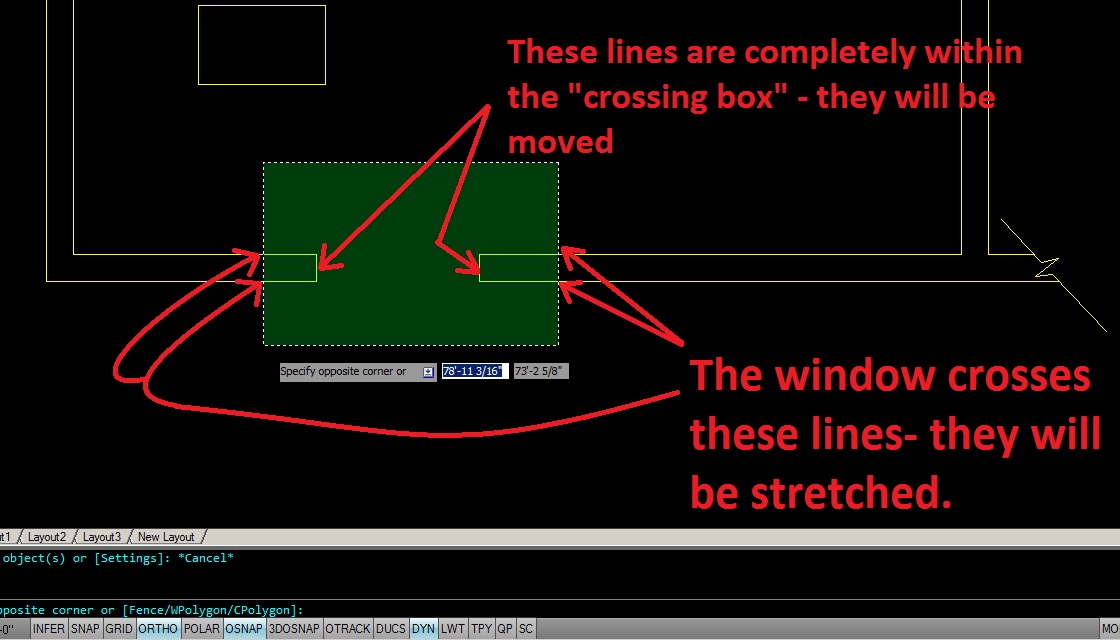
A crossing window is the green selection window that starts at the right side and finishes at the left (as seen below)

Here’s the rule to remember how this tool works. Whatever is completely within the crossing window gets moved. And whatever the crossing window is crossing gets stretched.

If you keep ortho on or are able to snap to something in the desired direction, you will find this tool to be very helpful.

Here’s How:

  • STR <enter> or STRETCH <enter> to start the STRETCH command
  • Select objects using and crossing window (default) or CP <enter> for crossing polygon.
  • You can also use C <enter> to make a crossing window in any direction as explained HERE.
  • Specify a base point anywhere along the direction in which you you plan on stretching.
  • move your cursor in the direction and either click to end or type in a distance.

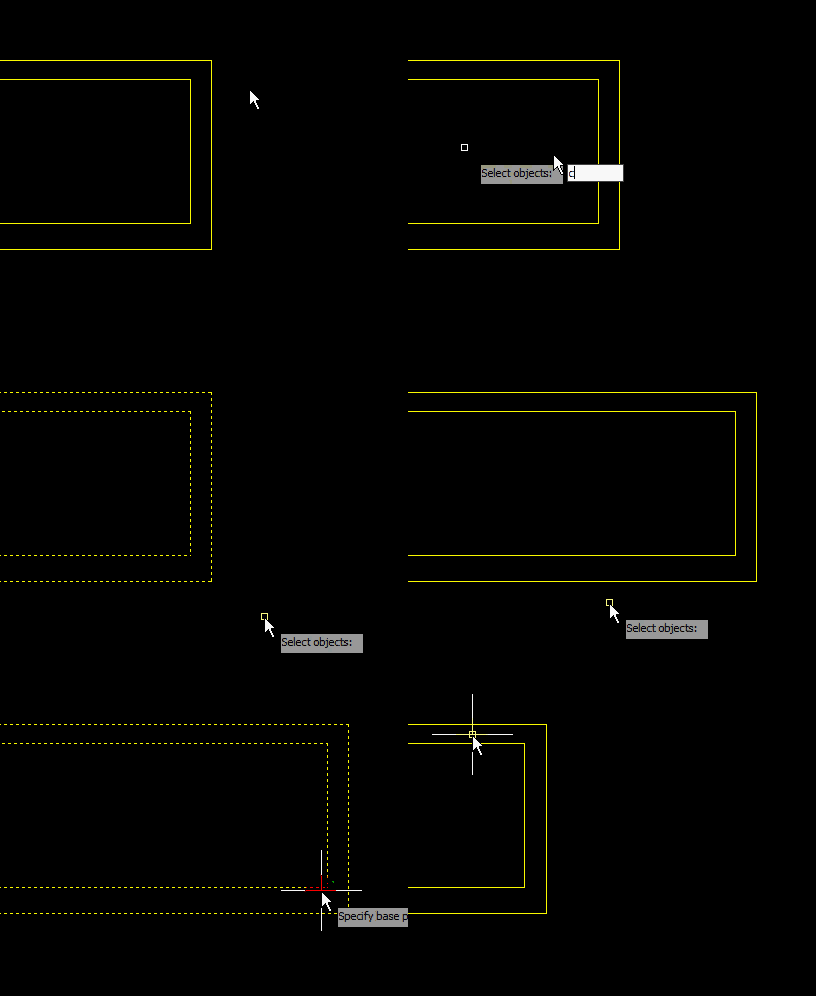
The following animation shows how you can use any number of selection methods when selecting objects as I have mentioned before HERE. Notice that When prompted to “select objects” I enter C <enter> and then now matter which direction the window I make, it is always a “crossing window” (green window).

~Enjoy

Posted in BASICS, Modifying, TIPS | 24 Comments