Plot Color Regardless of .ctb file

https://autocadtips.wordpress.com/2011/12/07/plot-color-regardless-of-ctb-or-stb-file/

Correction. This tip does not override .stb files – sorry for any confusion.

This tip can either be the answer to a problem or a helpful tip that can be applied to a drawing. I stumbled upon this while creating PDFs from a drawing. There was a stubborn layer that wouldn’t plot as Black or a shade of grey even though I specified it to plot using the  “Monochrome” .ctb file.

Anytime you specify a color to an entire layer, individual object(s) or a viewport override, you have the option of using 3 color categories. One of which is called “True Color.” (This is similar to specifying material colors in 3Ds MAX)

Properties override by either the Properties panel on the ribbon or the Properties Palette

A True Color viewport override is applied in the Layers Properties Palette when a viewport is activated.

These “True Colors” don’t seem to play by the rules when plotting. Regardless of the .ctb file that you specify, they will plot their True Color. So if you have some of these True Colors set, you may want to find an equivalent on another tab or hopefully you will be plotting on a black & white plotter.

In the pictures shown below, I show that one layer called “Logo” has its color set as a “True Color.” I did this so that the logo will stand out when I plot.

I then start the Plot dialog (ctrl +P) and after specifying the plotter and page size I set the .ctb file to be “Monochrome.” Notice that in the layout tab, the walls and windows are a red-ish color

The result (in this case, a PDF) shows that the logo is the only object that printed in color thanks to this “True Color” setting.

~Greg
Posted in BASICS, Customization, Layers, Layout, Manage, Modifying, Paper Space, Printing - Plotting, TIPS | 3 Comments

2012 Selectable UCS Icon

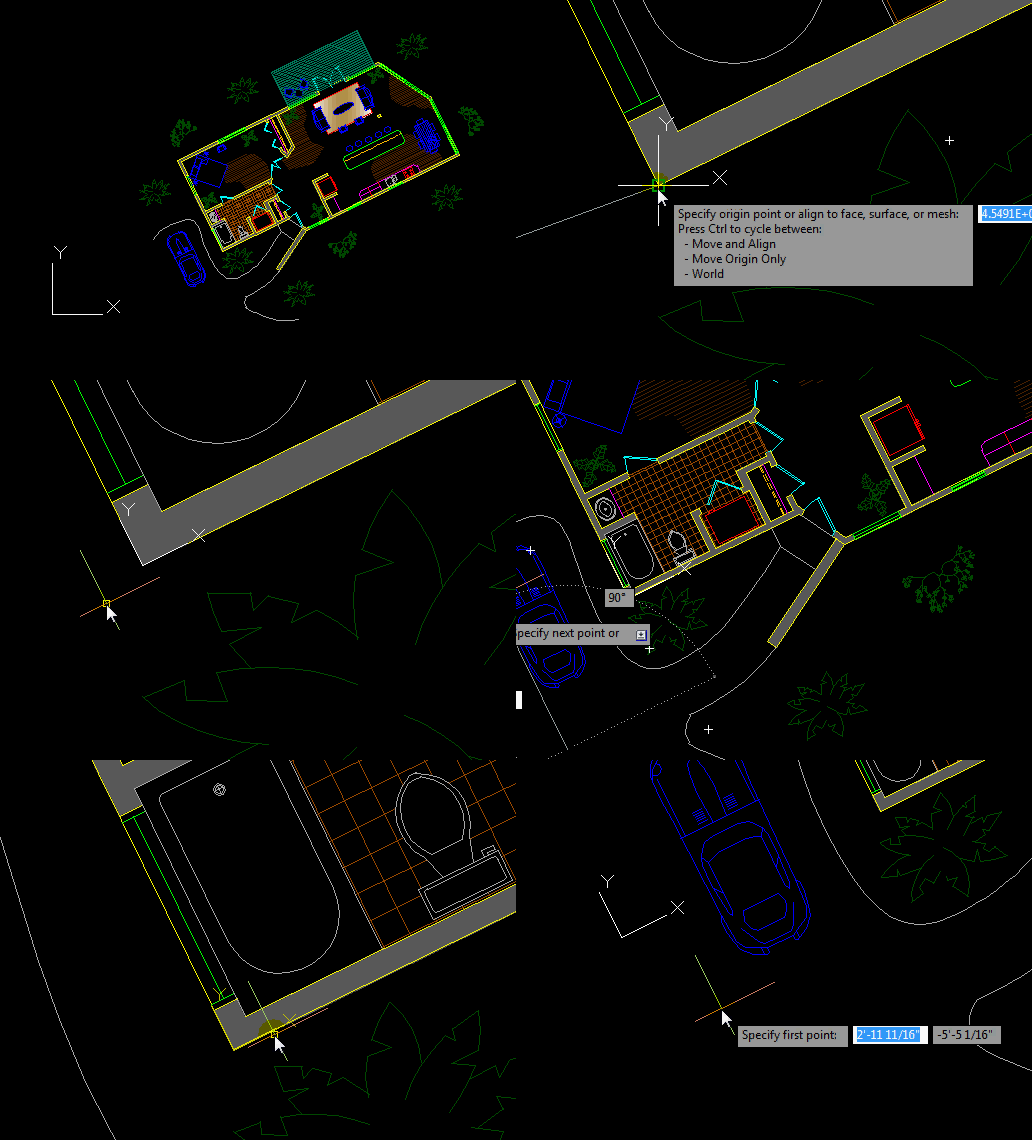
This is a pretty sweet feature for AutoCAD 2012. A selectable UCS icon that is intuitively movable and align-able.

Instead of having to remember the many variatins of the UCS command, you are now able to select and manipulate the UCS icon as if it were an object in your drawing.

This is especially useful for when you have a part of a drawing that is at an odd angle or if you need to align the UCS for drawing/modifying objects in 3D.

Note: I plan on starting a series of blog posts that will introduce the basics of 3D fairly soon.  During these future posts, I will cover the importance of the UCS icon and more of its options.

Here’s how:

  • Select the UCS icon
  • Click the grip that is at its vertex (intersection)
  • Place the vertex of the UCS at its new location
  • If the UCS is still selected, click one of its end points (X axis for example) and place it so that it is aligned in the direction that you want it to be pointing.
  • Then do the same for the Y axis.

To do this in 3D, do the same as above but consider the Z direction.

Posted in BASICS, Customization, Modifying, New in 2012 | 3 Comments

AutoLISP: Point Circle

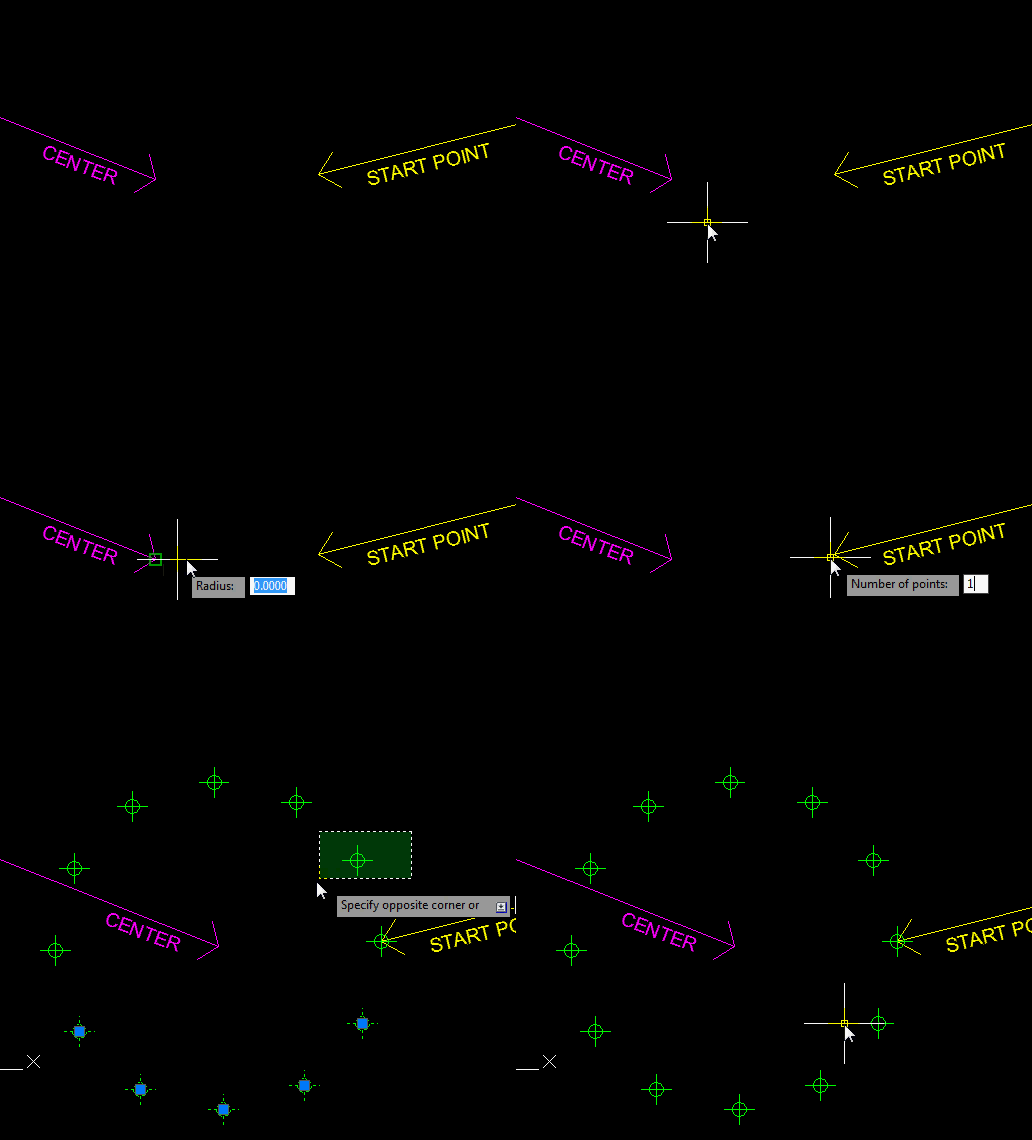
This routine lets you create a circle that is made of AutoCAD Point entities. A great feature of this routine is that it lets you determine the starting point where the first point will be placed.

Here’s how:

Set the Point Type to a points size and type that is visible by using the DDPTYPE command.

  • PCIRC <enter> to start
  • Specify the center point for the circle
  • Specify the radius (note: there is NO option to specify a diameter…)
  • Specify the Starting Point. This is where the first point will be placed
  • Specify the number of points that you want the “circle” to be made of.

(vl-load-com)
(defun c:pcirc (/ p r u n c lst param delta)
(if
(and
(setq p (getpoint "\nCenter point: "))
(setq r (getdist p "\nRadius: "))
(setq u (getangle p "\nStart angle: "))
(setq n (getint "\nNumber of points: "))
(setq c (entmakex (list '(0 . "CIRCLE") (cons 10 p) (cons 40 r)))
)
)
(progn
(setq lst
(mapcar
'(lambda (x) (vlax-curve-getPointAtParam c x))
(repeat n
(setq param
(cons
(+ (cond ((car param))
((- u (setq delta (/ (* 2. pi) n))))
)
delta
)
param
)
)
)
)
)
(entdel c)
(mapcar '(lambda (x) (entmakex (list '(0 . "POINT") (cons 10 x)))) lst)
)
)
(princ)
)
Posted in AutoLISP, AutoLISP: Creating | Leave a comment

Auto Load Your Lisp Files (& others)

I was fortunate enough to attend Autodesk university this week. There were many things that I learned but one thing I learned was from a class that I did not attend. A friend attended a class and and learned this awesome tip from this class. He told me and now I am happy to say that IT WORKS!!!!

What is this tip? It is very simple – there is a folder that is included in AutoCAD 2012. This folder can contain any custom routine – LISP, .NET, ObjectARX, VBA…

After being placed in this folder, AutoCAD will automatically load it for you. So instead of using the commands NETLOAD or APPLOAD and then searching for your lisp file or .dll, it is automatically loaded and ready to be used without having to do anything but simply placing the routine in the folder. How cool is that?

The following is where the folder is located:
Computer>C:>Users>(username)>AppData>Roaming>Autodesk>ApplicationPlugins

Notice that there are folders already in this location. These are plugins that I loaded from the “App Store” that is available in AutoCAD 2012. And this folder is where these plugins are stored and thus auto-loaded as well.

Below is a routine that I simply copied into this folder and then opened AutoCAD. After AutoCAD started, I simply ran the command and it works as if it was a native AutoCAD command.

The Routine shown in this example can be found here.

Note: I am using this for LISP routines only for now.

Posted in AutoLISP, Customization, New in 2012 | 9 Comments

AutoLISP: Merge Hatches Join Hatches

I didn’t know how useful this LISP routine was until I saw it posted over at the swamp.org. At my previous job, I would receive drawing that were contained too many hatches and some hatches were not hatched correctly. So I would end up deleting all of the hatches and then turn the lines that formed the hatch boundary into polylines. I would then hatched the newly formed polyline using a consistent hatch.

Well, with this routine, I would no longer have to delete any hatches or join any lines.

Here’s how:

  • MH <enter> to start Merge Hatch
  • Select an existing hatch pattern in the drawing to specify what hatch to use.
  • Select all of the hatches that you want to be merged into one hatch. (Note: Even though you already selected a hatch to specify what pattern to use, you need to select that hatch again so that it is included in the selection set)
  • <enter> to finish selecting

That’s it.

;; © Juan Villarreal 11.20.2011 ;;
;; massoc (Jaysen Long) ;;
;; Minor Modification by Jvillarreal ;;
;; Extracts info from list by key ;;
;; Found @ http://www.theswamp.org/index.php?topic=40149.0
(defun massoc (key alist / x nlist)
(foreach x alist
(if
(eq key (car x))
(setq nlist (cons x nlist))
)
)
(reverse nlist)
);defun
(defun c:MergeHatch ( / hentinfo ss i ent ent# seedpt# entinfo entinfo2 ent# seedpt# seedpts MergedHatchList)
(while (/= (cdr (assoc 0 hentinfo)) "HATCH")
(setq hentinfo (car (entsel "\nSelect Hatch Pattern to use:")))
(If hentinfo (setq hentinfo (entget hentinfo)) (princ "\nMissed. Try again.")))
(while (not ss) (princ "\nSelect hatch entities to merge:")(setq ss (ssget '((0 . "HATCH")))))
(setq MergedHatchList
(list (cons 0 "HATCH")
(cons 100 "AcDbEntity")
(assoc 8 hentinfo)
(cons 100 "AcDbHatch")
(assoc 10 hentinfo)
(assoc 210 hentinfo)
(assoc 2 hentinfo)
(assoc 70 hentinfo)
(assoc 71 hentinfo)
(cons 91 (sslength ss))
) i -1 seedpt# 0 ent# 0)
(repeat (sslength ss)
(setq n -1
entinfo (entget (ssname ss (setq i (1+ i))))
entinfo2 (member (assoc 92 entinfo) entinfo)
entinfo2 (reverse (cdr (member (assoc 75 entinfo2)(reverse entinfo2))))
ent# (+ ent# (cdr (assoc 91 entinfo)))
seedpt# (+ seedpt# (cdr (assoc 98 entinfo)))
seedpts (append seedpts (cdr (member (assoc 98 entinfo) entinfo)))
MergedHatchList (append MergedHatchList entinfo2)
)
(entdel (ssname ss i))
)
(setq MergedHatchList (subst (cons 91 ent#)(assoc 91 MergedHatchList) MergedHatchList)
MergedHatchList
(append MergedHatchList
(append
(reverse (cdr (member (assoc 98 hentinfo)(reverse (member (assoc 75 hentinfo) hentinfo)))))
(cons (cons 98 seedpt#) seedpts))))
(if (= (cdr (assoc 71 hentinfo)) 1)(setq MergedHatchList (append MergedHatchList '((-3 ("ACAD" (1010 0.0 0.0 0.0)))))))
(entmake MergedHatchList)
(setq ent (entlast))
(if (= (cdr (assoc 71 hentinfo)) 1)
(mapcar
'(lambda (x / entlist)
(setq entlist (entget (cdr x)))
(entmod (subst (cons 330 ent) (assoc 330 entlist) entlist))
)
(massoc 330 MergedHatchList)
)
)
)
(defun c:MH () (c:MergeHatch))
Posted in AutoLISP, AutoLISP: Creating, AutoLISP: Modify, Hatch, Modifying, Uncategorized | 4 Comments

AutoLISP: Align Attributes

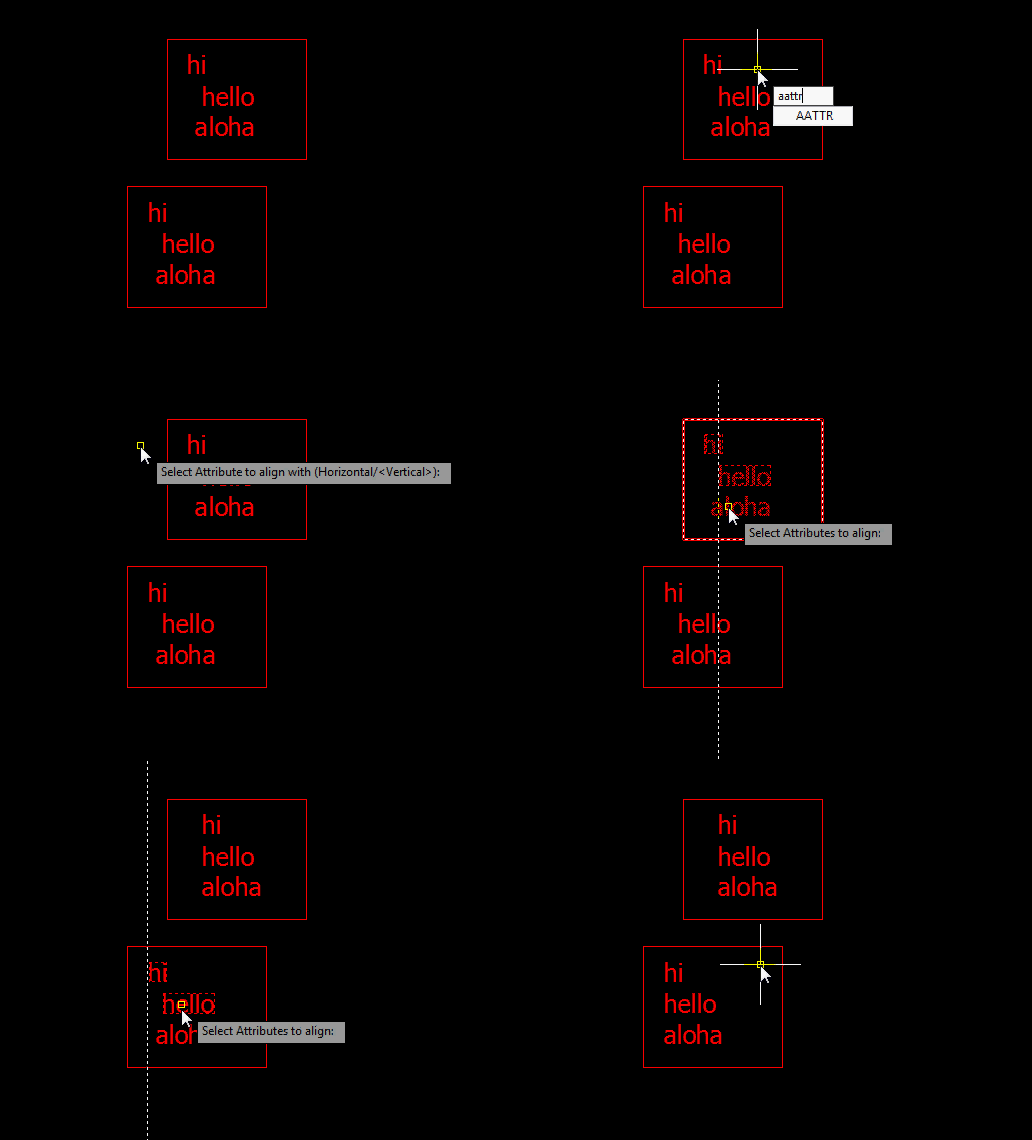
Here is a simple yet helpful LISP routine that will let you align you attributes after they have been added to a block. It allows you to align them either vertically (up & down) or vertically (side-to-side). Note: This routine only aligns attributes one block at a time, even if you have multiple versions of that block in the drawing.

Here’s how:

  • AATTR <enter> to start “Align ATTRibutes”
  • Select the Attribute that you want the others to be aligned to
  • Select the other attributes that need to be aligned

~enjoy

;*
;* AlignAttr.lsp
;*
;* Written by: Steve Kemp
;*
;* This routine will allow the user to align attributes on either Vertically or Horizontally on either the same block or different block
;* in the active drawing.
;*
;* THIS AUTOLISP ROUTINE IS PROVIDED 'AS IS' AND WITH ALL FAULTS.
;* THE OPERATION OF THIS ROUTINE IS NOT GUARANTEED IN ANY WAY TO BE ERROR FREE.
;*
;* To run this routine, type in AATTR at the command prompt.  You will be asked 'Select Attribute to align with'  this will be the 'master'
;* attribute that all other attributes will align with.  You will also be able to switch between Vertical (default) or Horizontal alignment
;* at this time.
;*
;* After selecting the 'master' attribute, you will be prompted 'Select Attributes to align'.  This will allow you to select multiple attribute
;* to align with the 'master' attributes insertion point.
;*
;*
;* NOTE: This routine does not work with 'ALIGN' or 'FIT' justified attributes and the routine will exit if one of these types is selected.
;*
(setvar 'cmdecho 0)
(defun c:AAttr (/ TextJust ParentAttr  ChildAttrList TempAttr TempData TempInsPt TempAdPt NewInsPt NewAdPt BlkEntName AttrOrientation AttrData AttrInsPt AttrAdPt AttrHeight GuideLineLen GuideLineStartPt GuideLineEndPt x )
   (command ".undo" "BE")
   (setq
      CurErr *error*
      *error* AAttrErr  ;* Redefine the error function
      ParentAttr  "Vertical"
      tempAttr T
   )
   (while (or (= ParentAttr "Vertical") (= ParentAttr "Horizontal"))
      (initget "Horizontal Vertical")
      (if (= ParentAttr "Vertical")
         (setq
            ParentAttr (nentsel "\nSelect Attribute to align with (Horizontal/<Vertical>): ") ;* Select Master Attribute
            AttrOrientation "Vertical"
         )
         ;else
         (setq
            ParentAttr (nentsel "\nSelect Attribute to align with (Vertical/<Horizontal>): ") ;* Select Master Attribute
            AttrOrientation "Horizontal"
         )
      )
   )
   (if (/= ParentAttr nil)
      (progn
         (setq
            AttrData (entget (car ParentAttr))
         )
         (if (= (cdr (assoc 0 AttrData)) "ATTRIB")  ;* Make sure entity selected was an attribute
            (progn
               ;*
               ;* If this is Align or Fit justified text, exit since these are non-supported justifications
               ;*
               (if (or (= (GetTextJust AttrData) "Align") (= (GetTextJust AttrData) "Fit"))
                  (progn
                     (alert "Unsupported attribute justification.\nAlign and Fit justifications not supported")
                     ;*
                     ;* Redefine the error function back to original
                     ;*
                     (setq
                        *error* CurErr
                        CurErr nil
                     )
                     (command ".undo" "E")
                     (redraw)
                     (exit)
                  )
               )
               ;*
               ;* Draw highlight box around selected attribute
               ;*
               (DrawBox AttrData)
               (setq
                  AttrInsPt (cdr (assoc 11 AttrData)) ;* This is the user selected insertion point, if middle justified, then this is the middle of the text.  If left justified, then this is all zeros
                  AttrAdPt (cdr (assoc 10 AttrData)) ;* This is the Acad adjusted point (attr starting point, alway the lower left of text even on justifications like Middle).
                  AttrHeight (cdr (assoc 40 AttrData))
                  GuideLineLen (* 25 AttrHeight)
               )
               ;*
               ;* If this is lower left justtified text, then use the AttrAdPt for both AttrInsPt and AttrAdPt because in Left justified text, the
               ;* AttrInsPt value will be all zeros
               ;*
               (if (= (GetTextJust AttrData) "Left")
                  (setq
                     AttrInsPt AttrAdPt
                  )
               )
               ;*
               ;* Draw guide line
               ;*
               (if (= AttrOrientation "Vertical")
                  (progn
                     (setq
                        GuideLineStartPt (list (car AttrInsPt) (+ (cadr AttrInsPt) GuideLineLen))
                        GuideLineEndPt (list (car AttrInsPt) (- (cadr AttrInsPt) GuideLineLen))
                     )
                     (grdraw GuideLineStartPt GuideLineEndPt -1 1)
                  )
                  ;else Horizontal
                  (progn
                     (setq
                        GuideLineStartPt (list (- (car AttrInsPt) GuideLineLen) (cadr AttrInsPt))
                        GuideLineEndPt (list (+ (car AttrInsPt) GuideLineLen) (cadr AttrInsPt))
                     )
                     (grdraw GuideLineStartPt GuideLineEndPt -1 1)
                  )
               )
               ;*
               ;* Select all attributes to align with the parent selected above and add the attribute entname and the block
               ;* entname to a list in format ( (AttrEntName BlkEntName) (AttrEntName BlkEntName) (AttrEntName BlkEntName) )
		(setq ChildAttrList (catchwindow))
;;;               (while (/= TempAttr nil)
;;;                  (setq
;;;                     TempAttr (nentsel "\nSelect Attributes to align: ")
;;;                  )
;;;                  (if (/= TempAttr nil)
;;;                     (progn
;;;                        (setq
;;;                           TempData (entget (car TempAttr))
;;;                        )
;;;                        (if (= (cdr (assoc 0 TempData)) "ATTRIB")  ;* Make sure entity selected was an attribute
;;;                           ;*
;;;                           ;* If this is Align or Fit justified text, skip this attribute since these are non-supported justifications
;;;                           ;*
;;;                           (if (or (= (GetTextJust TempData) "Align") (= (GetTextJust TempData) "Fit"))
;;;                              (alert "Unsupported attribute justification.\nAlign and Fit justifications not supported")
;;;                              ;else
;;;                              (progn
;;;                                 (setq
;;;                                    BlkEntName (ssname (ssget (cadr TempAttr)) 0)
;;;                                    ChildAttrList (cons (list (car TempAttr) BlkEntName) ChildAttrList)
;;;                                 )
;;;                                 ;*
;;;                                 ;* Draw highlight box around selected attribute
;;;                                 ;*
;;;                                 (DrawBox TempData)
;;;                              )
;;;                           )
;;;                        )
;;;                     )
;;;                  )
;;;               )
               ;*
               ;* Step through all the attributes to align with the parent and align them
               ;*

               (foreach x ChildAttrList
                  (setq
                     TempData (entget (car x))
                     TempInsPt (assoc 11 TempData)
                     TempAdPt (assoc 10 TempData)
                     TextJust (GetTextJust TempData)
                  )
                  ;*
                  ;* If Vertical allignment, then make the X value of TempInsPt and TempAdPt match the X value of AttrInsPt and AttrAdPt
                  ;*
                  (if (= AttrOrientation "Vertical")
                     ;*
                     ;* This might seem weird, but if the attribute to align is Left justified, I need to use the AttrInsPt (user selected point)
                     ;* in the calculation of the NewAdPt since the AttrInsPt was the actual user selected point and that is the one I want
                     ;* to align with.  Also I only need to set the NewAdPt since the NewInsPt (dxf 11) is not used when left justified.
                     ;*
                     (if (= TextJust "Left")
                        (setq
                           NewAdPt (cons (car AttrInsPt) (cddr TempAdPt))
                           NewAdPt (cons 10 NewAdPt)
                        )
                        ;else
                        (setq
                           NewInsPt (cons (car AttrInsPt) (cddr TempInsPt))
                           NewInsPt (cons 11 NewInsPt)
                           NewAdPt (cons (car AttrAdPt) (cddr TempAdPt))
                           NewAdPt (cons 10 NewAdPt)
                        )
                     )
                     ;else Horizontal
                     ;*
                     ;* This might seem weird, but if the attribute to align is Left justified, I need to use the AttrInsPt (user selected point)
                     ;* in the calculation of the NewAdPt since the AttrInsPt was the actual user selected point and that is the one I want
                     ;* to align with.  Also I only need to set the NewAdPt since the NewInsPt (dxf 11) is not used when left justified.
                     ;*
                     (if (= TextJust "Left")
                        (setq
                           NewAdPt (cons (cadr TempAdPt) (cdr AttrInsPt))
                           NewAdPt (cons 10 NewAdPt)
                        )
                        ;else
                        (setq
                           NewInsPt (cons (cadr TempInsPt) (cdr AttrInsPt))
                           NewInsPt (cons 11 NewInsPt)
                           NewAdPt (cons (cadr TempAdPt) (cdr AttrAdPt))
                           NewAdPt (cons 10 NewAdPt)
                        )
                     )
                  )
                  ;*
                  ;* Update the alignment of the attribute.  If the attribute is lower left justified, then only update the Acad adjusted point (dxf 10)
                  ;* if any other justification update both the attr insertion point and the Acad adjusted point
                  ;*
                  (if (= TextJust "Left")
                     (setq
                        TempData (subst NewAdPt TempAdPt TempData)
                     )
                     ;else
                     (setq
                        TempData (subst NewInsPt TempInsPt TempData)
                        TempData (subst NewAdPt TempAdPt TempData)
                     )
                  )
                  (entmod TempData)
                  (entupd (cadr x))
               )
            )
         )
      )
   )
   ;*
   ;* Redefine the error function back to original
   ;*
   (setq
      *error* CurErr
      CurErr nil
   )
   (command ".undo" "E")
   (redraw)
   (princ)
)
;*
;* Function to draw highlight box around the selected attribute
;*
(defun DrawBox ( Ent / )
   ;*
   ;* Set the USC to the selected entity so the box gets drawn corectly
   ;*
   (command ".ucs" "Entity" (cdr (assoc -1 Ent)))
   (setq
      GblUcsChg T
      TextBoxPts (textbox Ent)
      LowerLeft (car TextBoxPts)
      UpperRight (cadr TextBoxPts)
      UpperLeft (list (car LowerLeft) (cadr UpperRight) 0.0)
      LowerRight (list (car UpperRight) (cadr LowerLeft) 0.0)
   )
   (grvecs (list -1 UpperLeft UpperRight -1 UpperRight LowerRight -1 LowerRight LowerLeft -1 LowerLeft UpperLeft))
   ;*
   ;* Set the USC back to its previous setting
   ;*
   (command ".ucs" "P")
   (setq
      GblUcsChg nil
   )
)
;*
;* Function to return justification of atribute of it is lower Left, Align of Fit.  These justifications are special cases.
;*
(defun GetTextJust ( EntData / Ret )
   (cond
         ((and (= (cdr (assoc 72 EntData)) 0) (= (cdr (assoc 74 EntData)) 0))
            (setq Ret "Left")
         )
         ((and (= (cdr (assoc 72 EntData)) 3) (= (cdr (assoc 74 EntData)) 0))
            (setq Ret "Align")
         )
         ((and (= (cdr (assoc 72 EntData)) 5) (= (cdr (assoc 74 EntData)) 0))
            (setq Ret "Fit")
         )
         (setq Ret nil)
   )
   (setq Ret Ret)
)
;*
;* My Error handler
;*
(defun AAttrErr (msg)
   (redraw)
   ;*
   ;* If an error happened in while the UCS was changed to draw the box around the attribute, set the UCS back to previou setting
   ;*
   (if GblUcsChg
      (progn
         (command ".ucs" "P")
         (setq
            GblUcsChg nil
         )
      )
   )
   ;*
   ;* Redefine the error function back to original
   ;*
   (setq
      *error* CurErr
      CurErr nil
   )
   (command ".undo" "E")
   (princ "\n")
   (princ msg)
)

(defun catchwindow ( / Inside-p _HiLow of blks atlist )(vl-load-com)
;;;	 pbe Oct 17 2012	;;;  
(defun Inside-p (a b c)
;;; http://mathforum.org/library/drmath/view/54386.html ;;;
;;; (.5)(x1*y2 - y1*x2 -x0*y2 + y0*x2 + x0*y1 - y0*x1)	;;;
	 (* (- (+ (+ (- (- (* (car b) (cadr c)) (* (cadr b) (car c)))
		     (* (car a) (cadr c))
		  )  (* (cadr a) (car c))
	       ) (* (car a) (cadr b))
	    ) (* (cadr a) (car b))
	 ) 0.5)
  )
(defun _HiLow  (lev lev2 lst)
      (list (apply lev (mapcar 'car lst))
            (apply lev2 (mapcar 'cadr lst))
            ))     
(setq atlist nil)  
  (while (progn (princ "\nSelect Objects: ")
    (if (and (setq fc (getpoint))
		 (setq oc (getcorner  fc " Specify opposite corner:"))
		 (setq blks (ssget "C" fc oc '((0 . "INSERT")(66 . 1)))))
      	(progn
	  (setq pts (list (_hilow 'min 'min (setq lst (list fc oc)))
		      (_hilow 'max 'min lst)(_hilow 'max 'max lst)
		      (_hilow 'min 'max lst)))
	  	(repeat (sslength blks)
		  	 (setq at_ (entnext (setq prnt (ssname blks 0))))
			     (while (not (eq (setq etyp (cdr (assoc 0 (setq e (entget at_))))) "SEQEND"))
			        (if (eq etyp "ATTRIB") (progn
				 (setq pt (cdr (assoc 10 e)))	
				 (if (not (vl-some '(lambda (k) (minusp k))
					   (mapcar '(lambda (j)
						      (Inside-p (car j) (cadr j) pt))
						   (mapcar '(lambda (q w)
							      (list q w) ) pts
							   (append (cdr pts) (list (car pts)))
							   ))))
					  (setq atlist (cons (list at_ prnt) atlist)
						box (DrawBox  (entget at_)) ))
				 	)
				  ) 
			       (setq at_ (entnext at_))
			       )
		  (ssdel  prnt blks)
		  ))))
    		)
		atlist
  	)

(princ "\nTo run the command, type in: AATTR")
Posted in Attributes, AutoLISP, AutoLISP: Attributes, AutoLISP: Blocks, Blocks, Modifying | 1 Comment

AutoLISP: Text Calculator by LM

Last Spring, I asked Lee Mac for a program to help me with my job at the time and he delivered. You can find the program here.

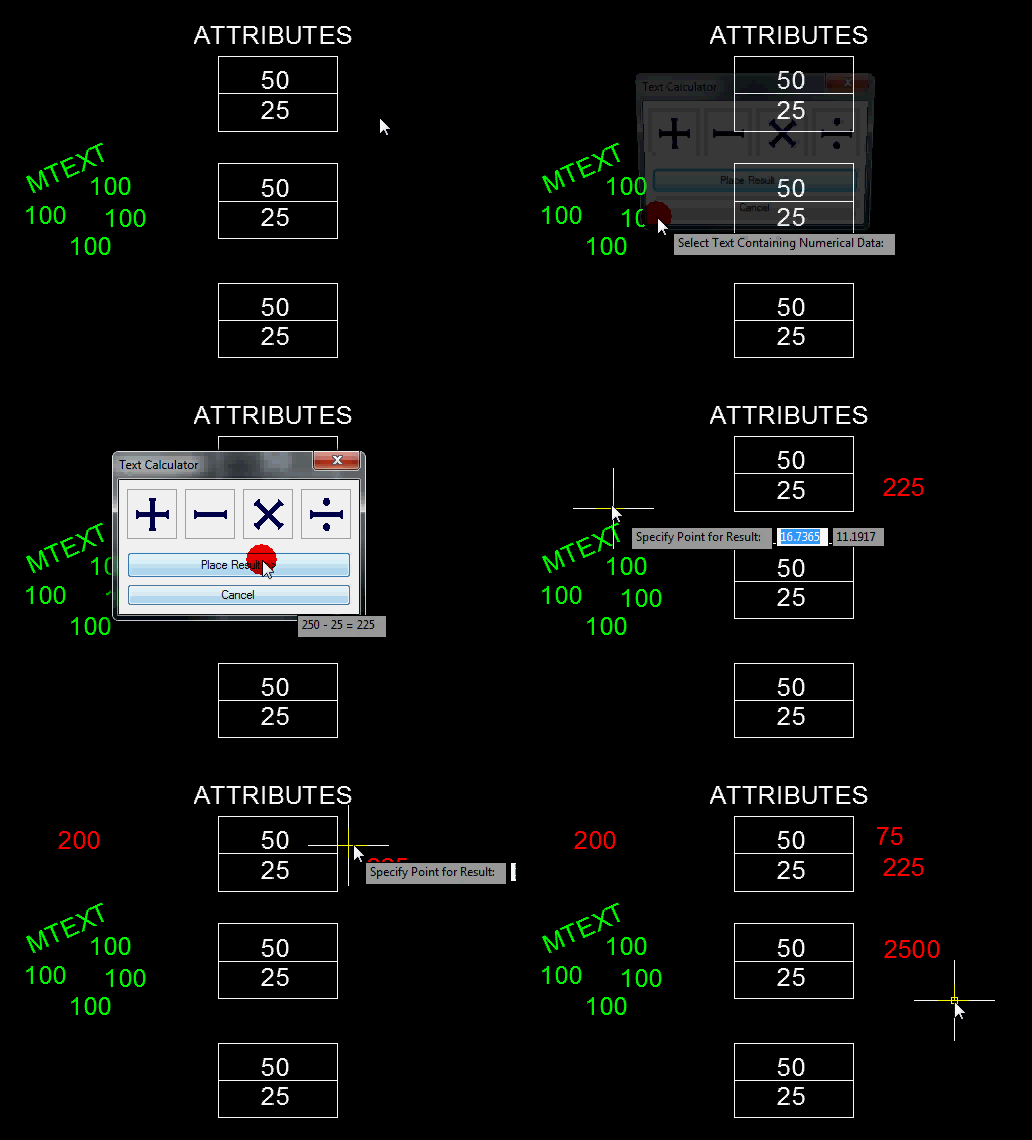
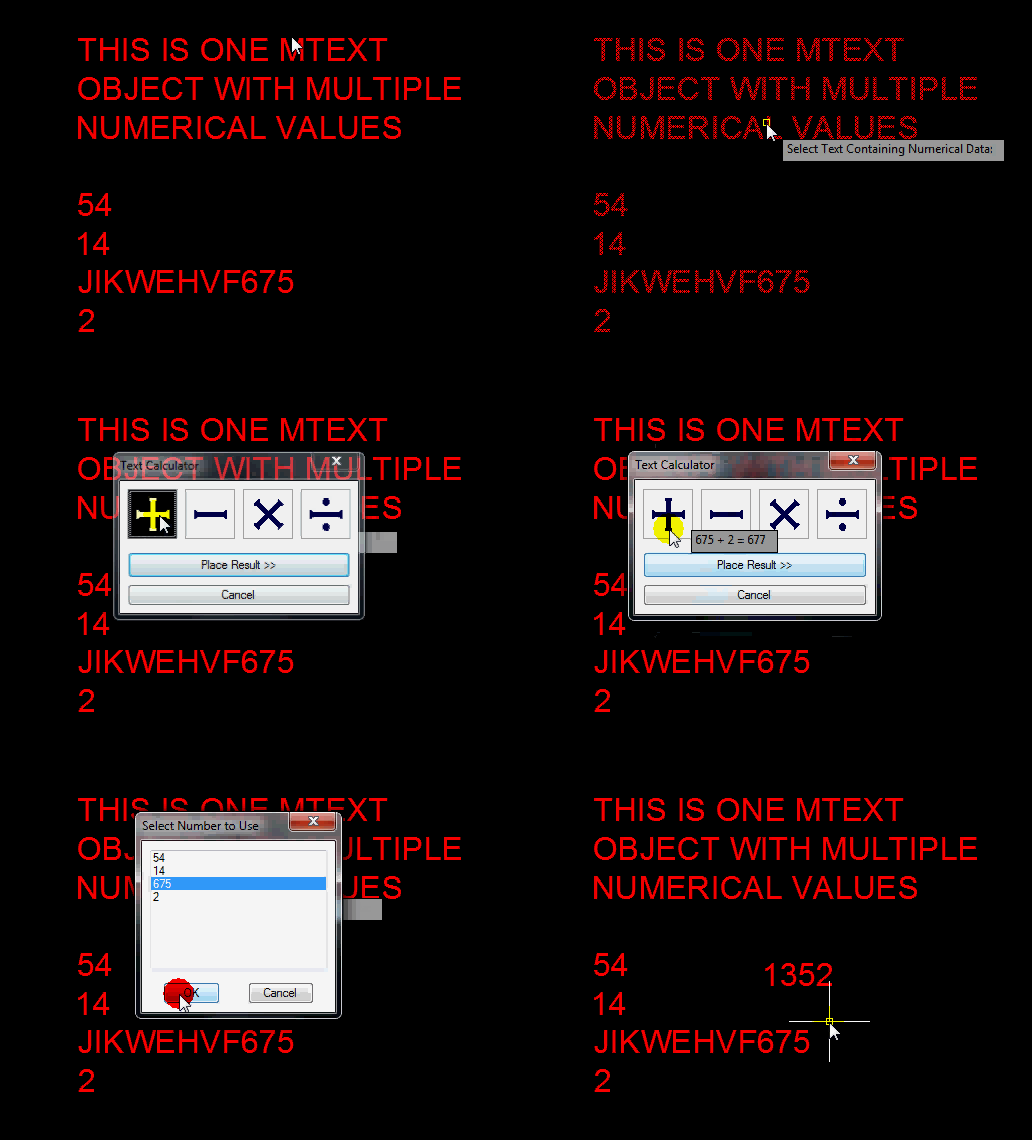
What it does is allow you to select various text objects whether they be DTEXT, MTEXT, Attributes… and then a simplified graphical calculator appears that lets you select a mathematical function (Add, Subtract, Multiply, Divide). then you select the next numerical text object and so on… When you are finished, you can place the total of the mathematical functions as a text object.

TC <enter> to start

The original source code can be found [here]. It is better to redirect you to the source code in case there are any updates, changes or improvements to the Lisp routine at Lee’s site, it is just easier to keep track of.

http://www.lee-mac.com/textcalculator.html

Posted in Attributes, AutoLISP, AutoLISP: Attributes, AutoLISP: Text, Blocks, Text, TIPS | 2 Comments

AutoLISP: Make a Real Rectangle

A long time ago, AutoCAD used to make Rectangles and polygons as their own entities. When you made a rectangle and then did a LIST <enter> on it, it would show as a rectangle. Nowadays, these objects are those objects in their geometry but are made of polyline entities. So modifying these objects is sometimes hard. that’s where this routine steps in to help.

This routine lets you create a rectangle and even after you continue working elsewhere in your drawing, you can come back to that rectangle and modify that object and it acts like how rectangles used to act in AutoCAD.

Here’s how:

  • TREC <enter> to start “True RECtangle”
  • Create a rectangle how you normally create one
  • When needed, this routine will let you drag a single corner and the rest of the rectangle’s geometry will adjust accordingly to keep its geometry as a rectangle.

~enjoy

(vl-load-com)
;; Version 1.08
(setq *gc:rectangleCommandReactor*
nil
*gc:rectangleLispReactor*
nil
*gc:rectangleCopied*
nil
*gc:rectangleModified*
nil
)
;;===================== COMMANDS =====================;;
;; TREC (c) Gilles Chanteau
;; Creates a 'true rectangle' polyline
(defun c:TREC (/ pt rec)
(and
(setvar 'cmdecho 0)
(vl-cmdf "_.rectangle" "_fillet" 0.0)
(vl-cmdf)
(setvar 'cmdecho 1)
(setq pt (getpoint "\nSpecify the first corner: "))
(vl-cmdf "_.rectangle" pt)
(while (/= 0 (getvar 'cmdactive))
(vl-cmdf pause)
)
(gc:IsRectangle (setq rec (vlax-ename->vla-object (entlast))))
(gc:addRectangleReactor rec)
)
(princ)
)
;; PL2REC (c) Gilles Chanteau
;; Converts a rectangular polyline into a 'true rectangle'
(defun c:PL2REC (/ rec)
(if (and
(setq rec (car (entsel "\nSelect a rectangle: ")))
(gc:IsRectangle (setq rec (vlax-ename->vla-object rec)))
(null
(vl-member-if
(function
(lambda (rea)
(and (equal rec (car (vlr-owners rea)))
(member '(:VLR-modified . GC:RECTANGLEMODIFIED)
(vlr-reactions rea)
)
)
)
)
(cdr (assoc :VLR-Object-Reactor (vlr-reactors)))
)
)
)
(gc:addRectangleReactor rec)
(princ "\nInvalid entity.")
)
(princ)
)
;; REC2PL (c) Gilles Chanteau
;; Converts back a 'true rectangle' into a polyline
(defun c:REC2PL (/ rec)
(sssetfirst)
(if (and
(setq rec (car (entsel "\nSelect a rectangle: ")))
(setq rec (vlax-ename->vla-object rec))
)
(foreach rea (cdr (assoc :VLR-Object-Reactor (vlr-reactors)))
(if (and (equal rec (car (vlr-owners rea)))
(member '(:VLR-modified . GC:RECTANGLEMODIFIED)
(vlr-reactions rea)
)
)
(vlr-remove rea)
)
)
)
(princ)
)
;;===================== SUB ROUTINES =====================;;
;; gc:2dVariantToPointsList (gile)
;; Returns a 2d points list
;;
;; Argument : a variant as returned by vla-get-Coordinates
(defun gc:2dVariantToPointsList (var / foo)
(defun foo (lst)
(if lst
(cons (list (car lst) (cadr lst)) (foo (cddr lst)))
)
)
(foo (vlax-safearray->list (vlax-variant-value var)))
)
;; gc:2dPointsListToVariant (gile)
;; Returns a 2d coordinates variant
;;
;; Argument : a 2d points list
(defun gc:2dPointsListToVariant (lst)
(vlax-make-variant
(vlax-safearray-fill
(vlax-make-safearray
vlax-VbDouble
(cons 0 (1- (* 2 (length lst))))
)
(apply 'append lst)
)
)
)
;;; gc:GetItem (gile)
;;; Returns a vla-object if item exists in the collection
;;;
;;; Arguments
;;; col : the collection (vla-object)
;;; name : the item name (string) or its index (integer)
;;;
;;; Return : the vla-object or nil
(defun gc:GetItem (col name / obj)
(vl-catch-all-apply
(function (lambda () (setq obj (vla-item col name))))
)
obj
)
;;; gc:HandleToObject (gile)
;;; Returns the VLA-OBJECT corresponding to the handle if not erased
;;; Argument
;;; handle : the object handle
;;;
;;; Return : the vla-object or nil
(defun gc:HandleToObject (handle / obj)
(vl-catch-all-apply
(function
(lambda ()
(setq obj (vla-HandleToObject
(vla-get-ActiveDocument (vlax-get-acad-object))
handle
)
)
)
)
)
obj
)
;; gc:IsRectangle (gile)
;; Evaluates if a polyline is rectangular
;;
;; Argument : an entity (ename ou vla-object)
(defun gc:IsRectangle (ent / elst pts p1 p2 p3 p4)
(or (= (type ent) 'VLA-OBJECT)
(setq ent (vlax-ename->vla-object ent))
)
(and
(= (vla-get-ObjectName ent) "AcDbPolyline")
(setq pts (gc:2dVariantToPointsList (vla-get-Coordinates ent)))
(= 4 (length pts))
(= (vla-get-Closed ent) :vlax-true)
(vl-every '(lambda (x) (zerop x))
(mapcar '(lambda (p) (vla-GetBulge ent p)) '(0 1 2 3))
)
(mapcar '(lambda (v p) (set v p)) '(p1 p2 p3 p4) pts)
(equal 1 (/ (distance p1 p2) (distance p3 p4)) 1e-9)
(equal 1 (/ (distance p1 p4) (distance p2 p3)) 1e-9)
(equal 1 (/ (distance p1 p3) (distance p2 p4)) 1e-9)
)
)
;; gc:rectangleUpdate (gile)
;; Returns the vertices list of a re-built rectangle after stretching
;;
;; Arguments
;; rec : the rectangle (VLA-OBJECT)
;; old : the vertices list before stretching
(defun gc:rectangleUpdate (rec old / new stat ndep pos p1 p2 p3 p4 disp)
(setq new (gc:2dVariantToPointsList (vla-get-Coordinates rec))
stat (mapcar '(lambda (x1 x2) (equal x1 x2)) old new)
ndep (length (vl-remove T stat))
)
(cond
((= 1 ndep)
(setq pos (vl-position nil stat)
p1 (nth pos new)
p2 (nth (rem (+ 1 pos) 4) old)
p3 (nth (rem (+ 2 pos) 4) old)
p4 (nth (rem (+ 3 pos) 4) old)
new (subst
(inters p2 p3 p1 (polar p1 (angle p3 p4) 1.0) nil)
p2
(subst
(inters p3 p4 p1 (polar p1 (angle p2 p3) 1.0) nil)
p4
new
)
)
)
)
((and (= 2 ndep)
(or (and
(setq pos (vl-position nil stat))
(not (nth (1+ pos) stat))
(setq p1 (nth pos new))
)
(and (not (last stat))
(not (car stat))
(setq pos 3
p1 (last new)
)
)
)
)
(setq p2 (nth (rem (+ 1 pos) 4) new)
p3 (nth (rem (+ 2 pos) 4) old)
p4 (nth (rem (+ 3 pos) 4) old)
ang (+ (/ pi 2) (angle p1 p2))
new (subst
(inters p3 p4 p2 (polar p2 ang 1.0) nil)
p3
(subst
(inters p3 p4 p1 (polar p1 ang 1.0) nil)
p4
new
)
)
)
)
(T
(if (setq pos (vl-position nil stat))
(setq disp (mapcar '- (nth pos new) (nth pos old))
new (mapcar '(lambda (p)
(mapcar '+ p disp)
)
old
)
)
)
)
)
(vla-put-Coordinates rec (gc:2dPointsListToVariant new))
new
)
;; gc:addRectangleReactor
;; Adds an object reactor to a polyline
(defun gc:addRectangleReactor (rec)
(vlr-object-reactor
(list rec)
(gc:2dVariantToPointsList (vla-get-Coordinates rec))
'((:VLR-modified . GC:RECTANGLEMODIFIED)
(:VLR-copied . GC:RECTANGLECOPIED)
(:VLR-erased . GC:RECTANGLEERASED)
(:VLR-unerased . GC:RECTANGLEUNERASED)
)
)
)
;;===================== CALLBACKS =====================;;
;; Erased rectangle
(defun GC:RECTANGLEERASED (own rea lst)
(vlr-remove rea)
)
;; Unerased rectangle
(defun GC:RECTANGLEUNERASED (own rea lst)
(vlr-add rea)
)
;; Modified rectangle
(defun GC:RECTANGLEMODIFIED (own rea lst)
(setq *gc:rectangleModified* (cons rea *gc:rectangleModified*))
(if (zerop (getvar 'cmdactive))
(or *gc:rectangleLispReactor*
(setq *gc:rectangleLispReactor*
(vlr-lisp-reactor
nil
'((:VLR-lispEnded . GC:RECTANGLELISPENDED))
)
)
)
(or *gc:rectangleCommandReactor*
(setq *gc:rectangleCommandReactor*
(vlr-command-reactor
nil
'((:VLR-commandEnded . GC:RECTANGLECOMMANDENDED))
)
)
)
)
)
;; Copied rectangle
(defun GC:RECTANGLECOPIED (own rea lst / ent)
(if (and (= (type (setq ent (car lst))) 'ENAME)
(null (member ent *gc:rectangleCopied*))
)
(progn
(setq *gc:rectangleCopied* (cons ent *gc:rectangleCopied*))
(if (zerop (getvar 'cmdactive))
(or *gc:rectangleLispReactor*
(setq *gc:rectangleLispReactor*
(vlr-lisp-reactor
nil
'((:VLR-lispEnded . GC:RECTANGLELISPENDED))
)
)
)
(or *gc:rectangleCommandReactor*
(setq *gc:rectangleCommandReactor*
(vlr-command-reactor
nil
'((:VLR-commandEnded . GC:RECTANGLECOMMANDENDED))
)
)
)
)
)
)
)
;; Command ended
(defun GC:RECTANGLECOMMANDENDED (rea cmd)
(cond
((member (car cmd) '("STRETCH" "GRIP_STRETCH"))
(foreach r *gc:rectangleModified*
(vlr-remove r)
(vlr-data-set
r
(gc:rectangleUpdate (car (vlr-owners r)) (vlr-data r))
)
(vlr-add r)
)
)
((member (car cmd)
'("MOVE" "GRIP_MOVE" "ROTATE"
"GRIP_ROTATE" "SCALE" "GRIP_SCALE"
"MIRROR" "GRIP_MIRROR" "DROPGEOM"
)
)
(foreach r *gc:rectangleModified*
(vlr-data-set
r
(gc:2dVariantToPointsList
(vla-get-Coordinates (car (vlr-owners r)))
)
)
)
)
((member (car cmd) '("U" "UNDO"))
(foreach r *gc:rectangleModified*
(or (vlax-erased-p (car (vlr-owners r)))
(vlr-data-set
r
(gc:2dVariantToPointsList
(vla-get-Coordinates (car (vlr-owners r)))
)
)
)
)
)
((= (car cmd) "PEDIT")
(foreach r *gc:rectangleModified*
(if (gc:IsRectangle (car (vlr-owners r)))
(vlr-data-set
r
(gc:2dVariantToPointsList
(vla-get-Coordinates (car (vlr-owners r)))
)
)
(vlr-remove r)
)
)
)
)
(foreach rec *gc:rectangleCopied*
(and
(entget rec)
(setq rec (vlax-ename->vla-object rec))
(gc:IsRectangle rec)
(gc:addRectangleReactor rec)
)
)
(vlr-remove rea)
(setq *gc:rectangleModified*
nil
*gc:rectangleCopied*
nil
*gc:rectangleCommandReactor*
nil
)
)
;; LISP ended
(defun GC:RECTANGLELISPENDED (rea lst)
(foreach r *gc:rectangleModified*
(if (gc:IsRectangle (car (vlr-owners r)))
(vlr-data-set
r
(gc:2dVariantToPointsList
(vla-get-Coordinates (car (vlr-owners r)))
)
)
(vlr-remove r)
)
)
(foreach rec *gc:rectangleCopied*
(setq rec (vlax-ename->vla-object rec))
(if (gc:IsRectangle rec)
(gc:addRectangleReactor rec)
)
)
(vlr-remove rea)
(setq *gc:rectangleLispReactor*
nil
*gc:rectangleCopied*
nil
*gc:rectangleModified*
nil
)
)
;;===================== SAVING =====================;;
;; Saves all 'rectangle' handles in a dictionary
(or (vl-some
'(lambda (x)
(equal (car (vlr-reactions x))
'(:VLR-beginSave . GC:RECTANGLESAVE)
)
)
(cdr (assoc :VLR-DWG-Reactor (vlr-reactors)))
)
(vlr-dwg-reactor
nil
'((:VLR-beginSave . GC:RECTANGLESAVE))
)
)
(defun GC:RECTANGLESAVE (rea datas / lst NOB dict xrec)
(foreach r (cdr (assoc :VLR-Object-Reactor (vlr-reactors)))
(if (member '(:VLR-modified . GC:RECTANGLEMODIFIED)
(vlr-reactions r)
)
(setq
lst (cons (cons 1 (vla-get-Handle (car (vlr-owners r)))) lst)
)
)
)
(if lst
(progn
(setq NOB (vla-get-Dictionaries
(vla-get-ActiveDocument (vlax-get-acad-object))
)
)
(or (setq dict (gc:GetItem NOB "GILE_RECTANGLE"))
(setq dict (vla-add NOB "GILE_RECTANGLE"))
)
(or (setq xrec (gc:GetItem dict "handles"))
(setq xrec (vla-addXrecord dict "handles"))
)
(vla-SetXrecordData
xrec
(vlax-safearray-fill
(vlax-make-safearray
vlax-vbInteger
(cons 0 (1- (length lst)))
)
(mapcar 'car lst)
)
(vlax-safearray-fill
(vlax-make-safearray
vlax-vbVariant
(cons 0 (1- (length lst)))
)
(mapcar
(function (lambda (x)
(vlax-make-variant (cdr x) vlax-vbString)
)
)
lst
)
)
)
)
)
)
;;===================== LOADING =====================;;
;; Re-builds the saved 'rectangles' reactors
((lambda (/ lst rec dict xrec xtyp xval)
(foreach r (cdr (assoc :VLR-Object-Reactor (vlr-reactors)))
(if (member '(:VLR-modified . GC:RECTANGLEMODIFIED)
(vlr-reactions r)
)
(vlr-remove r)
)
)
(if (and
(setq
dict (gc:GetItem
(vla-get-Dictionaries
(vla-get-ActiveDocument (vlax-get-acad-object))
)
"GILE_RECTANGLE"
)
)
(setq xrec (gc:GetItem dict "handles"))
(not (vla-GetXrecordData xrec 'xtyp 'xval))
xval
)
(foreach h (mapcar
(function (lambda (x) (vlax-variant-value x)))
(vlax-safearray->list xval)
)
(if (and
(null (member h lst))
(setq rec (gc:HandleToObject h))
(gc:IsRectangle rec)
)
(gc:addRectangleReactor rec)
)
)
)
)
)
(princ)
Posted in AutoLISP, AutoLISP: Creating, AutoLISP: Modify, AutoLISP: Polylines, Modifying, Polylines | Leave a comment

Zoom to Selected Using the ViewCube

If you happen to have the ViewCube turned on, you now have a quick way to zoom to selected objects. This is particularly easy when you are in a plan view (top view).

To turn on the ViewCube:

  • Command Line – NAVVCUBE <enter> ON <enter>

or

  • Ribbon – View tab > Windows panel > User Interface drop-down list > then check the box next to “ViewCube.”

Here’s how:

  • Simply select objects that you want to zoom to, then click the top view of the ViewCube

Posted in BASICS, New in 2011, Settling In, TIPS | Leave a comment

AutoLISP: Individual Attribute Visibility Toggle

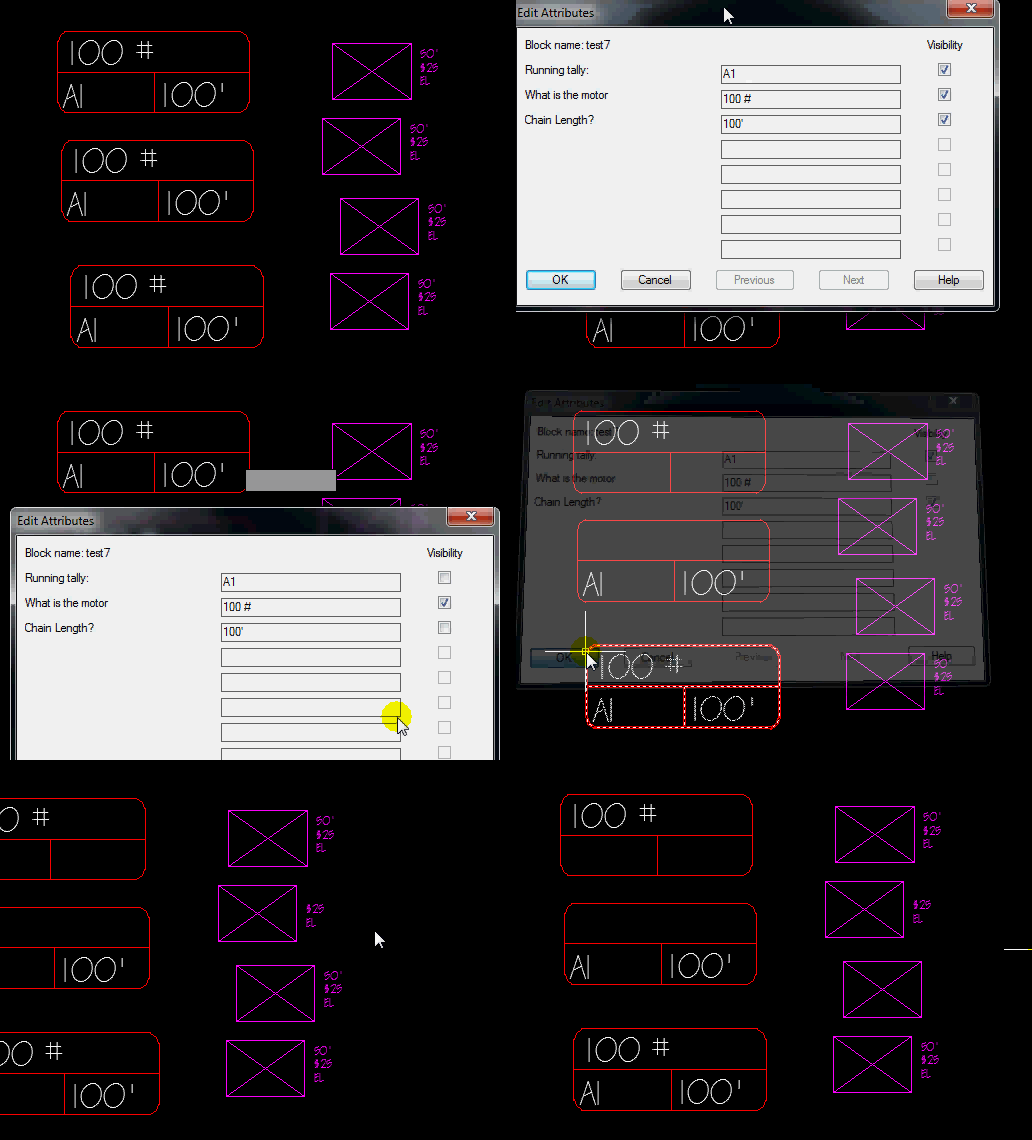
Here’s another great routine by Lee Mac. If you have ever needed to turn on or off a specific attribute, and used the BATTMAN (Block ATTribute MANager) command, you know that it toggles on or off the attribute you specify globally. Well, that’s where this routine comes in handy. You select a block with attributes and tell that block and only that one instance of that block – what attributes you want displayed or hidden.

Here’s how:

  • DDATTE2 <enter> to start
  • Select a block with attributes
  • check or uncheck to toggle the visibility for that instance of that attribute
  • Click OK when finished

;;; DDATTE2 (with Visibility Toggles)
(defun c:ddatte2 (/ *error*
DCL_Write
Button_Modes
FillPage
GetAttribInfo GroupByNum
Popup
ReplaceAttValue
ATTLST
DCFLAG DCFNAME DCTAG
I
J
OBJ
PAGE PAGEREF
ROW
SS
TILENUM
UFLAG
)
(vl-load-com)
;; Lee Mac ~ 07.03.10
(setq dcfName "LMAC_ddatte2.dcl")
(setq *doc (cond (*doc) ((vla-get-ActiveDocument
(vlax-get-acad-object)))))
(defun *error* (msg)
(and dcTag (unload_dialog dcTag))
(and UFlag (vla-EndUndoMark *doc))
(or (wcmatch (strcase msg) "*BREAK,*CANCEL*,*EXIT*")
(princ (strcat "\n** Error: " msg " **")))
(princ))
(defun dcl_write (fname / wPath ofile)
(if (not (findfile fname))
(if (setq wPath (findfile "ACAD.PAT"))
(progn
(setq wPath (vl-filename-directory wPath))
(or (eq "\\" (substr wPath (strlen wPath)))
(setq wPath (strcat wPath "\\")))
(setq ofile (open (strcat wPath fname) "w"))
(foreach str
'("ltxt : text { alignment = left; }"
"redi : edit_box { alignment = right; fixed_width = true; width = 30; }"
"bu12 : button { width = 12; fixed_width = true; alignment = centered; }"
"tog : toggle { alignment = right; }"
"spc : spacer { width = 10; fixed_width = true; }"
""
"ddatte2 : dialog { label = \"Edit Attributes\";"
" spacer;"
" : row {"
" "
" : ltxt { label = \"Block name: \"; key = \"bname\"; }"
" : spacer { width = 50; fixed_width = true; }"
" : text { label = \"Visibility\"; alignment = right; }"
""
" }"
" "
" spacer;"
""
" : row {"
""
" : column {"
""
" : ltxt { key = \"tag1\"; }"
" : ltxt { key = \"tag2\"; }"
" : ltxt { key = \"tag3\"; }"
" : ltxt { key = \"tag4\"; }"
" : ltxt { key = \"tag5\"; }"
" : ltxt { key = \"tag6\"; }"
" : ltxt { key = \"tag7\"; }"
" : ltxt { key = \"tag8\"; }"
""
" }"
""
" : column {"
""
" : row { spc; : redi { key = \"etag1\"; }"
" : tog { key = \"inv1\"; } }"
" : row { spc; : redi { key = \"etag2\"; }"
" : tog { key = \"inv2\"; } }"
" : row { spc; : redi { key = \"etag3\"; }"
" : tog { key = \"inv3\"; } }"
" : row { spc; : redi { key = \"etag4\"; }"
" : tog { key = \"inv4\"; } }"
" : row { spc; : redi { key = \"etag5\"; }"
" : tog { key = \"inv5\"; } }"
" : row { spc; : redi { key = \"etag6\"; }"
" : tog { key = \"inv6\"; } }"
" : row { spc; : redi { key = \"etag7\"; }"
" : tog { key = \"inv7\"; } }"
" : row { spc; : redi { key = \"etag8\"; }"
" : tog { key = \"inv8\"; } }"
" "
" }"
""
" }"
""
" spacer;"
""
" : row {"
""
" : bu12 { key = \"accept\"; is_default = true; label = \"OK\"; }"
" : bu12 { key = \"cancel\"; is_cancel = true; label = \"Cancel\"; }"
" : bu12 { key = \"prev\"; label = \"Previous\"; }"
" : bu12 { key = \"next\"; label = \"Next\"; }"
" : bu12 { key = \"help\"; label = \"Help\"; }"
""
" }"
" "
" spacer;"
""
"}")
(write-line str ofile))
(setq ofile (close ofile))
t) ; File written successfully
nil) ; Filepath not Found
t)) ; DCL file already exists
(defun Popup (title flags msg / WSHShell result)
(setq WSHShell (vlax-create-object "WScript.Shell"))
(setq result (vlax-invoke WSHShell 'Popup msg 0 title flags))
(vlax-release-object WSHShell)
result)
(defun GroupByNum (lst num / rtn)
(setq rtn nil)
(if lst
(cons (reverse
(repeat num
(progn
(setq rtn (cons (car lst) rtn)
lst (cdr lst))
rtn)))
(GroupByNum lst num))))
(defun GetAttribInfo (obj / GetPrompts lst att prompts)
(defun GetPrompts (blk / rtn sub tg p)
(vlax-for sub (vla-item (vla-get-Blocks *doc) (GetBlockName blk))
(if (eq "AcDbAttributeDefinition"
(vla-get-ObjectName sub))
(setq rtn (cons (cons (setq tg (vla-get-TagString sub))
(if (or (not (setq p (vla-get-PromptString sub)))
(eq "" p))
tg p))
rtn))))
rtn)
(setq prompts (GetPrompts obj))
(if (eq :vlax-true (vla-get-HasAttributes obj))
(foreach att (vlax-invoke obj 'GetAttributes)
(setq lst (cons (list att (cdr (assoc (vla-get-TagString att) prompts))
(vla-get-TextString att)
(itoa (- 1 (* -1 (vlax-get att 'Invisible))))) lst))))
(reverse lst))
(defun GetBlockName (obj)
(if (vlax-property-available-p obj 'EffectiveName)
(vla-get-EffectiveName obj)
(vla-get-Name obj)))
(defun FillPage (lst page / GetKey tags x j tLst tiles)
(setq GetKey (lambda (key num) (strcat key (itoa num)))
tLst '("tag" "etag" "inv"))
(if (setq j 0 tags (assoc page lst))
(foreach x (cdr tags)
(setq j (1+ j) tiles (mapcar (function (lambda (key) (GetKey key j))) tLst))
(if (not (car x))
(progn
(mapcar
(function
(lambda (tile) (mode_tile tile 1))) tiles)
(mapcar (function set_tile) tiles '("" "" "0")))
(progn
(mapcar
(function
(lambda (tile) (mode_tile tile 0))) tiles)
(mapcar (function set_tile) tiles (cdr x)))))))
(defun Button_Modes (page lst)
(if (= 0 Page)
(mode_tile "prev" 1)
(mode_tile "prev" 0))
(if (= (1- (length Lst)) Page)
(mode_tile "next" 1)
(mode_tile "next" 0))
(if (= 1 (length Lst))
(progn
(mode_tile "prev" 1)
(mode_tile "next" 1))))
(defun ReplaceAttValue (num page lst flag new)
(setq PageRef (assoc page lst) row (nth (1- num) (cdr PageRef)))
(subst
(subst
(append (list (car row) (cadr row))
(if flag (list new (last row))
(list (caddr row) new)))
row
PageRef)
PageRef
lst))
(cond ( (not (DCL_Write dcfName))
(popup "Warning" 48 "DCL File could not be Written"))
( (not (setq ss (ssget "_+.:E:S" '((0 . "INSERT") (66 . 1))))))
( (<= (setq dcTag (load_dialog dcfName)) 0)
(popup "Warning" 48 "Dialog Definition File not Found"))
( (not (new_dialog "ddatte2" dcTag))
(popup "Warning" 48 "Dialog could not be Loaded"))
(t
(setq i -1 Page 0 tilenum 0)
(setq AttLst
(mapcar
(function
(lambda (x)
(cons (setq i (1+ i)) x)))
(GroupByNum
(GetAttribInfo
(setq obj
(vlax-ename->vla-object (ssname ss 0)))) 8)))
(set_tile "bname" (strcat "Block name: " (GetBlockName obj)))
(FillPage AttLst Page)
(mode_tile "etag1" 3)
(Button_Modes Page Attlst)
(action_tile "prev"
(vl-prin1-to-string
(quote
(progn
(setq Page (1- Page))
(Button_Modes Page AttLst)
(FillPage AttLst Page)))))
(action_tile "next"
(vl-prin1-to-string
(quote
(progn
(setq Page (1+ Page))
(Button_Modes Page AttLst)
(FillPage AttLst Page)))))
(action_tile "help" "(help \"acad_acr.chm\" \"WS1a9193826455f5ffa23ce210c4a30acaf-513b-reference\")")
(mapcar
(function
(lambda (num)
(action_tile (strcat "etag" num)
(strcat "(setq attlst (ReplaceAttValue " num " page attlst t $value))"))
(action_tile (strcat "inv" num)
(strcat "(setq attlst (ReplaceAttValue " num " page attlst nil $value))"))))
'("1" "2" "3" "4" "5" "6" "7" "8"))
(setq dcFlag (start_dialog))
(setq dcTag (unload_dialog dcTag))
(if (= 1 dcFlag)
(progn
(setq uFlag (not (vla-StartUndoMark *doc)))
(foreach entry (apply (function append)
(mapcar (function cdr) AttLst))
(if entry
(progn
(vla-put-TextString (car entry) (caddr entry))
(vlax-put (car entry) 'Invisible (* -1 (- 1 (atoi (last entry))))))))
(setq uFlag (vla-EndUndoMark *doc)))
(princ "\n*Cancel*"))))
(princ))
;;;¤º°`°º¤ø,¸¸,ø¤º°`°º¤ø,¸¸,ø¤º°`°º¤ø,¸¸,ø¤º°`°º¤ø,¸¸,ø¤º°`°º¤ø,¸¸,ø¤º°`°º¤ø,¸¸,;;;
;; ;;
;; End of Program Code ;;
;; ;;
;;;ø,¸¸,ø¤º°`°º¤ø,¸¸,ø¤º°`°º¤ø,¸¸,ø¤º°`°º¤ø,¸¸,ø¤º°`°º¤ø,¸¸,ø¤º°`°º¤ø,¸¸,¤º°`°º¤;;; 
Posted in Attributes, AutoLISP, AutoLISP: Attributes, Blocks | 6 Comments