Remove Dimbreaks From Objects

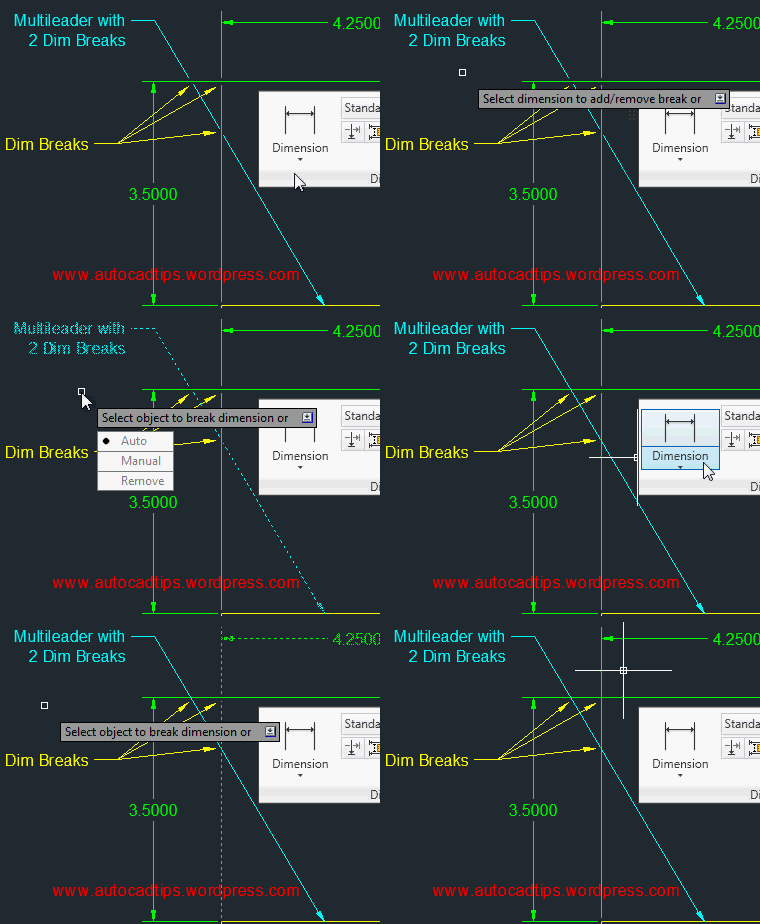
If you have applied Dimbreaks to either a dimension or a multileader and need to remove them please don’t erase the objects and recreate them. You can use the same DIMBREAK command that created the dimbreak to remove the same dimbreak!

Click here to learn how to apply a dimbreak to Dimensions

Click here to learn how to apply a dimbreak to Multileaders

Here’s how:

  • Click the “Break” tool that is located on the “Dimensions” panel of the “Annotate” tab

OR

  • DIMBREAK <enter>
  • Select the object that you would like to remove the break from
  • R <enter> To use the “Remove” function of the tool. This will remove the breaks from the selected object.

~enjoy
Posted in Dimensions, Leaders, Modifying, Text, TIPS | 2 Comments

Add a Dim Break to a Multileader

I was reading my company standards and came across an outdated-yet-common method  of modifying multileader objects for clarity. The process is to explode the multileader and then trim the leader line where it crosses dimensions so as to not be confused as an object line or a part of the dimension.

Don’t explode!!! you can add a “dimension break” to multileader objects. The DIMBREAK command also works for MLeaders – it does not work on the older Leader or QLeader objects…

Click here to learn how to apply a DIMBREAK to dimensions.

Click Here to learn how to remove DIMBREAKS from objects.

Here’s how:

  • Click the “Break” tool that is located on the “Annotate” tab > “Dimensions” panel

OR

  • DIMBREAK <enter> to start
  • Select the Multileader to which you want the dimbreak applied.
  • Select the dimension that crosses the multileader. the intersection where these 2 objects meet is where the break will be applied.

Note: Multiple breaks can be applied to a single leader.

Posted in Dimensions, Leaders, Text, TIPS | 2 Comments

AutoLISP: Fillet To A Selected Point

This is a useful routine that lets you easily create a fillet when the radius of the fillet is not not known. The point that you pick while defining the radius will lie along the fillet.

Here’s how:

  • FP <enter> to start Fillet Point.lsp
  • Select the first line
  • Select the second line
  • Pick a point that the fillet will lie upon

~enjoy


;;; By Irneb
;;; http://www.theswamp.org/index.php?topic=41775.0;all
;;; Creates a fillet but lets you pick a point that will lie on the arc.
;;; This is usefull when the radius is not known.
(defun c:FP (/ l1 l2 pt ed)
  (if (and (setq l1 (entsel "\nPick first line: "))
           (setq l2 (entsel "\nPick second line: "))
           (setq pt (getpoint "\nPick point passing through circle: ")))
    (progn (command "._circle" "_3P" "_tan" (cadr l1) "_tan" (cadr l2) "_non" pt)
           (setq ed (entget (entlast)))
           (entdel (entlast))
           (command "._fillet" "_radius" (cdr (assoc 40 ed)) "._fillet" l1 l2)))
  (princ)
)
Posted in AutoLISP, AutoLISP: Creating, AutoLISP: Modify | 2 Comments

AutoLISP: Define a Pipe’s Path by 3D Curved Objects

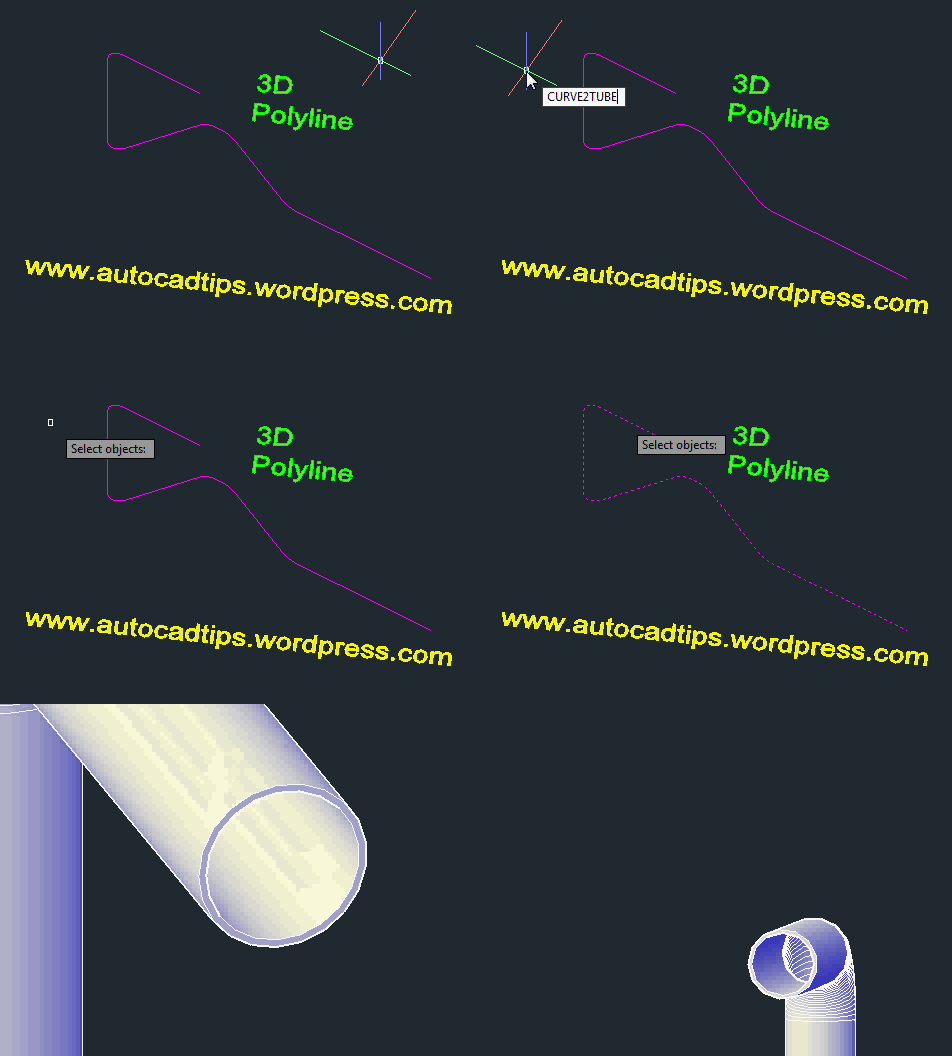
Today’s featured routine is a gem if you need to make basic 3D Pipes. It does a couple of awesome thing: 1) It creates a pipe with an inner and outer diameter thus creating a true pipe. 2) Lets you specify the path of the pipe by selecting simple and complex objects such as polylines with arc segments, 3D polylines, arcs, circles, ellipses…3) Creates the pipe/tube as a 3D solid objects which will allow you to use the union and subtract commands if needed.

Here’s how:

  • CURVE2TUBE <enter> to start
  • Specify outer radius <enter>
  • Specify inner radius <enter>
  • Select object to define the path of the pipe


;;;===================================================================
;;; CURVE2TUBE -Gilles Chanteau- (gile)
;;; Extrudes a "donut region" along a curve(s) object(s).
;;;===================================================================
(defun c:curve2tube	(/	   AcDoc     Space     ext_rad
			 int_rad   ss	     obj       start
			 ext_circ  int_circ  ext_reg   int_reg
			 norm
			)

  (vl-load-com)

  (defun vlen (v)
    (sqrt (vxv v v))
  )

  (defun vxv (v1 v2)
    (apply '+ (mapcar '* v1 v2))
  )

  (defun vunit (v / l)
    (if	(/= 0 (setq l (vlen v)))
      (mapcar '(lambda (x) (/ x l)) v)
    )
  )

  (setq AcDoc (vla-get-ActiveDocument (vlax-get-acad-object)))
  (setq	Space
	 (if (= 1 (getvar "CVPORT"))
	   (vla-get-PaperSpace AcDoc)
	   (vla-get-ModelSpace AcDoc)
	 )
  )
  (if
    (and
      (setq ext_rad (getdist "\nExternal radius: "))
      (setq int_rad (getdist "\nInternal radius: "))
      (setq ss
	     (ssget
	       '((-4 . "<OR")
		 (0 . "ARC,CIRCLE,ELLIPSE,LINE,LWPOLYLINE")
		 (-4 . "<AND")
		 (0 . "POLYLINE")
		 (-4 . "<NOT")
		 (-4 . "&")
		 (70 . 112)
		 (-4 . "NOT>")
		 (-4 . "AND>")
		 (-4 . "<AND")
		 (0 . "SPLINE")
		 (-4 . "&")
		 (70 . 8)
		 (-4 . "AND>")
		 (-4 . "OR>")
		)
	     )
      )
    )
     (progn
       (vla-StartUndoMark AcDoc)
       (foreach	path (vl-remove-if 'listp (mapcar 'cadr (ssnamex ss)))
	 (setq obj (vlax-ename->vla-object path))
	 (setq start (vlax-curve-getPointAtParam
		       obj
		       (vlax-curve-getStartParam obj)
		     )
	 )
	 (setq ext_circ (vla-addCircle Space (vlax-3d-Point start) ext_rad))
	 (setq int_circ (vla-addCircle Space (vlax-3d-Point start) int_rad))
	 (setq norm (vunit (vlax-curve-getFirstDeriv
			     obj
			     (vlax-curve-getStartParam obj)
			   )
		    )
	 )
	 (vla-put-Normal ext_circ (vlax-3d-point norm))
	 (vla-put-Normal int_circ (vlax-3d-point norm))
	 (setq ext_reg (car (vlax-invoke Space 'addRegion (list ext_circ))))
	 (setq int_reg (car (vlax-invoke Space 'addRegion (list int_circ))))
	 (vla-Boolean ext_reg acSubtraction int_reg)
	 (vla-addExtrudedSolidAlongPath Space ext_reg obj)
	 (mapcar 'vla-delete (list obj ext_circ int_circ ext_reg))
       )
       (vla-EndUndoMark AcDoc)
     )
  )
  (princ)
)
;;;=======================================================================================
Posted in AutoLISP, AutoLISP: 3D, AutoLISP: Creating, AutoLISP: Modify, AutoLISP: Polylines | 2 Comments

AutoLISP: Fillet a 3D Polyline

Here is a great routine that lets you easily fillet a 3D polyline. It even gives the option to apply the fillet to all of the vertices.

Here’s how:

  • 3DPOLYFILLET <enter> to start
  • R <enter> to specify the radius of the fillet
  • Specify the radius <enter>
  • Select the segments for the fillet
  • Or
  • Select the first segment and then enter A <enter> to apply the fillet to all segments.


;;; 3dPolyFillet -Gilles Chanteau- 21/01/07 -Version 1.5-
;;; "Fillets" a 3D polyline (succession of segments)

(defun c:3dPolyFillet (/	   3dPolyFillet_err	   closest_vertices
		       MakeFillet  AcDoc       ModSp	   cnt
		       prec	   rad	       ent1	   ent2
		       vxlst	   plst	       param	   obj
		      )
  (vl-load-com)

;;;*************************************************************;;;

  (defun 3dPolyFillet_err (msg)
    (if	(= msg "Fonction annulée")
      (princ)
      (princ (strcat "\nErreur: " msg))
    )
    (vla-EndUndoMark AcDoc)
    (setq *error* m:err
	  m:err	nil
    )
    (princ)
  )

;;;*************************************************************;;;

  (defun closest_vertices (obj pt / par)
    (if	(setq par (vlax-curve-getParamAtPoint obj pt))
      (list (vlax-curve-getPointAtParam obj (fix par))
	    (vlax-curve-getPointAtParam obj (1+ (fix par)))
      )
    )
  )

;;;*************************************************************;;;

  (defun MakeFillet (obj   par1	 par2  /     pts1  pts2	 som   p1    p2
		     ptlst norm	 pt0   pt1   pt2   pt3	 pt4   cen   ang
		     inc   n	 vlst  nb1   nb2
		    )
    (if	(and
	  (setq pts1 (closest_vertices obj par1))
	  (setq pts2 (closest_vertices obj par2))
	)
      (progn
	(setq som (inters (car pts1) (cadr pts1) (car pts2) (cadr pts2) nil))
	(if som
	  (if
	    (or	(equal (car pts1) som 1e-9)
		(equal (cadr pts1) som 1e-9)
		(and
		  (< (vlax-curve-getParamAtPoint obj (car pts1))
		     (vlax-curve-getParamAtPoint obj (car pts2))
		  )
		  (equal (vec1 (car pts1) (cadr pts1))
			 (vec1 (car pts1) som)
			 1e-9
		  )
		)
		(and
		  (< (vlax-curve-getParamAtPoint obj (car pts2))
		     (vlax-curve-getParamAtPoint obj (car pts1))
		  )
		  (equal (vec1 (cadr pts1) (car pts1))
			 (vec1 (cadr pts1) som)
			 1e-9
		  )
		)
	    )
	     (progn
	       (if (< (distance som (car pts1)) (distance som (cadr pts1)))
		 (setq p1 (cadr pts1)
		       p2 (car pts2)
		 )
		 (setq p1 (car pts1)
		       p2 (cadr pts2)
		 )
	       )
	       (if (= rad 0)
		 (setq ptlst (list som))
		 (progn
		   (setq norm (norm_3pts som p2 p1)
			 pt0  (trans som 0 norm)
			 pt1  (trans p1 0 norm)
			 pt2  (trans p2 0 norm)
			 cen  (inters
				(polar pt0 (- (angle pt0 pt1) (/ pi 2)) rad)
				(polar pt1 (- (angle pt0 pt1) (/ pi 2)) rad)
				(polar pt0 (+ (angle pt0 pt2) (/ pi 2)) rad)
				(polar pt2 (+ (angle pt0 pt2) (/ pi 2)) rad)
				nil
			      )
			 pt3  (polar cen (- (angle pt1 pt0) (/ pi 2)) rad)
			 pt4  (polar cen (+ (angle pt2 pt0) (/ pi 2)) rad)
			 ang  (- (angle cen pt4) (angle cen pt3))
		   )
		   (if
		     (and (inters pt0 pt1 cen pt3 T) (inters pt0 pt2 cen pt4 T))
		      (progn
			(if (minusp ang)
			  (setq ang (+ (* 2 pi) ang))
			)
			(setq inc (/ ang prec)
			      n	  0
			)
			(repeat	(1+ prec)
			  (setq	ptlst (cons
					(polar cen (- (angle cen pt4) (* inc n)) rad)
					ptlst
				      )
				n     (1+ n)
			  )
			)
			(setq ptlst (mapcar '(lambda (p) (trans p norm 0)) ptlst))
		      )
		   )
		 )
	       )
	       (setq vlst (3d-coord->pt-lst (vlax-get obj 'Coordinates)))
	       (if ptlst
		 (progn
		   (setq nb1 (vl-position p1 vlst)
			 nb2 (vl-position p2 vlst)
		   )
		   (if (= (vla-get-closed obj) :vlax-true)
		     (cond
		       ((and (equal p1 (car vlst))
			     (equal p2 (cadr (reverse vlst)))
			)
			(setq
			  vlst
			   (append (sublst vlst 1 (1+ nb2)) (reverse ptlst))
			)
		       )
		       ((and (equal p1 (cadr (reverse vlst)))
			     (equal p2 (car vlst))
			)
			(setq vlst (append (sublst vlst 1 (1+ nb1)) ptlst))
		       )
		       ((and (equal p1 (cadr vlst))
			     (equal p2 (last vlst))
			)
			(setq
			  vlst
			   (append (reverse ptlst) (sublst vlst (1+ nb1) nil))
			)
		       )
		       ((and (equal p1 (last vlst))
			     (equal p2 (cadr vlst))
			)
			(setq vlst (append ptlst (sublst vlst (1+ nb2) nil))
			)
		       )
		       (T
			(if (< nb1 nb2)
			  (setq	vlst (append (sublst vlst 1 (1+ nb1))
					     ptlst
					     (sublst vlst (1+ nb2) nil)
				     )
			  )
			  (setq	vlst (append (sublst vlst 1 (1+ nb2))
					     (reverse ptlst)
					     (sublst vlst (1+ nb1) nil)
				     )
			  )
			)
		       )
		     )
		     (if (equal (car vlst) (last vlst) 1e-9)
		       (cond
			 ((and (equal p1 (cadr vlst))
			       (equal p2 (cadr (reverse vlst)))
			  )
			  (setq	vlst (append (sublst vlst 2 nb2)
					     (reverse ptlst)
					     (list (cadr vlst))
				     )
			  )
			 )
			 ((and (equal p1 (cadr (reverse vlst)))
			       (equal p2 (cadr vlst))
			  )
			  (setq	vlst (append (sublst vlst 2 nb1)
					     ptlst
					     (list (cadr vlst))
				     )
			  )
			 )
		       )
		       (if (< nb1 nb2)
			 (setq vlst (append (sublst vlst 1 (1+ nb1))
					    ptlst
					    (sublst vlst (1+ nb2) nil)
				    )
			 )
			 (setq vlst (append (sublst vlst 1 (1+ nb2))
					    (reverse ptlst)
					    (sublst vlst (1+ nb1) nil)
				    )
			 )
		       )
		     )
		   )
		   (vlax-put obj 'Coordinates (apply 'append vlst))
		 )
		 (prompt "\nRadius is too large.")
	       )
	     )
	     (prompt "\nDivergent segments.")
	  )
	  (prompt "\nSegments are not converging.")
	)
      )
      (prompt "\nRadius is too large.")
    )
  )


;;;*************************************************************;;;

  (setq	AcDoc (vla-get-ActiveDocument (vlax-get-acad-object))
	ModSp (vla-get-ModelSpace AcDoc)
  )
  (setq	m:err	*error*
	*error*	3dPolyFillet_err
  )
  (vla-StartUndoMark AcDoc)

  ;; Saisie des données
  (if (not (vlax-ldata-get "3dFillet" "Prec"))
    (vlax-ldata-put "3dFillet" "Prec" 20)
  )
  (if (not (vlax-ldata-get "3dFillet" "Rad"))
    (vlax-ldata-put "3dFillet" "Rad" 10.0)
  )
  (prompt (strcat "\nCurrent settings.\tSegments: "
		  (itoa (vlax-ldata-get "3dFillet" "Prec"))
		  "\tRadius: "
		  (rtos (vlax-ldata-get "3dFillet" "Rad"))
	  )
  )
  (setq cnt 1)
  (while (= 1 cnt)
    (initget 1 "Segments Radius")
    (setq ent1
	   (entsel
	     "\nSelect first segment ou [Segments/Radius]: "
	   )
    )
    (cond
      ((not ent1)
       (prompt "\nNone selected object.")
      )
      ((= ent1 "Segments")
       (initget 6)
       (if (setq prec
		  (getint
		    (strcat "\nSpecify le number of segments for arcs <"
			    (itoa (vlax-ldata-get "3dFillet" "Prec"))
			    ">: "
		    )
		  )
	   )
	 (vlax-ldata-put "3dFillet" "Prec" prec)
       )
      )
      ((= ent1 "Radius")
       (initget 4)
       (if (setq rad
		  (getdist
		    (strcat "\nSpecify the radius <"
			    (rtos (vlax-ldata-get "3dFillet" "Rad"))
			    ">: "
		    )
		  )
	   )
	 (vlax-ldata-put "3dFillet" "Rad" rad)
       )
      )
      ((and
	 (= (cdr (assoc 0 (entget (car ent1)))) "POLYLINE")
	 (= (logand 8 (cdr (assoc 70 (entget (car ent1))))) 8)
       )
       (setq cnt 0)
      )
      (T
       (prompt "\nSelected object is not a 3D polyline.")
      )
    )
  )
  (setq	prec (vlax-ldata-get "3dFillet" "Prec")
	rad  (vlax-ldata-get "3dFillet" "Rad")
  )
  (while (not ent2)
    (initget 1 "All")
    (setq ent2 (entsel "\nSelect second segment or [All]: "))
    (if	(not (or (= ent2 "All") (eq (car ent1) (car ent2))))
      (progn
	(prompt
	  "\nThe selected segment is not on same object"
	)
	(setq ent2 nil)
      )
    )
  )
  (setq obj (vlax-ename->vla-object (car ent1)))
  (if (= ent2 "All")
    (progn
      (setq vxlst (3d-coord->pt-lst (vlax-get obj 'Coordinates))
	    param 0.5
      )
      (repeat (if (= (vla-get-closed obj) :vlax-true) (length vxlst) (1- (length vxlst)))
	(setq plst  (append plst (list (vlax-curve-getPointAtParam obj param)))
	      param (1+ param)
	)
      )
      (if (or (= (vla-get-closed obj) :vlax-true)
	      (equal (car vxlst) (last vxlst) 1e-9)
	      )
	(setq plst (cons (last plst) plst))
	)
      (setq cnt 0)
	  (repeat (1- (length plst))
	    (MakeFillet obj (nth cnt plst) (nth (setq cnt (1+ cnt)) plst))
	  )
    )
    (MakeFillet	obj
		(trans (osnap (cadr ent1) "_nea") 1 0)
		(trans (osnap (cadr ent2) "_nea") 1 0)
    )
  )
  (vla-EndUndoMark AcDoc)
  (setq	*error*	m:err
	m:err nil
  )
  (princ)
)

;;;*************************************************************;;;
;;;*********************** SOUS ROUTINES ***********************;;;


;;; NORM_3PTS returns the normal vector of a 3 points defined plane

(defun norm_3pts (org xdir ydir / norm)
  (foreach v '(xdir ydir)
    (set v (mapcar '- (eval v) org))
  )
  (if (inters org xdir org ydir)
    (mapcar '(lambda (x) (/ x (distance '(0 0 0) norm)))
	    (setq norm (list (-	(* (cadr xdir) (caddr ydir))
				(* (caddr xdir) (cadr ydir))
			     )
			     (-	(* (caddr xdir) (car ydir))
				(* (car xdir) (caddr ydir))
			     )
			     (-	(* (car xdir) (cadr ydir))
				(* (cadr xdir) (car ydir))
			     )
		       )
	    )
    )
  )
)

;;;*************************************************************;;;

;;; 3d-coord->pt-lst Convert a 3D coordinates flat list in points list
;;; (3d-coord->pt-lst '(1.0 2.0 3.0 4.0 5.0 6.0)) -> ((1.0 2.0 3.0) (4.0 5.0 6.0))

(defun 3d-coord->pt-lst	(lst)
  (if lst
    (cons (list (car lst) (cadr lst) (caddr lst))
	  (3d-coord->pt-lst (cdddr lst))
    )
  )
)

;;;*************************************************************;;;

;;; SUBLST Returns a sub list
;;; First item : 1
;;; (sublst '(1 2 3 4 5 6) 3 2) -> (3 4)
;;; (sublst '(1 2 3 4 5 6) 3 nil) -> (3 4 5 6)

(defun sublst (lst start leng / rslt)
  (if (not (<= 1 leng (- (length lst) start)))
    (setq leng (- (length lst) (1- start)))
  )
  (repeat leng
    (setq rslt	(cons (nth (1- start) lst) rslt)
	  start	(1+ start)
    )
  )
  (reverse rslt)
)

;;;*************************************************************;;;

;;; VEC1 Returns the singleunit vector from p1 to p2

(defun vec1 (p1 p2)
  (if (not (equal p1 p2 1e-009))
    (mapcar '(lambda (x1 x2)
	       (/ (- x2 x1) (distance p1 p2))
	     )
	    p1
	    p2
    )
  )
)

;;;*************************************************************;;;

;;; BUTLAST List but last item

(defun butlast (lst)
  (reverse (cdr (reverse lst)))
)
Posted in AutoLISP, AutoLISP: 3D, AutoLISP: Modify, AutoLISP: Polylines | 4 Comments

AutoLISP: Apply Current Page Setup To All Layout Tabs

The title of today’s routine pretty much explains what this LISP routine does. You must have the layout tab active with the correct page setup current on that tab as well.

Here’s how:

CPS <enter> To start and run

~enjoy


;; Copy current layout page setup to all layout tabs
(vl-load-com)
(defun c:CPS (/ Adoc Layts clyt)
  (setq	aDoc  (vla-get-activedocument (vlax-get-acad-object))
	Layts (vla-get-layouts aDoc)
	clyt  (vla-get-activelayout aDoc)
  )
  (foreach
	    itm
	       (vl-remove (vla-get-name clyt) (layoutlist))
    (vla-copyfrom (vla-item Layts itm) clyt)
  )
  (princ)
)
Posted in AutoLISP, AutoLISP: Manage, Layout, Paper Space, Printing - Plotting | 33 Comments

AutoLISP: Auto Trim and Extend Lines

This routine may come in handy if you would like to trim or extend lines to an object.

Note: This routine will only modify line objects.

Here’s how:

  • TTT <enter> to start
  • Select the bounding edge that the lines will either be trimmed at or extended to
  • Select the objects that you want to be modified
  • <enter> when finished

Note that lines that are crossing the cutting edge will be trimmed and the portion that will be erased is the portion that has the smaller amount of overlap. For lines that are sitting at their midpoint – the side of the line that was drawn first (the first pick point when creating the line) will be kept.


;;; Touch.LSP                                              *
;;; Small routine to align endpoints of lines to an edge.  *
;;; The edge have to be a line.                            *
;;; The routine works by calculating the point of inter-   *
;;; section and change the nearest endpoint to that point  *
;;; 2001 Stig Madsen, no rights reserved                   *
;;; modified by qjchen, the edge line can be line or polyline *
;
;GREAT for PROJECTING LINES FOR ELEVATIONS !!!!!!!!!!!
;
(defun C:Ttt (/ cmd ent entl spt ept sset a lent lentl lspt lept lint)
  (vl-load-com)
  (setq cmd (getvar "CMDECHO"))
  (setvar "CMDECHO" 0)
  (command "UNDO" "Begin")
  (while (not ent)
    (setq ent (car (entsel "Select edge line: ")))
    (if ent
      (progn
	(setq entl (entget ent))
      )
    )
  )
  (if ent
    (progn
      (redraw ent 3)
      (prompt "\nSelect lines to touch edge: ")
      (setq sset (ssget '((0 . "LINE")))
	    a 0
      )
      (if sset
	(repeat (sslength sset)
	  (setq lentl (entget (setq lent (ssname sset a)))
		lspt (cdr (assoc 10 lentl))
		lept (cdr (assoc 11 lentl))
	  )
	  (setq entttt (ssname sset a))
	  (setq lint (nth 0 (x_intlst ent entttt acExtendOtherEntity)))
	  (if lint
	    (progn

	      (if (< (distance lint lspt) (distance lint lept))
		(entmod (subst
			  (cons 10 lint)
			  (assoc 10 lentl)
			  lentl
			)
		)
		(entmod (subst
			  (cons 11 lint)
			  (assoc 11 lentl)
			  lentl
			)
		)
	      )
	    )
	  )
	  (setq a (1+ a))
	)
	(princ "\nNo objects found")
      )
      (redraw ent 4)
    )
    (princ "\nNo edge selected")
  )
  (setvar "CMDECHO" cmd)
  (command "UNDO" "End")
  (princ)
)

;;; by kuangdao at xdcad
(defun x_intlst (obj1 obj2 param / intlst1 intlst2 ptlst)

  (if (= 'ENAME (type obj1))
    (setq obj1 (vlax-ename->vla-object obj1))
  )
  (if (= 'ENAME (type obj2))
    (setq obj2 (vlax-ename->vla-object obj2))
  )
  (setq intlst1 (vlax-variant-value (vla-intersectwith obj1 obj2 param)))
  (if (< 0 (vlax-safearray-get-u-bound intlst1 1))
    (progn
      (setq intlst2 (vlax-safearray->list intlst1))
      (while (> (length intlst2) 0)
	(setq ptlst (cons (list (car intlst2) (cadr intlst2) (caddr intlst2))
			  ptlst
		    )
	      intlst2 (cdddr intlst2)
	)
      )
    )
  )
  ptlst
)
Posted in AutoLISP, AutoLISP: Modify | 2 Comments

Viewport Clip

Say that you have a default rectangle viewport already set – you have the scale set and dimensions and the multileaders points to objects in your viewport. But then you want to trim some of the objects out of the viewport that are cluttering up what you are trying to present. You could erase everything and create a viewport out of the desired shape and then have to place the dimensions again… or you could use this handy tool VPCLIP. By using the VPCLIP tool. you can easily keep the scale and position of an existing viewport thus keeping the placement of dimensions and multileaders and lets you either select an existing object to be the new frame of the viewport or define a new one by picking points (like making a polyline).

Here’s how:

  • While in Paper space, use the command VPCLIP <enter>

or

  • (AutoCAD 2013) This tool is found on the “Layout” tab of the ribbon > “Viewport Layout” panel > “Clip” button
  • (Earlier versions) This tool is found on the “View” tab of the ribbon > “Viewports” panel > “Clip” tool.

or

  • Select the viewport > right-click > select “viewport clip”

Shown below is an example using an existing closed shape to redefine the viewport:

Shown below is an example of picking points to define a closed object (like a polyline):

~enjoy

Posted in Layout, Modifying, Paper Space, Viewports | 9 Comments

AutoCAD 2013 Property Preview

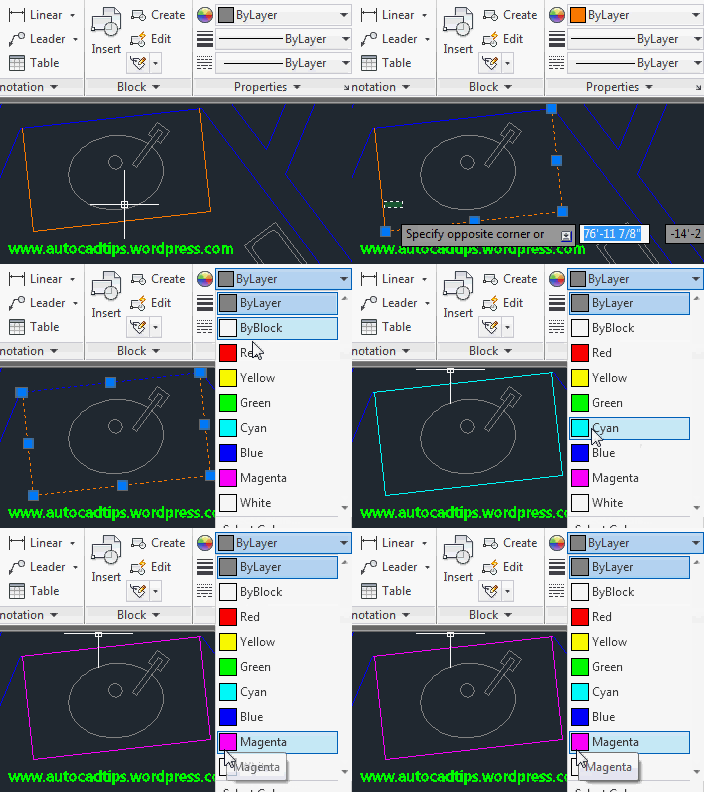
AutoCAD 2013 has introduced a great new feature that allows you to select objects and then preview their property changes prior to assigning those properties to the objects. This a familiar feature that you may have used in other applications such as Microsoft Word. In Word, you can select some text and then change its font or color but before you press the mouse button to assign the new property, if you hover your cursor over the desired property, you will see a preview of how it will look when applied to the objects. The same is true with Text fonts, line types colors… in AutoCAD 2013.

This new feature might be a little demanding on some computers so if that is an issue, you may want to turn off this feature. To do this, you can do it 2 ways.

1) simply use the system variable in the command line or in the system variable dialog box (SYSVDLG <enter>). The system variable is simply PROPERTYPREVIEW <enter> and the variables are either 0 (zero) or 1.

  • 0 (zero) = Property Preview OFF
  • 1 = Property preview ON

2) The other Method of controlling the Property Preview is in the Options dialog box.

OPTIONS <enter> or OP <enter> or right click and select options…

Click the “Selections” tab and then uncheck the box next to “Property preview” (shown below).

Posted in AutoCAD 2013, Customization, Modifying, New In 2013, Settling In, TIPS | 1 Comment

AutoLISP: Select Attributes for Invisibility

Here is a simple lisp routine that lets you select the individual attribute to make it “invisible.”

Here’s how:

  • INVIS <enter> to start
  • Select the attributes that you would like to be invisible
  • <enter> when finished


(defun c:invis (/ ent obj)
  (vl-load-com)

  (while (setq ent (car (nentsel "\nSelect Attribute: ")))
    (if (eq "ATTRIB" (cdr (assoc 0 (entget ent))))
      (vlax-put (setq obj (vlax-ename->vla-object ent)) 'invisible -1)))

  (princ))
Posted in Attributes, AutoLISP, AutoLISP: Attributes, AutoLISP: Blocks, AutoLISP: Modify | Leave a comment