
Here’s a useful quickie:
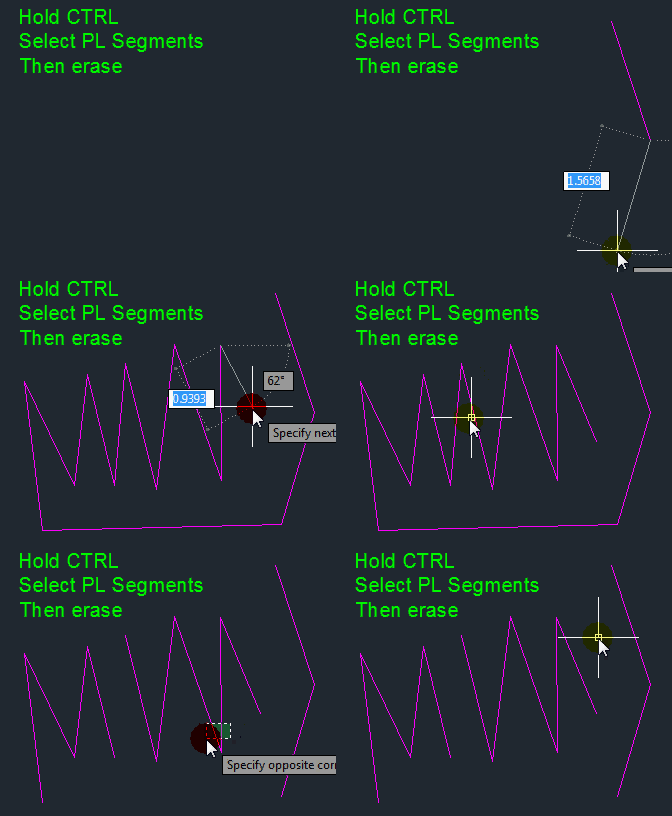
You can select individual segments of a PolyLine and then edit the segments by simply holding the CTRL button and then individually picking the segments.
In the example below, I selected the individual segments and then erased them. the resulting objects are still polylines.

 AutoCAD Tips
I use autocad 2012 and I want to delete a track but it was not a polyline
Sorry – I don’t know how to address this. Is this a question or a statement?
I’m trying the same process happens.polyline dan den bir segment silemiyorum.I use autocad 2012.use google translate to ingilzce , I’m sorry for my English is bad.
Select Individual Polyline Segment
I’m trying the same process happens.polyline dan den bir segment silemiyorum.I use autocad 2012.use google translate to ingilzce , I’m sorry for my English is bad
Hi this used to work for me at my old computer but now it doesn’t anymore on my new computer. Originally it was the same version of Autocad, but I’ve updated several times since then. Is there a control that I can use to toggle the control-click back on for individual segment selection? It’s been 3 years but I still miss this ability. Thanks!