
Did you know that you can print multiple layout tabs at once?
Here’s how:
- Hold the CTRL button
- Select the layout tabs that you want to print/plot
- Right-click any of the tabs and select “Publish Selected Layouts…”

Did you know that you can print multiple layout tabs at once?
Here’s how:
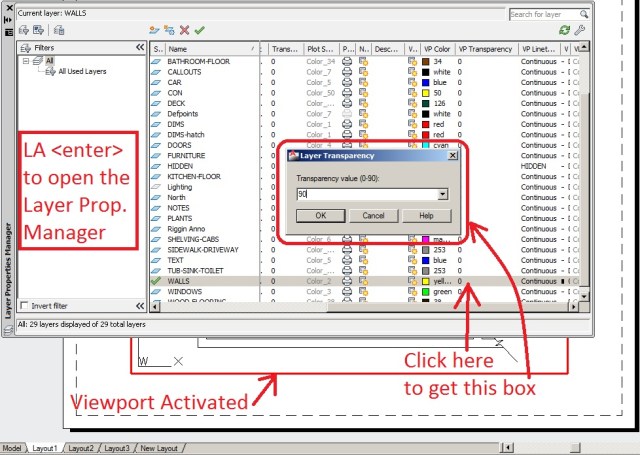
I started working part-time recently and I actually got to use this new transparency feature that is new to AutoCAD 2011. And now I love it. It is as easy as freezing layers in viewports – REALY!
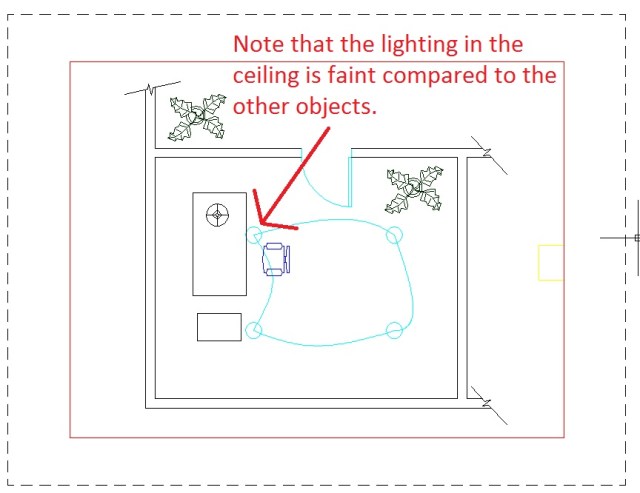
(the picture below shows how your drawings may currently look without transparency)
Here’s how:
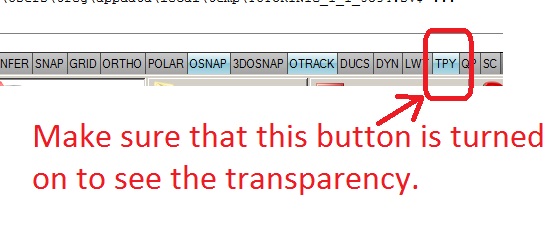
(The picture below shows the TYP “transparency” button in the status bar)
(The Picture Below shows the results)

This setting is great but if you plot/print, you may not see the transparency in the plot.
To fix this:

One last tip: Apparently, when plotting with transparency, it takes longer because AutoCAD processes the plot as a picture instead of plotting it as “vectorized” lines and arcs. So be patient when plotting. The results are worth it.
~enjoy
When it comes time to annotate your drawings, wouldn’t it be nice for you to be able to select a block and then have its name appear as a text object and then place that text object?
Here ya go:
; places name of block as text via pick

(defun C:blockn()

(setvar "cmdecho" 0)

(setq pt(cadr(entsel"\nSelect Block:")))

(setq e1(ssget pt))

(setq e2 (entget (ssname e1 0)))

(setq blname (cdr(assoc 2 e2)))

(setq pt1 (getpoint"\nSelect point for block title:"))

(command "text" pt1 "" 0 blname)

)
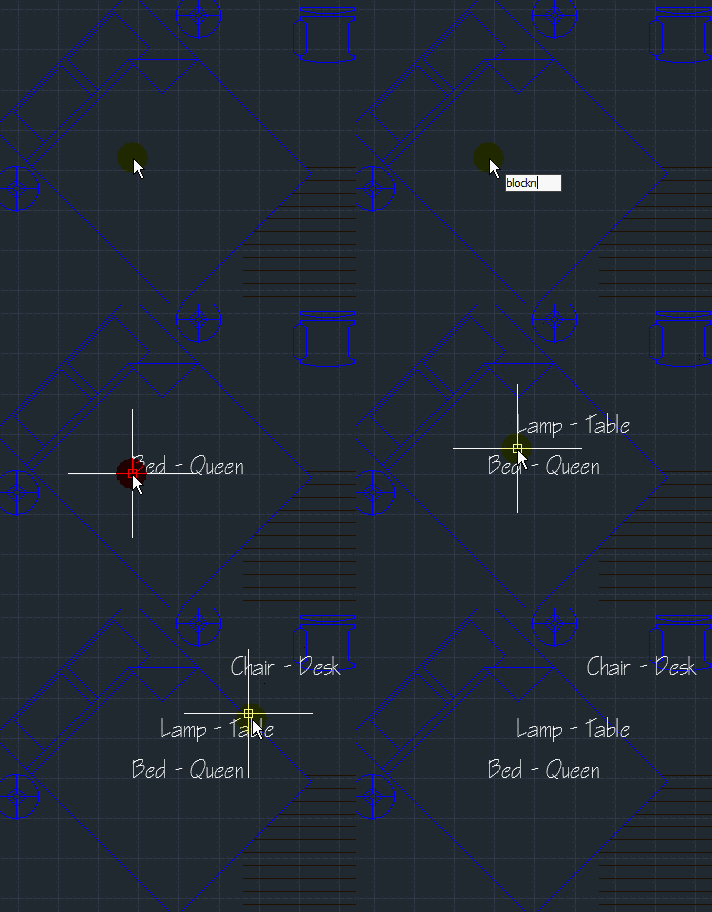
As you can see, these LISP routines are very helpful.
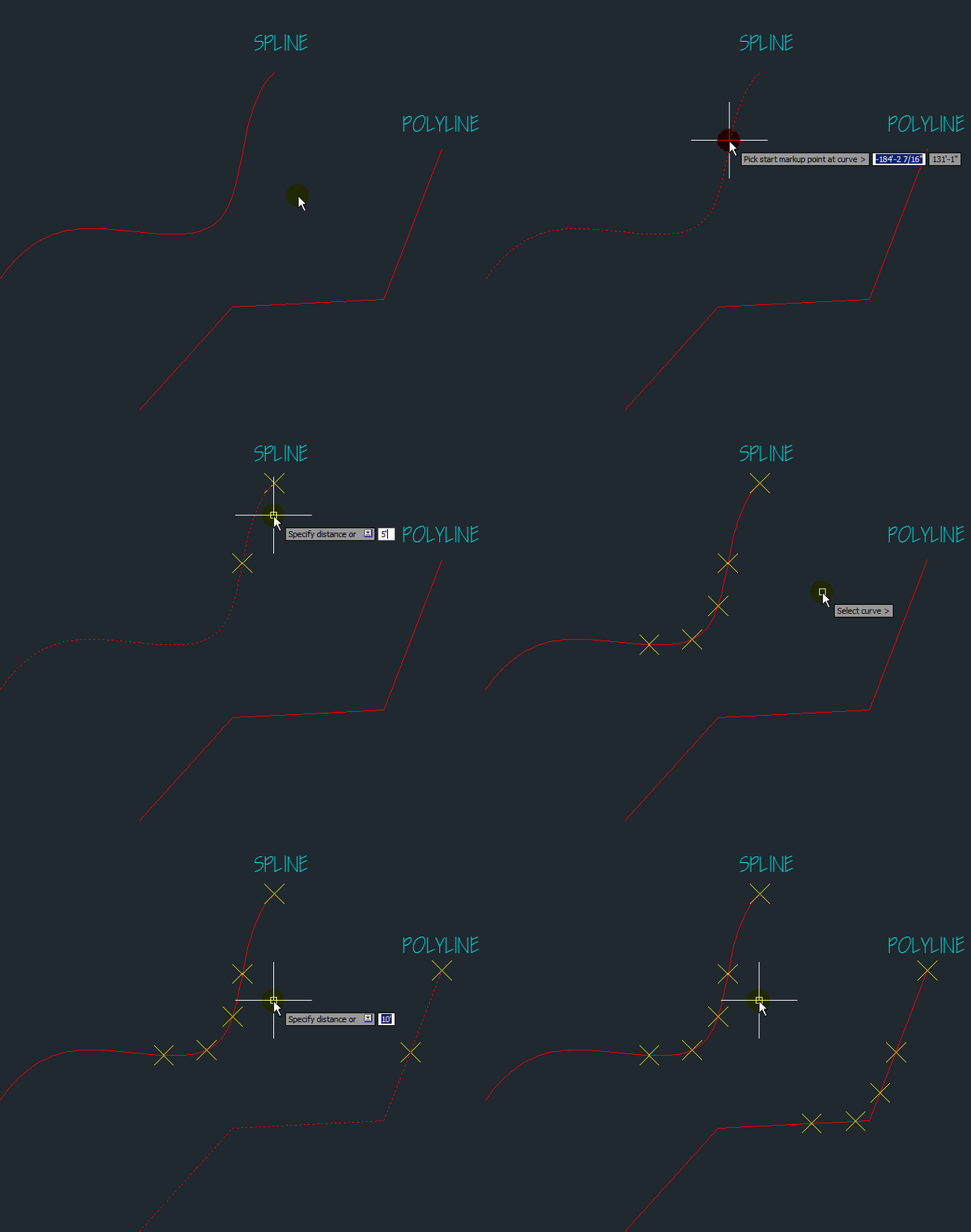
With this one you can pick an object (except LWPOLYLINES) and specify a starting point and then tell it how far along that object you would like to place a node. After the initial node is placed, it measures from the previous node.
In the example animated picture:
etc…
(The picture is so large that you may need to click it so that it opens up in a separate window in order for it to load.)
Code criginally posted @ http://www.cadtutor.net by ASMI
(defun c:tracepolyline(/ *error* cCurve curPt dPar dPt

enPt fPar fPt maxLen obType oldDis

oldOsn posDir rClose sFlag stPt

sumDis swMod undoLst vClose whatDo)

(vl-load-com)

(defun asmi_GetActiveSpace(/ actDoc)

(if

(= 1(vla-get-ActiveSpace

(setq actDoc

(vla-get-ActiveDocument

(vlax-get-acad-object)

); end vla-get ActiveSpace

); end setq

); end vla-get-ActiveDocument

); end =

(vla-get-ModelSpace actDoc)

(vla-get-PaperSpace actDoc)

); end if

); end of asmi_GetActiveSpace

(defun RestorePointStyle()

(if

(and xdiv:oldPm xdiv:oldPs)

(progn

(initget "Yes No")

(setq swMod

(getkword

"\nRestore point style? [Yes/No] <No>: "))

(if(null swMod)(setq swMod "No"))

(if

(= swMod "Yes")

(progn

(princ "\nPlease wait... \n")

(setvar "PDMODE" xdiv:oldPm)

(setvar "PDSIZE" xdiv:oldPs)

); end progn

); end if

); end progn

); end if

(princ)

); end of RestorePointStyle

(defun AddPointOrInsert(Mode Block Scale)

(vla-AddPoint

(asmi_GetActiveSpace)

(vlax-3d-point curPt))

); end of AddPointOrInsert

(defun AddPointOrInsert(Mode Block Scale / outObj)

(setq undoLst

(append

(list

(list

(setq outObj

(vla-AddPoint

(asmi_GetActiveSpace)

(vlax-3d-point curPt))); end setq

curPt xdiv:curDis

); end list

); end list

undoLst); end append

); end setq

outObj

); end of AddPointOrInsert

(defun *error*(msg)

(if cCurve

(progn

(vla-Highlight cCurve :vlax-false)

(setvar "OSMODE" oldOsn)

); end progn

); end if

(princ "\n*Cancel*")

(princ)

); end of *error*

(if

(member

(setq xdiv:oldPm(getvar "PDMODE"))

'(0 1)

); end member

(progn

(setq xdiv:oldPs(getvar "PDSIZE"))

(initget "Yes No")

(setq swMod

(getkword

"\nChange points style to good visible? [Yes/No] <Yes>: "))

(if(null swMod)(setq swMod "Yes"))

(if

(= swMod "Yes")

(progn

(princ "\nPlease wait... \n")

(setvar "PDMODE" 35)

(setvar "PDSIZE" -2)

); end progn

); end if

); end progn

); end if

(setq oldOsn

(getvar "OSMODE")); end setq

(if

(not xdiv:curDis)

(setq xdiv:curDis 1.0

xdiv:oldDis 1.0); end setq

); end if

(if

(setq cCurve

(entsel

"\nSelect curve > ")); end setq

(progn

(setq cCurve

(vlax-ename->vla-object

(car cCurve))); end setq

(if

(member

(setq obType

(vla-get-ObjectName cCurve))

'("AcDbLine" "AcDbPolyline" "AcDb3dPolyline"

"AcDbSpline" "AcDbArc" "AcDbCircle" "AcDbEllipse")

); end member

(progn

(vla-Highlight cCurve :vlax-true)

(setvar "OSMODE" 3071)

(setq stPt

(vlax-curve-GetStartPoint cCurve)

enPt

(vlax-curve-GetEndPoint cCurve)

fPt

(getpoint

"\nPick start markup point at curve > ")

); end setq

(if fPt

(setq fPt(trans fPt 1 0)

curPt(vla-AddPoint

(asmi_GetActiveSpace)

(vlax-3d-point fpt)); end vla-AddPoint

undoLst

(list

(list curPt 0.0 0.0)); end list

); end setq

); end if

(if

(and

fPt

(setq fPar

(vlax-curve-GetParamAtPoint cCurve fPt))

); end and

(progn

(if

(and

(not(equal fPt stPt 0.0001))

(not(equal fPt enPt 0.0001))

); end or

(progn

(setq dPt

(getpoint fPt

"\nPick point at curve to specify markup direction > "))

(if dPt

(setq dPt(trans dPt 1 0))); end if

(if

(and

dPt

(setq dPar

(vlax-curve-GetParamAtPoint cCurve dPt))

); end and

(progn

); end progn

(princ "\nEmpty input or point not at curve! ")

); end if

); end progn

); end if

); end progn

(princ "\nEmpty input or point not at curve! ")

); end if

); end progn

(princ "\nInvalid object type! ")

); end if

(setq maxLen

(-

(vlax-curve-GetDistAtPoint cCurve enPt)

(vlax-curve-GetDistAtPoint cCurve stPt)

); end -

rClose

(vlax-curve-IsClosed cCurve)

); end setq

(if(equal fPt stPt 0.0001)

(setq vClose T)

); end if

(if

(or

(equal fPt stPt 0.0001)

(and

dPar

(> dPar fPar)

); end and

); end or

(setq posDir T

sumDis

(vlax-curve-GetDistAtPoint cCurve fPt)

); end setq

(setq sumDis

(- maxLen

(- maxLen

(vlax-curve-GetDistAtPoint cCurve fPt)))

); end setq

); end if

(while(not sFlag)

(setq whatDo

(getstring

(strcat

"\nSpecify distance or [Undo/Quit] <"

(if xdiv:curDis(rtos xdiv:curDis) "not defined")

">: "); end strcat

); end getstring

); end setq

(cond

((or

(= 'REAL(type(distof whatDo)))

(= "" whatDo)

); end or

(if(= "" whatDo)

(setq xdiv:curDis xdiv:oldDis)

(setq xdiv:curDis(distof whatDo))

); end if

(setq xdiv:oldDis xdiv:curDis); end setq

(cond

(posDir

(setq sumDis

(+ sumDis xdiv:curDis)

curPt

(vlax-curve-GetPointAtDist cCurve sumDis)

); end setq

(if curPt

(AddPointOrInsert nil nil nil)

(princ "\n>>> End of line <<< ")

); end if

); end condition # 1

((not posDir)

(setq sumDis

(- sumDis xdiv:curDis)

curPt

(vlax-curve-GetPointAtDist cCurve sumDis)

); end setq

(if curPt

(AddPointOrInsert nil nil nil)

(princ "\n>>> End of line <<< ")

); end if

); end condition # 1

); end cond

); end condition #1

((=(strcase whatDo) "Q")

(if

(= 1(length undoLst))

(vla-Delete(caar undoLst))

); end if

(RestorePointStyle)

(if cCurve

(progn

(vla-Highlight cCurve :vlax-false)

(setvar "OSMODE" oldOsn)

); end progn

); end if

(setq sFlag T)

)

((=(strcase whatDo) "U")

(if

(and

undoLst

(/= 1(length undoLst))

); end and

(progn

(vla-Delete(caar undoLst))

(setq undoLst(cdr undoLst)

curPt(cadar undoLst)

sumDis(- sumDis

(last

(car undoLst)))

); end setq

); end progn

(princ "\n>>> Nothing to undo <<< ")

); end if

)

); end cond

); end while

); end progn

(princ "\nEmpty selection! ")

); end if

(princ)

); end of c:xdiv
Here is another LISP gem…
I know that the same can be accomplished with the command SETBYLAYER, but it is still fun nonetheless. And it allows you to change the color to other colors – not just to bylayer.
If you’ve ever selected blocks in your drawing and changed their layer, but they didn’t change color – this one will help you to change the blocks to any color number or to “BYLAYER” which is #256.
To do this:
That’s it.

;****************************************************************************************

;	UPDATE BLOCK COLOR (updblkcl.lsp)

;	PRE-INSERTED BLOCK DEFINITION CLEAN-UP UTILITY

;

;	This routine is especially usefull to redefine pre-inserted blocks whose

;	entity colors need to be changed to BYLAYER.

;

;       This routine allows the user to update the color of

;	all entities within a block to a single color (exam: color=BYLAYER)

;	without the user having to explode the symbol.  By default the layer name of

;	all entities are NOT changed. The routine changes the original

;	definition of the block within the current drawing.

;

;	To use this routine the user is asked to specify a single

;	color to place all entities of a selected block(s).

;

;	The user is next prompted to select one or more blocks to update. The routine

;	then redefines all entities of the block to the color specified.

;

;	When the user regenerates the drawing she/he will find that all

;	occurances of the block have been redefined.  This is because the

;	original definition of the block is changed!!!

;

;       by CAREN LINDSEY, July 1996

;****************************************************************************************

;

;INTERNAL ERROR HANDLER

(defun err-ubc (s)				; If an error (such as CTRL-C) occurs

; while this command is active...

(if (/= s "Function cancelled")

(princ (strcat "\nError: " s))

)

(setq *error* olderr)			; Restore old *error* handler

(princ)

);err-ubc

(DEFUN C:BBL (/ BLK CBL CBL2 C ACL ALY NLY NCL)

(setq olderr *error* *error* err-ubc)

(initget "?")

(while

(or (eq (setq C (getint "\nEnter new color number/<?>: ")) "?")

(null C)

(> C 256)

(< C 0)

);or

(textscr)

(princ "\n                                                     ")

(princ "\n                 Color number   |   Standard meaning ")

(princ "\n                ________________|____________________")

(princ "\n                                |                    ")

(princ "\n                       0        |      <BYBLOCK>     ")

(princ "\n                       1        |      Red           ")

(princ "\n                       2        |      Yellow        ")

(princ "\n                       3        |      Green         ")

(princ "\n                       4        |      Cyan          ")

(princ "\n                       5        |      Blue          ")

(princ "\n                       6        |      Magenta       ")

(princ "\n                       7        |      White         ")

(princ "\n                    8...255     |      -Varies-      ")

(princ "\n                      256       |      <BYLAYER>     ")

(princ "\n                                               \n\n\n")

(initget "?")

);while

(PROMPT "\nPick blocks to update. ")

(SETQ SS (SSGET '((0 . "INSERT"))))

(SETQ K 0)

(WHILE (< K (SSLENGTH SS))

(setq CBL (tblsearch "BLOCK" (CDR (ASSOC 2 (ENTGET (SETQ BLK (SSNAME SS K)))))))

(SETQ CBL2 (CDR (ASSOC -2 CBL)))

(WHILE (BOUNDP 'CBL2)

(SETQ EE (ENTGET CBL2))

;Update layer value

(SETQ NCL (CONS 62 C))

(SETQ ACL (ASSOC 62 EE))

(IF (= ACL nil)

(SETQ NEWE (APPEND EE (LIST NCL)))

(SETQ NEWE (SUBST NCL ACL EE))

);if

(ENTMOD NEWE)

(SETQ CBL2 (ENTNEXT CBL2))

);end while

(ENTUPD BLK)

(SETQ K (1+ K))

);end while

(setq *error* olderr)

(princ)

);end updblkcl
So, after you have used the previous LISP routine to create your new linetype, you need to save it if you plan on using it in other drawings. Sure, you could just re-use the previous routine in the drawing, but you may just want the new linetype to be available in all of your drawings. In your AutoCAD support folder, you have a .lin file. this is where your linetypes are stored. Just because you made a new linetype in one drawing doesn’t mean that it is stored in this “master” linetype file. You have to do this yourself. Welcome to the world of customizing AutoCAD…
This Lisp routine is awesome. It takes the info for the all the linetypes that have been loaded in your current drawing and prints out a new .lin file where you can easily copy the info from the new linetype and paste t into the “master” linetype file for future use.
To do this:

;|

NEW-LIN.LSP -- (c) 2000 Tee Square Graphics

NEW-LIN is a useful AutoLISP routine that extracts parameters for

unknown LineTypes in a drawing, and creates entries in a new LineType

definition file, NEW-ACAD.LIN. After extraction, the LineType definitions

may be moved to ACAD.LIN or any other *.LIN file desired by the user.

This version of NEW-LIN.LSP functions fully with simple LineTypes, and

Complex LineTypes composed of linear elements and Text objects. Because

of difficulty in extracting Shape data from shape definition (*.shx)

files, the user may, for the time being, have to supply the appropriate

name for the Shape represented by {Shape #nnn} in NEW-ACAD.LIN, in cases

where the associated Shape Source File (*.shp) is unavailable.

|;

(defun C:NEW-LIN (/ flag outf ltname tblent tblist i desc alist acode value

rot shpno shxfl shpfl inf dat n shpnm flg txt sty)

(setq flag (findfile "new-acad.lin")

outf (open (if flag flag "new-acad.lin") "w"))

(write-line ";;" outf)

(write-line ";; New LineType descriptions extracted" outf)

(write-line ";; from existing drawing(s) by NEW-LIN.LSP." outf)

(write-line ";;" outf)

(write-line ";; NEW-LIN.LSP (c) 2000 Tee Square Graphics" outf)

(write-line ";;\n" outf)

(setvar "luprec" 8)

(setvar "auprec" 8)

(tblnext "ltype" T)

(while (setq tblent (tblnext "ltype"))

(setq ltname (cdr (assoc 2 tblent))

tblent (tblobjname "ltype" ltname)

tblist (entget tblent)

i 1

desc "A,")

(write-line (strcat "*" (cdr (assoc 2 tblist)) "," (cdr (assoc 3 tblist)))

outf)

(while (< i (length tblist))

(setq alist (nth i tblist)

acode (car alist)

value (cdr alist))

(cond

((= acode 49)

(setq desc (strcat desc (trim (rtos value 2 8)) ",")))

((= acode 74)

(setq flag (if (= (logand value 4) 4) T nil)

rot (if (= (logand value 1) 1) "a" "r")))

((= acode 75)

(setq shpno (itoa value)))

((= acode 340)

(if flag

(progn

(setq shxfl (cdr (assoc 3 (entget value)))

shpfl (strcat (substr shxfl 1 (- (strlen shxfl) 3)) "shp"))

(if (setq inf (findfile shpfl))

(progn

(setq inf (open inf "r"))

(while (setq dat (read-line inf))

(if (wcmatch dat (strcat "`*" shpno "*"))

(progn

(setq n 1)

(repeat 2

(while (/= (substr dat n 1) ",")

(setq n (1+ n)))

(setq n (1+ n)))

(setq shpnm (substr dat n)))))

(close inf)))))

(setq flg flag

txt (if flag

(if shpnm shpnm (strcat "{Shape #" shpno "}"))

(strcat "\"" (cdr (assoc 9 (member alist tblist))) "\""))

sty (if flag

(cdr (assoc 3 (entget value)))

(cdr (assoc 2 (entget value))))

desc (strcat desc "\n[" txt "," sty ",s="

(trim (rtos (cdr (nth (1+ i) tblist)) 2 8)) "," rot "="

(trim (angtos (cdr (nth (+ i 2) tblist)) 0 8)) ",x="

(trim (rtos (cdr (nth (+ i 3) tblist)) 2 8)) ",y="

(trim (rtos (cdr (nth (+ i 4) tblist)) 2 8)) "],\n")

i (+ i 4)))

(T nil))

(setq i (1+ i)))

(write-line (substr desc 1 (1- (strlen desc))) outf)

(write-line " " outf))

(close outf)

(alert (strcat "All loaded LineTypes in the current drawing database have

been\n"

"duplicated in a new LineType definition file, NEW-ACAD.LIN.\n"

"Any complex LineTypes using Shape Definitions for which no\n"

"source file (*.shp) could be found will contain a reference in\n"

"curly braces { }; the user must supply the correct shape name\n"

"before NEW-ACAD.LIN can be used to load these LineTypes."))

(setq new-acad(findfile"new-acad.lin"))

(princ (strcat "\nYour new linetype definition file is located at: "

new-acad))

(princ)

)

(defun trim (x / i)

(setq i (strlen x))

(while (= (substr x i) "0")

(setq i (1- i)

x (substr x 1 i)))

(if (= (substr x i) ".")

(substr x 1 (1- i))

x)

)

(prompt "\nExport Linetypes by Tee Square Graphics, ")

(princ "\nType NEW-LIN to run")

(princ)

;END ROUTINE ----------------------------------------------------------------------
It seems that this blog has gotten a lot of interest since I started posting AutoLISP code.
Here is great routine that creates a new LineType with text. If you have ever tried creating a linetype with text on your own, you know how frustrating it can be. This Lisp routine makes this task effortless and will make you look like a “wizard” in the eyes of the other drafters.
In the animated picture, the linetype dropdown list would not record when I recorded this. I don’t know why… What I was showing you is that before the routine, there was no linetype called “Greg” and then after the routine, I made the linetype “Greg” current before drawing the lines.
In the example I did the following:

;;; AUTHOR

;;; 2010 Ron Perez

;;; Updated original code posted to Cadalyst http://cadtips.cadalyst.com/2d-operations/create-custom-linetype

;;; User can specify text height now

;;; Gap that text is placed in is much more accurate vertical and horizontal

;;; Text in linetype now uses the current textstyle (getvar 'textstyle)

;;; Assembled linetype definition is printed to command line

;;; Checks for existing linetype and prompts user to redefine

;;; Variables dashlen, txtgap, txthgt can be modified in code for user preference ... Maybe someday I'll create a front end for this :P

;;; *Known Issues* Current textstyle that has a fixed height creates wonky linetypes, code does not catch invalid characters for linetype names

(defun c:makelt

(/ dashlen exprt file fn ltdef str strw txtgap txthgt txtstyle rjp-txtwdth _rtos)

(vl-load-com)

(defun rjp-txtwdth (str hgt style / d e pts)

;;Returns textstring width, gap from insertion point to start of text, and height

(if	(setq e	(entmakex (list	'(0 . "TEXT")

'(100 . "AcDbEntity")

'(100 . "AcDbText")

'(8 . "rjp-tmptxtlayer")

'(10 0. 0. 0.)

(cons 40 hgt)

(cons 1 str)

(cons 7 style)

)

)

)

(progn (setq pts (textbox (entget e)))

(setq d (distance (car pts) (list (caadr pts) (cadar pts))))

(entdel e)

)

)

(list d (caar pts) (- (cadadr pts) (abs (cadar pts))))

)

(defun _rtos (real) (rtos real 2 6))

;;Set these numbers to preference

(setq dashlen 0.25)

(setq txtgap 0.025)

(setq txthgt 0.1)

;;-------------------------------

(setq txtstyle (getvar 'textstyle))

(if (and (setq str (getstring t "\nEnter string to use in linetype: "))

(not (zerop (strlen str)))

(setq txthgt

(cond

((getreal (strcat "\nEnter height of text [<" (rtos txthgt 2 3) ">]: "))

)

(txthgt)

)

)

(setq strw (rjp-txtwdth str txthgt txtstyle))

(setq file

(strcat (getvar 'dwgprefix) (vl-filename-base (getvar 'dwgname)) "_mylt.lin")

)

(setq fn (open file "w"))

(setq exprt (getvar 'expert))

)

(progn

(setq ltdef (strcat "\n*"

str

", ---"

str

"---\n"

"A,"

(_rtos dashlen)

",-"

(_rtos (abs (- txtgap (cadr strw))))

",[\""

str

"\","

txtstyle

",S="

(_rtos txthgt)

",R=.0,X=-.0,Y=-"

(_rtos (* (caddr strw) 0.5))

"],-"

(_rtos (+ txtgap (car strw) (cadr strw)))

)

)

(write-line ltdef fn)

(close fn)

(setvar 'expert 5)

(cond ((not (tblsearch "ltype" str))

(command "._-linetype" "load" "*" file "")

(princ ltdef)

(princ (strcat "\nLinetype " str " loaded..."))

)

((and (not (initget 1 "Y N"))

(eq (getkword "\nLinetype exists... Reload it? [Y/N]") "Y")

)

(command "._-linetype" "load" "*" file "")

(vla-regen (vla-get-activedocument (vlax-get-acad-object)) acactiveviewport)

(princ ltdef)

(princ (strcat "\nLinetype " str " reloaded..."))

)

)

(setvar 'expert exprt)

(vl-file-delete file)

)

)

(princ)

)
Have you ever been frustrated with trying to erase or even select a wipeout?
Here’s how to select them:
Now, all of your wipeouts have a frame around them that you can easily select and modify…

Here is a quick tip:
Have you ever mirrored text and it was backwards and looked as if it was being seen through the rear-view mirror of your car? Well this is how you fix that.
Change the System Variable MIRRTEXT:
In the animated picture below, I mirrored text text objects with their respective variable setting and then show that these variable settings do not effect text that is within blocks.

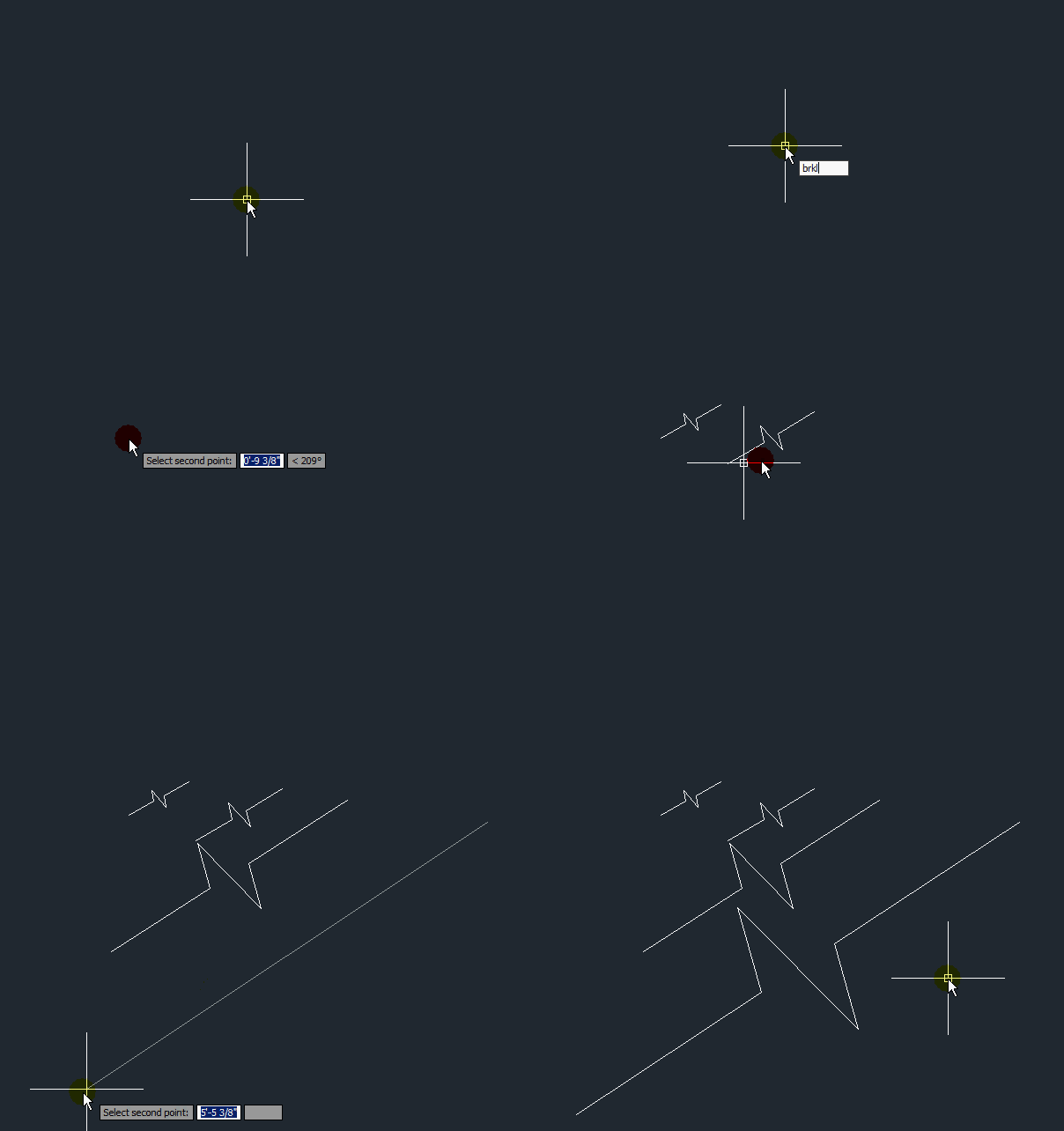
If you’ve ever used the Express Tool BREAKLINE, you know how frustrating it is to get the darn thing to look correct. Here is a great lisp routine that makes the size of the break symbol proportional to the 2 points that you pick.
;;;===========================================

;;;      Single Line Break Symbol Creator

;;;===========================================

;;;

;|     Created by C. Alan Butler  2003

Yet another Break symbol creator

Uses PloyLine created on the current layer

Ortho Mode is up to you to pre set or not

Symbol is proportional to the length

and doesn't break anything

|;

;

(defun c:brkl (/ p1 p2 p3 p4 p5 p6 dist ang usercmd)

;

; error function & Routine Exit

(defun *error* (msg)

(if

(not

(member

msg

'("console break" "Function cancelled" "quit / exit abort" "")

)

)

(princ (strcat "\nError: " msg))

) ; if

(setvar "CMDECHO" usercmd)

(setvar "osmode" useros)

(princ)

) ;

;end error function

(setq oldcmd (getvar "CMDECHO"))

(setvar "CMDECHO" 0)

(setq useros (getvar "osmode"))

(setq usercmd (getvar "CMDECHO"))

(setvar "CMDECHO" 0)

(setvar "plinewid" 0)

(if (and (setq p1 (getpoint "Starting point of line : "))

(setq p6 (getpoint p1 "\nSelect second point: "))

)

(progn

(setq dist (distance p1 p6)

ang  (angle p1 p6)

p2   (polar p1 ang (* 0.4167 dist))

p5   (polar p1 ang (* 0.5833 dist))

p3   (polar p2 (+ 1.25664 ang) (* 0.1667 dist))

p4   (polar p5 (+ 4.39824 ang) (* 0.1667 dist))

) ;_ end of setq

(setvar "osmode" 0)

(command "pline" p1 p2 p3 p4 p5 p6 "") ; Draw the Z-Line

)

)

(*error* "")

(princ)

)

(prompt

"\nBreak Symbol Creator loaded.  Type BRKL to run it."

)

(princ)
 AutoCAD Tips