Nudge – New in 2012

here is a quickie that I have come to use a lot. This feature is new in AutoCAD 2012

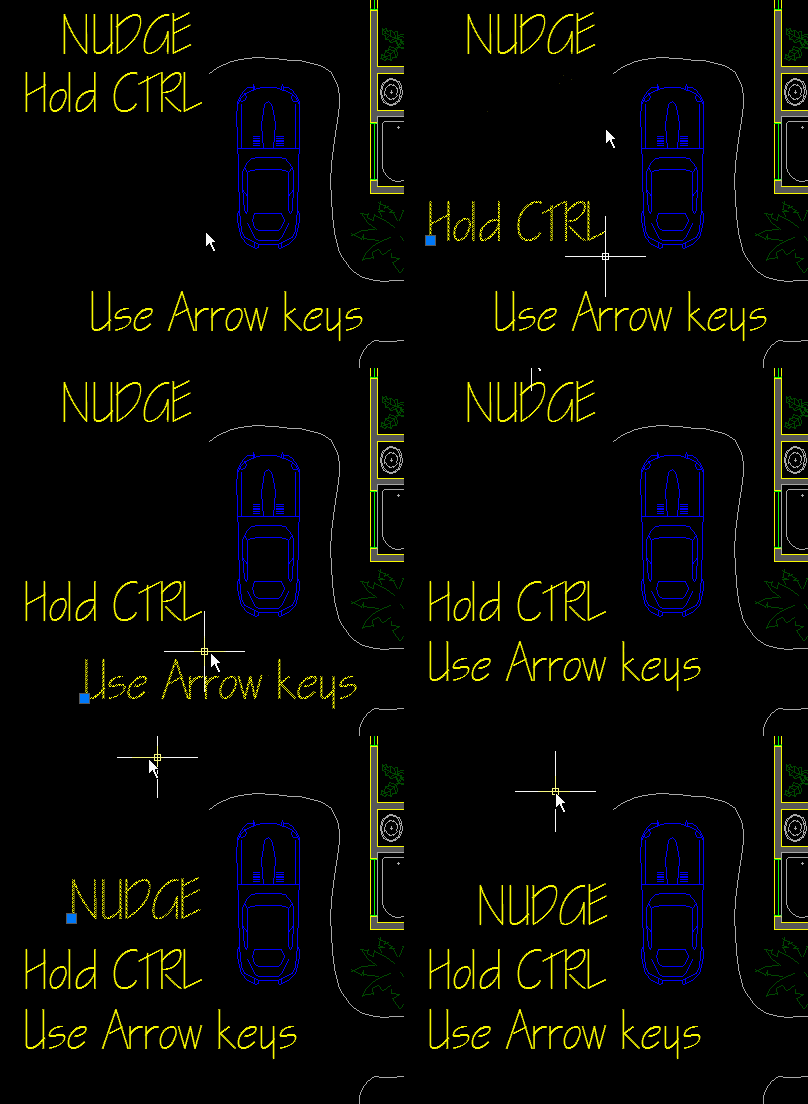
It is called “nudging” and is a way of moving things in your drawing without using your mouse. Well, not completely. you still needs to select your objects with the mouse…

Here’s How:

  • Select objects
  • Hold the CTRL button
  • Use the arrow buttons on your keyboard to give your objects a little “nudge”

~enjoy

Posted in BASICS, Modifying, New in 2012, Settling In, TIPS | Leave a comment

AutoLISP: Change Attribute Color to Bylayer (global)

I have used this routine a lot. I sometimes get drawings that have attributes that have had their color changed to something other than “BYLAYER.”  This routine will change all attributes colors to be BYLAYER.

Here’s How:

  • After loading, simply type in CHGATTCOL <enter> to start and it finishes from there.
Note: if you need to change both the geometry and attribute color to BYLAYER, use the SETBYLAYER command that is already in AutoCAD.

;change all attribute colors to bylayer

(defun C:ChgAttCol (/ name ss sslen cnt blck ent entinfo)

;(setq name (strcase (getvar "loginname")))

(setq ss (ssget "x" '((0 . "INSERT"))))

(setq cnt 0)

(setq sslen (sslength ss))

(while (< cnt sslen)

(setq blck (ssname ss cnt))

(setq ent (entnext blck))

(setq entinfo (entget ent))

(while

(and ent

(= (cdr (assoc 0 entinfo)) "ATTRIB")

)

(if (assoc 62 entinfo)

(entmod (subst (cons 62 256) (assoc 62 entinfo) entinfo))

)

(entupd ent)

(setq ent (entnext ent))

(setq entinfo (entget ent))

)

(setq cnt (1+ cnt))

)

(princ)

)
Posted in Attributes, AutoLISP, Blocks, Modifying, Text, TIPS | 5 Comments

AutoLISP: Offset PolyLine Segments

The title of this post pretty much describes what this routine does. It behaves just like the OFFSET command but it allows you to offset single or multiple segments of a polyline. This pretty cool if you’ve ever needed something like this.

Here’s how to use it:

  • OFSEGS <enter> to start
  • Specify the offset distance or enter T for the “Through” option
  • Select the segments that are to be offset
  • Hit <enter> when done selecting segments
  • Click on a side to specify what side the objects should be offset

;; OFSEGS -Gilles Chanteau- 2008/03/26

;; Offsets the selected segments of lwpolyline

;; Joined segments are offseted in a single lwpolyline

;; Keeps arcs and widthes

;; Works whatever the current UCS and the pline OCS and elevation

(defun c:ofsegs (/ ofdist ent pline normal elevat params

points side closest par bulge p1

p2 arc_data

)

(vl-load-com)

(or *acdoc*

(setq *acdoc* (vla-get-ActiveDocument (vlax-get-acad-object)))

)

(initget 6 "Through")

(if (setq

ofdist (getdist

(strcat "\nSpecify offset distance or [Through] <"

(if (< (getvar "OFFSETDIST") 0)

"Through"

(rtos (getvar "OFFSETDIST"))

)

">: "

)

)

)

(if (= ofdist "Through")

(setvar "OFFSETDIST" -1)

(setvar "OFFSETDIST" ofdist)

)

(setq ofdist (getvar "OFFSETDIST"))

)

(if (and (setq ent (entsel "\nSelect a segment to offset: "))

(setq pline (vlax-ename->vla-object (car ent)))

(= (vla-get-ObjectName pline) "AcDbPolyline")

(setq normal (vlax-get pline 'Normal))

(setq elevat (vla-get-Elevation pline))

)

(progn

(setq params (cons (fix (vlax-curve-getParamAtPoint

pline

(trans (osnap (cadr ent) "_nea") 1 0)

)

)

params

)

)

(HighlightSegment pline (car params))

(while

(setq ent (entsel "\nSelect next segment or <exit>: "))

(if (equal (vlax-ename->vla-object (car ent)) pline)

(progn

(setq par (fix (vlax-curve-getParamAtPoint

pline

(trans (osnap (cadr ent) "_nea") 1 0)

)

)

params (if (member par params)

(vl-remove par params)

(cons par params)

)

)

(redraw)

(foreach p params (HighlightSegment pline p))

)

)

)

(if (setq side (getpoint

(if (minusp (getvar "OFFSETDIST"))

"\nSpecify through point: "

"\nSpecify point on side to offset: "

)

)

)

(progn

(redraw)

(vla-StartUndoMark *acdoc*)

(setq side (ilp

(trans side 1 0)

((lambda (p)

(trans (list (car p) (cadr p) (1+ (caddr p))) 2 0)

)

(trans side 1 2)

)

(trans (list 0 0 elevat) normal 0)

normal

)

closest (vlax-curve-getClosestPointTo pline side T)

par (vlax-curve-getParamAtPoint pline closest)

)

(if (minusp (getvar "OFFSETDIST"))

(setq ofdist (distance side closest))

)

(cond

((equal closest (vlax-curve-getStartPoint pline) 1e-9)

(setq side (trans side 0 normal))

)

((equal closest (vlax-curve-getEndPoint pline) 1e-9)

(setq par (- par 1)

side (trans side 0 normal)

)

)

((= (fix par) par)

(setq side

(polar

(trans closest 0 normal)

((if

(clockwise-p

(trans

(vlax-curve-getPointAtParam pline (- par 0.1))

0

normal

)

(trans closest 0 normal)

(trans

(vlax-curve-getPointAtParam pline (+ par 0.1))

0

normal

)

)

+

-

)

(angle '(0 0 0)

(trans (vlax-curve-getFirstDeriv pline par)

0

normal

T

)

)

(/ pi 2)

)

ofdist

)

)

)

(T

(setq par (fix par)

side (trans side 0 normal)

)

)

)

(setq bulge (vla-getBulge pline (fix par))

p1 (trans (vlax-curve-getPointAtParam pline (fix par))

0

normal

)

p2 (trans (vlax-curve-getPointAtParam pline (1+ (fix par)))

0

normal

)

)

(if (zerop bulge)

(if (clockwise-p side p2 p1)

(setq ofdist (- ofdist))

)

(progn

(setq arc_data (PolyArc-data bulge p1 p2))

(if (minusp bulge)

(if (< (cadr arc_data)

(distance (car arc_data) side)

)

(setq ofdist (- ofdist))

)

(if (< (distance (car arc_data) side)

(cadr arc_data)

)

(setq ofdist (- ofdist))

)

)

)

)

(mapcar

(function

(lambda (p)

(vl-catch-all-apply 'vla-Offset (list p ofdist))

(vla-delete p)

)

)

(Copysegments pline params)

)

(vla-EndUndoMark *acdoc*)

)

)

)

(princ "\nUnvalid entity.")

)

(princ)

)

;; CopySegments

;; Duplicates polyline segments at the same location

;; Consecutive selected segments are joined

;;

;; Arguments

;; pline : the source polyline (vla-object)

;; params ; the index list of segment to be copied

;;

;; Return

;; the list of created polylines

(defun CopySegments (pline params / nor space tmp copy ret)

(vl-load-com)

(or *acdoc*

(setq *acdoc* (vla-get-ActiveDocument (vlax-get-acad-object)))

)

(setq params (vl-sort params '<)

nor (vlax-get pline 'Normal)

space (vla-ObjectIDToObject *acdoc* (vla-get-OwnerID pline))

)

(while params

(setq tmp (cons (car params) tmp)

params (cdr params)

)

(if (and (zerop (car tmp))

(= (- (vlax-curve-getEndParam pline) 1) (last params))

(equal (vlax-curve-getStartPoint pline)

(vlax-curve-getEndPoint pline)

1e-9

)

)

(progn

(setq params (reverse params)

tmp (cons (car params) tmp)

params (cdr params)

)

(while (= (car params) (1- (car tmp)))

(setq tmp (cons (car params) tmp)

params (cdr params)

)

)

(setq tmp (reverse tmp)

params (reverse params)

)

)

)

(while (= (car params) (1+ (car tmp)))

(setq tmp (cons (car params) tmp)

params (cdr params)

)

)

(setq tmp (reverse (cons (1+ (car tmp)) tmp)))

(setq

pts

(vl-remove nil

(mapcar

(function

(lambda (pa / pt)

(if (setq pt (vlax-curve-getPointAtParam pline pa))

((lambda (p)

(list (car p) (cadr p))

)

(trans pt 0 nor)

)

)

)

)

tmp

)

)

)

(setq copy

(vlax-invoke

space

'addLightWeightPolyline

(apply 'append pts)

)

)

(foreach p (cdr (reverse tmp))

(vla-setBulge

copy

(vl-position p tmp)

(vla-getBulge pline p)

)

(vla-getWidth pline p 'swid 'ewid)

(vla-setWidth copy (vl-position p tmp) swid ewid)

)

(foreach prop '(Elevation Layer Linetype

LinetypeGeneration LinetypeScale

Lineweight Normal Thickness

TrueColor

)

(if (vlax-property-available-p pline prop)

(vlax-put copy prop (vlax-get pline prop))

)

)

(setq tmp nil

ret (cons copy ret)

)

)

)

;;======================================================;;

;; HighlightSegment

;; Highlight a polyline segment

;;

;; Arguments

;; pl : the polyline (vla-object)

;; par : the segment index

(defun HighlightSegment (pl par / p1 p2 n lst)

(and

(setq p1 (vlax-curve-getPointAtParam pl par))

(setq p1 (trans p1 0 1))

(setq p2 (vlax-curve-getPointAtParam pl (+ par 1)))

(setq p2 (trans p2 0 1))

(if (zerop (vla-getBulge pl par))

(grvecs (list -255 p1 p2))

(progn

(setq n 0)

(repeat 100

(setq lst (cons (trans (vlax-curve-getPointAtParam pl (+ n par)) 0 1)

lst

)

n (+ n 0.01)

)

)

(grvecs

(cons -255 (apply 'append (mapcar 'list lst (cdr lst))))

)

)

)

)

)

;;=====================================================;;

;;; Clockwise-p

;;; Returns T if p1 p2 and p3 are clockwise

(defun clockwise-p (p1 p2 p3)

(< (sin (- (angle p1 p3) (angle p1 p2))) -1e-14)

)

;;========================================================;;

;;; Polyarc-data

;;; Returns a list of the center, radius and angle of a 'polyarc'.

(defun polyarc-data (bu p1 p2 / ang rad cen area cg)

(setq ang (* 2 (atan bu))

rad (/ (distance p1 p2)

(* 2 (sin ang))

)

cen (polar p1

(+ (angle p1 p2) (- (/ pi 2) ang))

rad

)

)

(list cen (abs rad) ang)

)

;;====================================================;;

;;; VXV Returns the dot product of two vectors

(defun vxv (v1 v2)

(apply '+ (mapcar '* v1 v2))

)

;;===================================================;;

;;; ILP

;;; Returns the intersection point between a line (extended) and a plane

;;;

;;; Arguments

;;; p1 and p2 : two points defining the line

;;; org : a point on the plane

;;; nor : the plane normal

(defun ilp (p1 p2 org nor / scl)

(setq scl (/ (vxv nor (mapcar '- p1 org))

(vxv nor (mapcar '- p2 p1))

)

)

(mapcar (function (lambda (x1 x2) (+ (* scl (- x1 x2)) x1)))

p1

p2

)

)
Posted in AutoLISP, Modifying, Polylines, TIPS | 6 Comments

AutoLISP: Arc to Circle

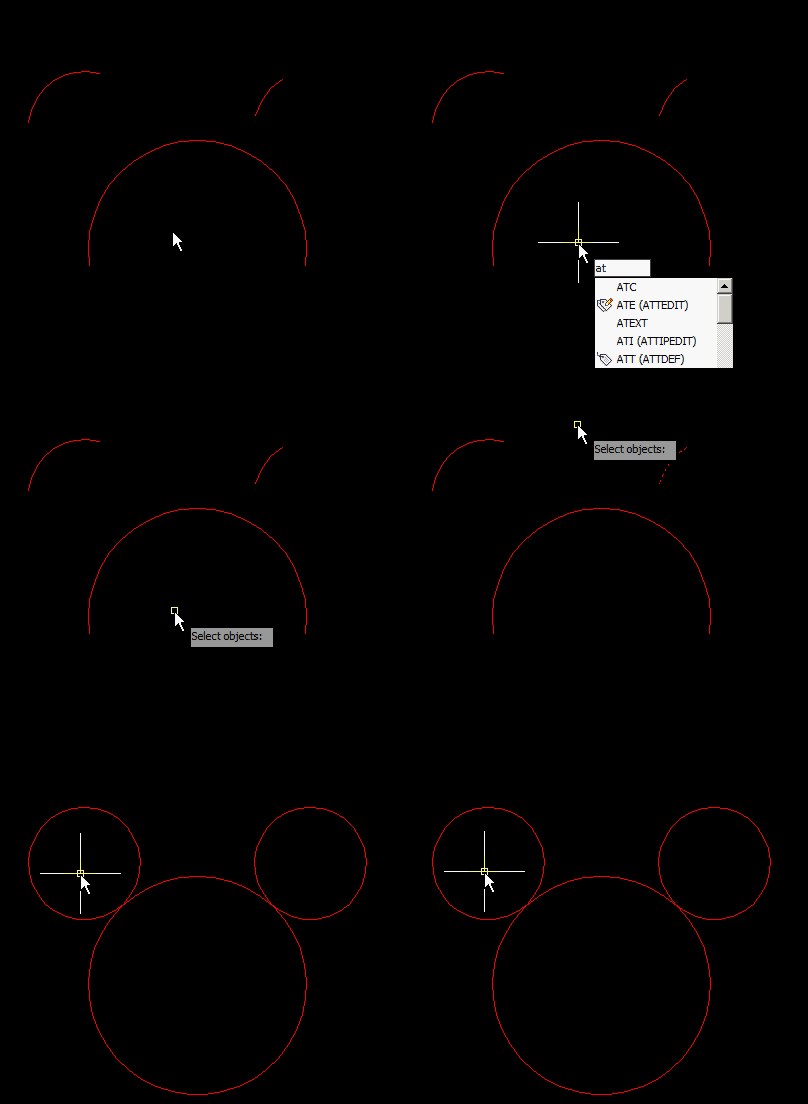
Here’s one that someone asked me about a while ago and I just just it. Very simply, you select arc and this routine turns these arcs into circles keeping both the arc’s radius and the layer that the arcs were on.

Here’s how:

ATC <enter> to start (Arc To Circle)

Select arcs to be made into circles

<enter> after selection is made

;*****************************************************************************

; ATC.LSP V1.0

; by Zoltan Toth

; ZOTO Technologies,

; 23 Greenhills Dve,

; Melton 3337.

; E-MAIL: zoltan.toth@ains.net.au

; WWW: http://www.ains.net.au/zoto/

;;;;;;;;;;;;;;;;;;;;;;;;;;;;;;;;;;;;;;;;;;;;;;;;;;;;;;;;;;;;;;;;;;;;;;;;;;;;

; This program takes any number of arcs and converts them into circles.

; Each circle is a new object with all the properties of the arc it

; replaces. Non-arc objects are ignored.

;

;*****************************************************************************

(defun C:ATC (/ CTR2 CTR3 D2 SS2 OBN2 OBD2 OBD3)

(setq CTR2 0) ;initialize CTR2 for object counter

(prompt "\nSelect arcs to convert to circles: ")

(setq SS2 (ssget '((0 . "ARC")))) ;create selection set with arcs only

(repeat (sslength SS2) ;repeat for each object

(setq OBN2 (ssname SS2 CTR2)) ;get object name

(setq OBD2 (entget OBN2)) ;get object data lists

;substitute CIRCLE in assoc. 0

(setq OBD2 (subst (cons 0 "CIRCLE")(assoc 0 OBD2) OBD2))

(setq CTR3 (1- (length OBD2))) ;set CTR3 to 1 less than size of OBD2

(repeat (length OBD2) ;repeat for each list in OBD2

(setq D2 (nth CTR3 OBD2)) ;set D2 to an association list from the arc

;;;;

;if association list is neither a start or end angle,

;copy the association list to OBD3

(if (and (/= 50 (car D2))(/= 51 (car D2))) ;check for assoc. 50 & 51

(setq OBD3 (cons D2 OBD3)) ;copy assoc. list to OBD3

)

(setq CTR3 (1- CTR3)) ;decrement counter CTR3

) ;end of second (repeat)

(entdel OBN2) ;delete arc

(entmake OBD3) ;make circle

(setq OBD3 nil) ;set OBD3 to (nil)

(setq CTR2 (1+ CTR2)) ;increment object counter

) ;end of first (repeat)

(princ) ;exit quietly

)
Posted in AutoLISP, Modifying, TIPS | 1 Comment

AutoLISP: Array Rectanglular

Following the previous post concerning alternate array routines: here is one that is similar to the previous except that you can make rectangular arrays. Again, thanks to Lee-Mac.

Here’s how:

  • RECARR <enter> to start (RECtangular ARRay)
  • Select object(s) to be arrayed <enter>
  • Specify Base point (pick a point)
  • Specify distance for X direction (pick a point)
  • Specify distance for Y direction (pick a point)
  • Move your cursor in the direction until you get the desired amount of rows & columns and then click to place the array.

;; by Lee-MAC found at the swamp

(defun c:recarr ( / ss->list copyv dx dy gr i1 i2 nx ny obs obx oby p0 px py vx vy ) (vl-load-com)

(defun ss->list ( ss / i l )

(if ss

(repeat (setq i (sslength ss))

(setq l (cons (vlax-ename->vla-object (ssname ss (setq i (1- i)))) l))

)

)

)

(defun copyv ( ob n v / i b l ) (setq i 1 b (vlax-3D-point '(0. 0. 0.)))

(repeat n

(foreach obj ob

(vla-move (car (setq l (cons (vla-copy obj) l))) b (vlax-3D-point (mapcar '* v (list i i i))))

)

(setq i (1+ i))

)

l

)

(if

(and

(setq obs (ss->list (ssget '((0 . "~VIEWPORT")))))

(setq p0 (getpoint "\nBase Point (P0): "))

(setq px (getpoint "\nArray X-Vector (Px): " p0))

(setq py (getpoint "\nArray Y-Vector (Py): " p0))

)

(progn

(setq vx (mapcar '- px p0) dx (distance '(0. 0. 0.) vx)

vy (mapcar '- py p0) dy (distance '(0. 0. 0.) vy)

)

(princ "\nArray Endpoint: ")

(while (= 5 (car (setq gr (grread 't 13 0)))) (redraw)

(setq obx (car (mapcar 'vla-delete obx))

oby (car (mapcar 'vla-delete oby))

gr (mapcar '- (cadr gr) p0)

i1 (inters '(0. 0. 0.) vx gr (mapcar '+ gr vy) nil)

i2 (inters '(0. 0. 0.) vy gr (mapcar '+ gr vx) nil)

nx (fix (/ (caddr (trans i1 1 vx)) dx))

ny (fix (/ (caddr (trans i2 1 vy)) dy))

obx (copyv obs (abs nx) (mapcar (if (minusp nx) '- '+) vx))

oby (copyv (append obs obx) (abs ny) (mapcar (if (minusp ny) '- '+) vy))

)

(grvecs (list -3 '(0. 0. 0.) i1 i1 gr '(0. 0. 0.) i2 i2 gr)

(list

(list 1. 0. 0. (car p0))

(list 0. 1. 0. (cadr p0))

(list 0. 0. 1. (caddr p0))

(list 0. 0. 0. 1.)

)

)

)

)

)

(redraw) (princ)

)
Posted in AutoLISP, Modifying, New in 2012, TIPS | Leave a comment

AutoLISP: Array Single Line (Vector)

So the new array tool is cool but it may be frustrating at the same time. Autodesk didn’t make the new array tool very intuitive. Here is a lisp routine that works in any UCS and is more intuitive than the new array tool. I have used this one while working in 3D so I do know that it works just fine in 3D. Thanks again to Lee-Mac

This array tool works in one direction (as seen below)

Here’s how:

  • ARRV <enter> to start (Array Vector)
  • Select object(s) to be arrayed <enter>
  • Specify the base point
  • Specify the spacing
  • Move the cursor in the direction for the array and click to place the array.

(defun c:arrv ( / ss->list copyv dx gr nl nx obs obx p0 pd pw px vx ) (vl-load-com)

;; © Lee Mac 2011 found at the swamp

(defun ss->list ( ss / i l )

(if ss

(repeat (setq i (sslength ss))

(setq l (cons (vlax-ename->vla-object (ssname ss (setq i (1- i)))) l))

)

)

)

(defun copyv ( ob n v / i b l ) (setq i 1 b (vlax-3D-point '(0. 0. 0.)))

(repeat n

(foreach obj ob

(vla-move (car (setq l (cons (vla-copy obj) l))) b (vlax-3D-point (mapcar '* v (list i i i))))

)

(setq i (1+ i))

)

l

)

(if

(and

(setq obs (ss->list (ssget '((0 . "~VIEWPORT")))))

(setq p0 (getpoint "\nBase Point: "))

(setq px (getpoint "\nArray Vector: " p0))

(setq pw (trans p0 1 0)

pd (trans p0 1 3)

vx (trans (mapcar '- px p0) 1 0) dx (distance '(0. 0. 0.) vx)

)

(not (equal dx 0.0 1e-14))

(princ "\nArray Endpoint: ")

)

(while (= 5 (car (setq gr (grread 't 13 0)))) (redraw)

(setq obx (car (mapcar 'vla-delete obx))

nx (fix (setq nl (/ (caddr (trans (setq gr (mapcar '- (cadr gr) p0)) 1 vx)) dx)))

obx (copyv obs (abs nx) (mapcar (if (minusp nx) '- '+) vx))

)

(grvecs (list -3 '(0. 0. 0.) (mapcar '* (trans vx 0 3) (list nl nl nl)))

(list

(list 1. 0. 0. (car pd))

(list 0. 1. 0. (cadr pd))

(list 0. 0. 1. (caddr pd))

(list 0. 0. 0. 1.)

)

)

)

)

(redraw) (princ)

)
Posted in AutoLISP, Modifying, New in 2012, TIPS | Leave a comment

Working in a Viewport

You may already know that if you double click inside a viewport that is on a layout tab you will be able to work in model space even though you are in paper space. This is known as working in “Floating Model Space.” But you also may know that if you do this and your viewport is NOT locked, you will mess up your viewport scale when you zoom in & out and when you pan.

Fear not – here is a way to be in paper space and activate an unlocked viewport and still be able to work in model space and not mess up your viewport scale:

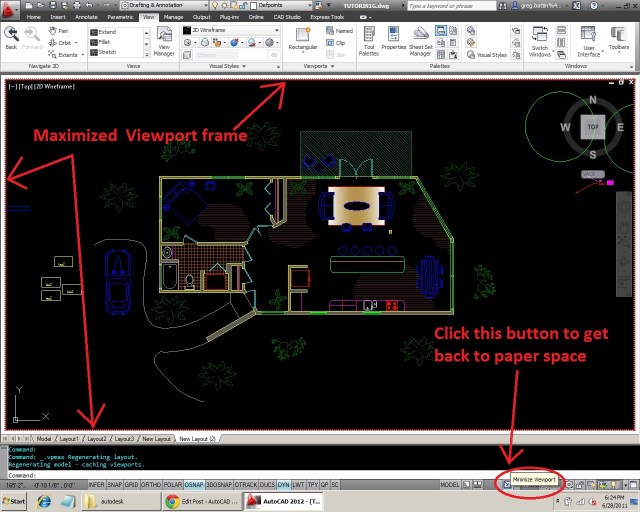
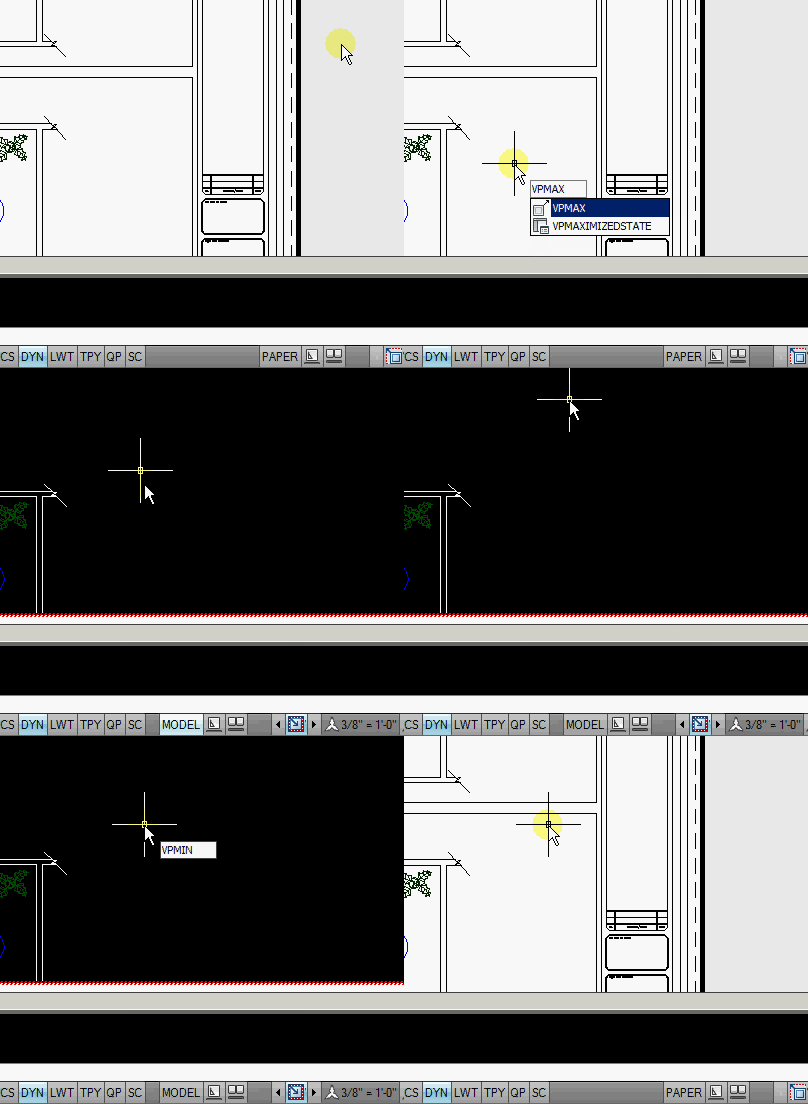
Simply double-click the frame of the view port. You will be thrown into what looks like model space but you will notice that there is a red striped frame around the drawing area. You can also use a command to achieve this. It is VPMAX <enter> then select the viewport border to maximize it. When you are finished, the command to exit is VPMIN <enter>. There is also a new button at the bottom of the status bar that has the similar red stripes around it. Click on this to exit as well.

Posted in BASICS, Layout, Modifying, Paper Space, TIPS, Viewports | 10 Comments

Quickly Make a new Viewport

Here is a quick tip to quickly make a new paper space viewport.

Set the layer to what you want the viewport frame to be on. It is best to use a designated layer for viewports that are set to not plot. Please don’t use the layer “DEFPOINTS” for viewports. You may run into some weird issues. For an example of what issue can arise from using DEFPOINTS on objects, see this post:
https://autocadtips.wordpress.com/2014/09/05/issues-with-using-defpoints-for-viewports/

Below is an example of a few layers in the “Layer Manager”. Notice that the “Viewport” layer is set to not plot.

Layer for Viewports set to not plot

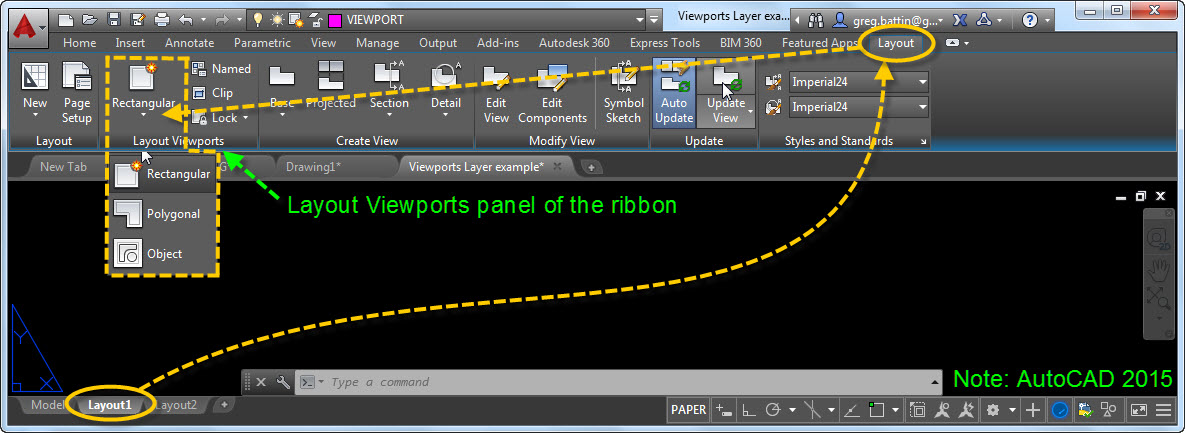
While in “Paper Space” is active (Layout1) Go to the “Layout” tab on the ribbon > “Layout Viewports” panel > –VPORTS tools (big button tool)

Layout Viewports of the ribbon

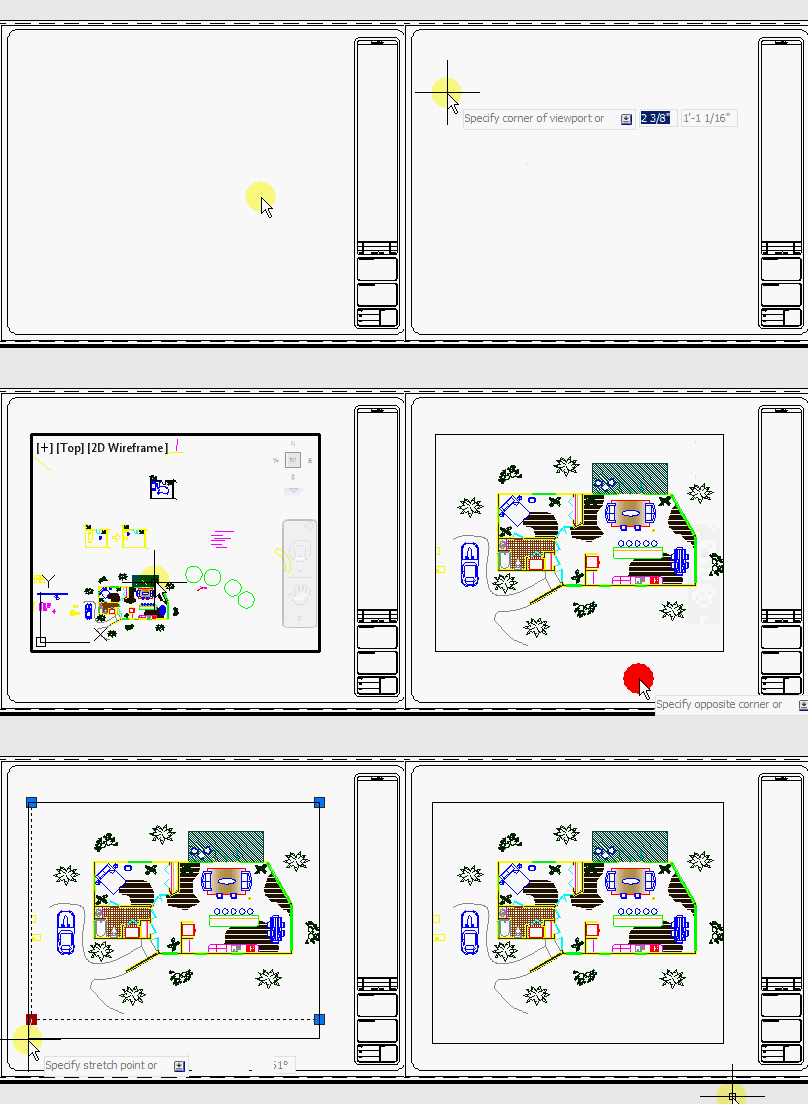
The command -VPORTS  or by using the tool on the ribbon you will have options like making a polygon or selecting an object such a closed polyline, circle or ellipse to be the shape of the viewport. If you don’t need these options, you can quickly use the command alias MV <enter> and then pick 2 points to define a rectangle and your viewport is made…

~enjoy

Posted in BASICS, Layout, Paper Space, Settling In, TIPS, Viewports | 8 Comments

AutoLISP: Arc Tangent to Line

I know that this blog has a lot of AutoLISP code on it. I will focus on regular drafting topics soon. It’s just that I have recently needed these LISP routines and thought that if they were handy for me, they would also be handy for you as well. Here is another LISP routine to add to your collection…

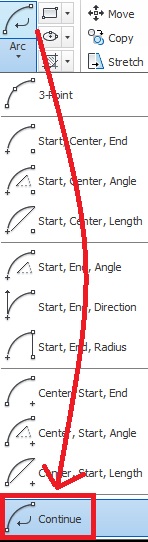
Without using a LISP routine, you can create an arc that is tangent to the last drawn line/arc by using the “Continue” option of the arc command (as seen below).
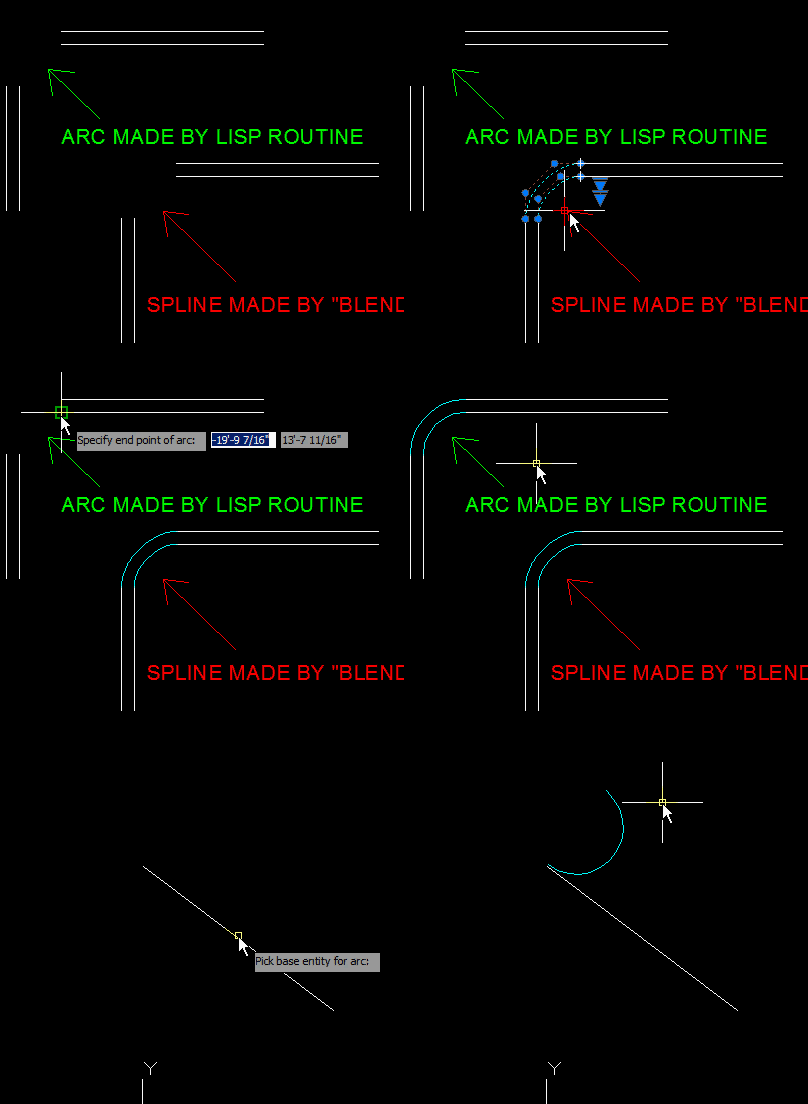
Also in AutoCAD 2012 there is the new BLEND command which will do pretty much the same thing as the LISP routine with the exception that with the BLEND tool, you have to pick two objects in order for it to work. This lisp routine simply asks you to select an existing line or arc and it starts a tangent arc from the end closest to where you pick. and you are able to either pick another line/arc or click anywhere you choose which is really helpful.

Here’s how:

  • ARCTAN <enter> to start
  • Specify the object that the arc is to be tangent to.
  • Specify the end point on the selected object to be the start point or the arc
  • Specify the end point of the arc
  • Prompt: “Is arc oriented correctly?” Y = will keep the arc the way it is. N = will flip the arc as seen on the single line in the animation.
FYI – I show in the below animation how the Blend tool makes a spline that is more like an ellipse than a circle. This LISP routine can be used sort of like the blend tool to create an arc.

~enjoy

;;; CADALYST 05/08 www.cadalyst.com/code

;;; Tip 2290: Arctan.LSP Tangent Arc Generators, File 1 of 5 (c) 2008 Rogelio Bravo

;;; Modified BY Greg Battin for english use

;;;

;; ARCTAN draws an arc tangent to any kind of object

;; picking any other point as end point of arc

;; written by Rogelio Bravo, Spain

(defun C:arctan ()

(graphscr)

(vl-load-com)

(setq obj (car (entsel "\nPick base entity for arc:")))

(setq ref (getvar "osmode"));

(command "_osnap" "_end,_nea");

(setq ptan (getpoint "\nSpecify start point of arc:"))

(setvar "osmode" ref);

(setq pam (vlax-curve-getParamAtPoint obj ptan))

(setq vtr (vlax-curve-getFirstDeriv obj pam));;

(setq ang (angle '(0 0 0) vtr));

;;(setq ref (getvar "osmode"));

;;(command "_osnap" "_end,_nea");

;;(setvar "osmode" ref);

(setq pt4 (getpoint "\nSpecify end point of arc: "))

(command "_arc" ptan "_e" pt4 "_d" (/ (* 180.0 ang) pi))

(initget 6 "Y N")

(if (null (setq resp (getkword "\nIs arc oriented correctly? (Y/N)<Y>:" )))

(setq resp "Y")

)

(while (/= resp "Y")

(setq ang (+ ang pi))

(command "_erase" "_l" "")

(command "_arc" ptan "_e" pt4 "_d" (/ (* 180.0 ang) pi))

(initget 6 "Si No")

(if (null (setq resp (getkword "\nIs arc oriented correctly? (Y/N)<Y>:" )))

(setq resp "Y")

)

);end while

)
Posted in AutoLISP, Modifying, TIPS, Uncategorized | 1 Comment

How to copy code from the internet and this blog.

So I received a question about how to copy code in general. I made my first video and instead of posting it here and taking up the limited amount of memory that WordPress allows, I posted it at YouTube.com

This will show how to save LISP code that you find from the internet into a lisp file. This is only a quick way to make the LISP file and test it in AutoCAD. This is not the way to load LISP routines every time you open AutoCAD.

Click HERE to watch the video.

~enjoy

Posted in AutoLISP, TIPS | 2 Comments